H Service Omega 2
H Service
1 Inspection and cleaning intervals
If a test image was printed after the print heads were cleaned, the
software saves t his information. Warranty and guarantee claims can
only be made if the following conditio ns are ful fi lled:
– The test images made after wiping with a wet cloth are retained.
–Allspecified maintenance work is carried out.
Extracts from the following chapters, either as a PDF or film, on
important service work can be fou n d o n th e Maintenance tab under
Printer in the software.
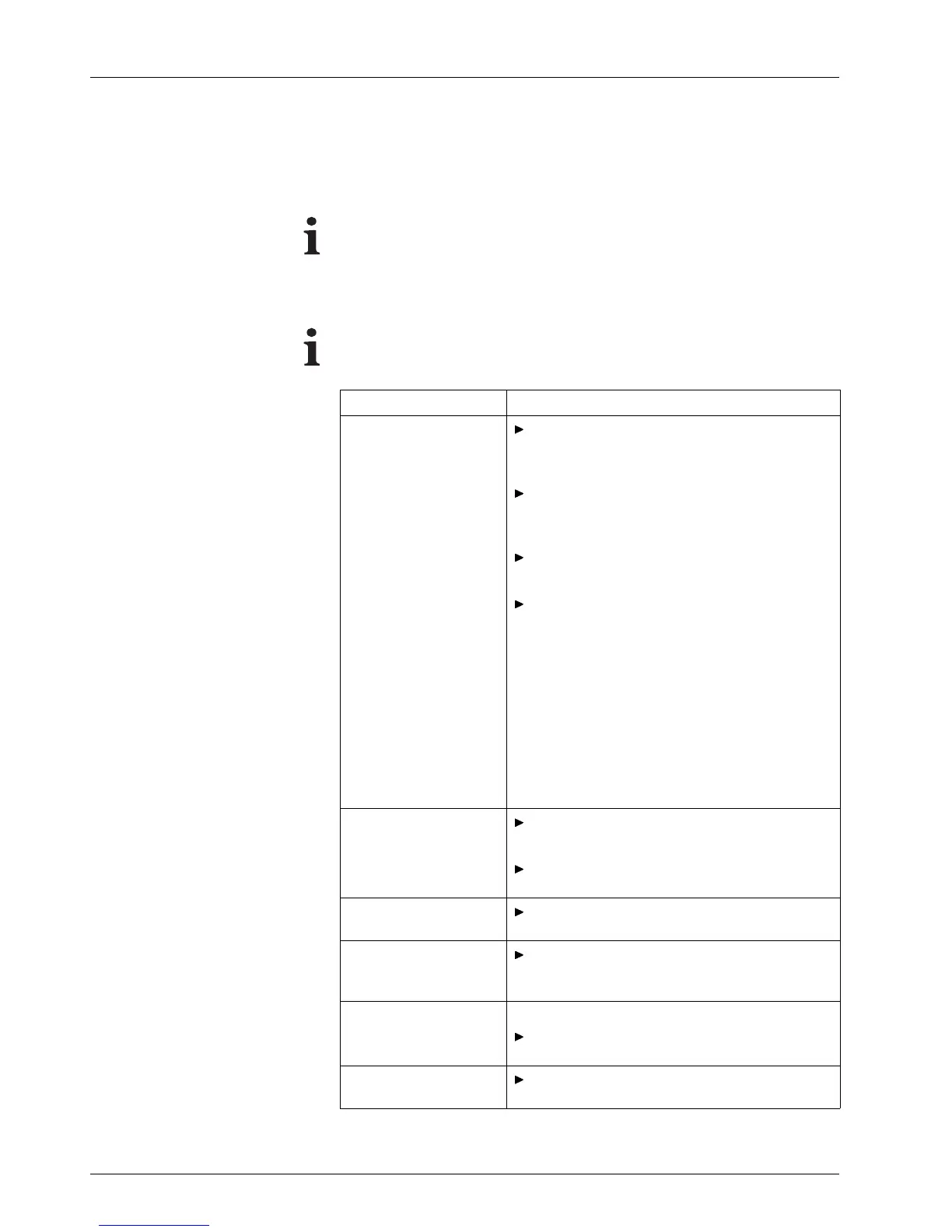
When? What?
Daily in the morning
Check conv eyor be lt f or soiling and clean if
necessary (→ Page 69 / Cleanin g con ve yor
belt).
Check loading and unloading units for
soiling and clean with slightly moist clo th if
necessary.
Clean light trap carrier (→ Page 69 / Clean
light trap carrier).
After the multiple spitting process is initiated,
carry out morning cleaning:
– Prepare for cleaning
(→ Page 79 / Preparing for clean-
ing).
– Suck out nozzles (→ Page 80 / Suc king
out nozzles).
– Print a test image.
– Wipe print heads wet if necessary
(→ Page 82 / Wiping print heads wet).
– Clean printing plate if n ecessary
(→ Page 83 / Wiping p rinting plate ).
Weekly
Lubricate carriage guide (→ Page 70 / Lubri-
cating carriage guide).
Clean UV LED (→ Page 76 / Cleaning U V
LED).
Monthly
Check encoder ruler and clean if necessary
(→ Page 71 / Cleaning encoder ruler).
Every 6 months
Change lubricating plates
(→ Page 73 / Changing lubricating
plates).
Annually Recommended:
Have inte
rmediate tank for ink changed by
Durst cu
stomer service.
Every 13000 hours or 2
years
Have Durst customer service refill transport
motor oil.
68 / 9 1 2004 – 2014 © Durst Ph ototechnik AG – www.d urst-online .com , Omega 2, Issued 0 7/20 14



 To Next Page