Contextual help of the web interface – 66
•
•
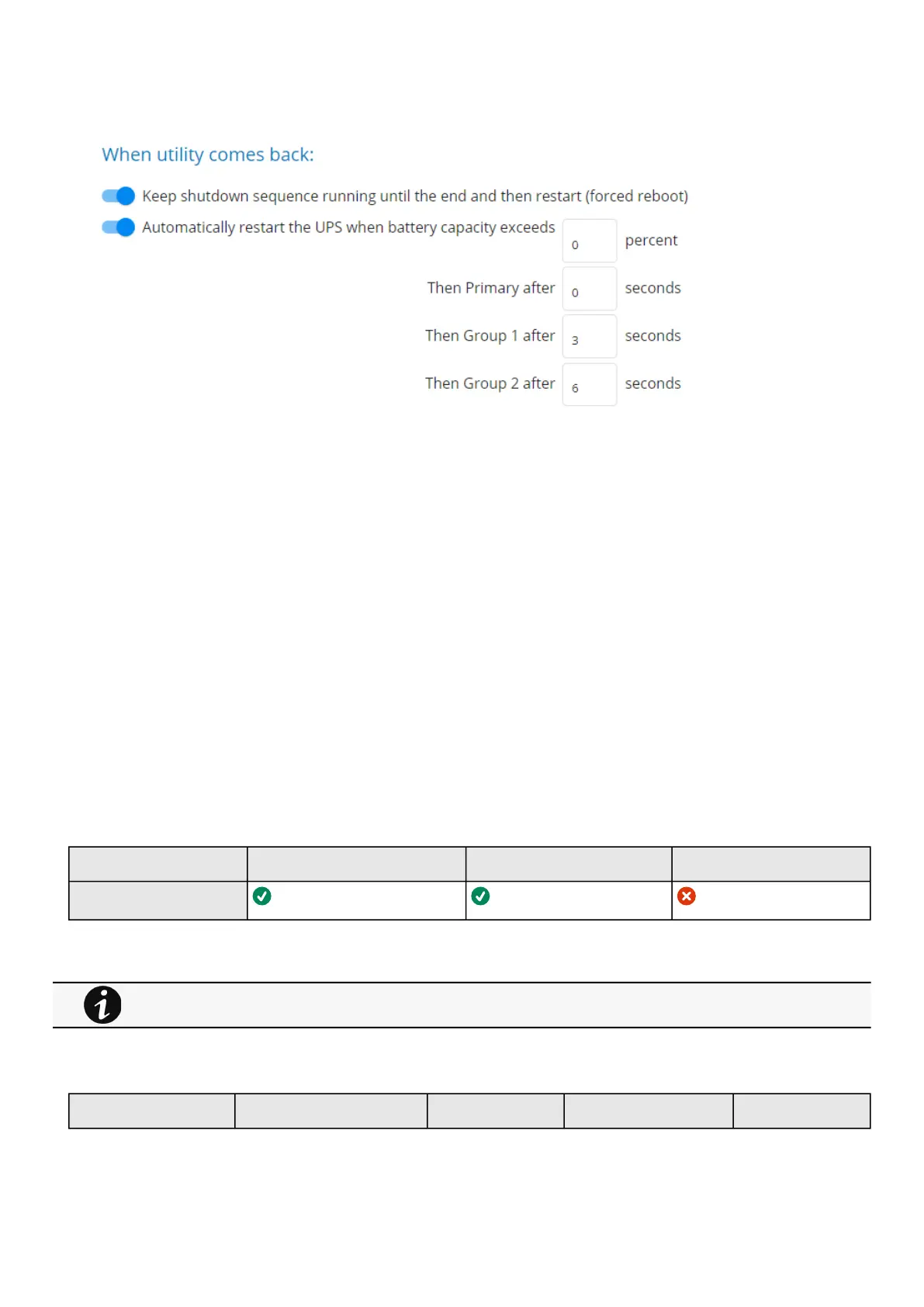
3.5.3.1.3 When utility comes back
Note: When utility comes back settings cannot be altered for three phase UPS units and will remain at their defaults.
These settings define the restart sequence when utility comes back. For example, thisallows sequential startup of the IT system
so that network and storage devices are connected to 'Primary' and start up immediately. After a delay database servers in Group1
are powered up, and then application and web servers in Group 2 are powered up. This startup would ensure that necessary
services would be available for each layer when needed. A sequential startup will also help avoid a peak power draw in the
beginning.
a Options
Keep shutdown sequence running until the end, and then restart (forced reboot).
Wait until UPS battery capacity exceeds a set percentage value in (%), and then automatically restart the UPS.
Then restartGroup 1 after a set time in (s).
Then restart Group 2 after a set time in (s).
b Enable/Disable
Each option listed above can be enabled or disabled with check-boxes.
When disabled, the option will be greyed out.
3.5.3.2 Access rights per profiles
Administrator Operator Viewer
Protection/Sequence
3.5.3.2.1 For other access rights
3.5.3.3 Save and Restore
SRR section SRR sub section Settings Possible values
For other access rights, see the Information>>>Access rights per profiles section.



 To Next Page