Installation and Startup of CI 3000 / SIOX
39
Version 2.09 09. April 2014
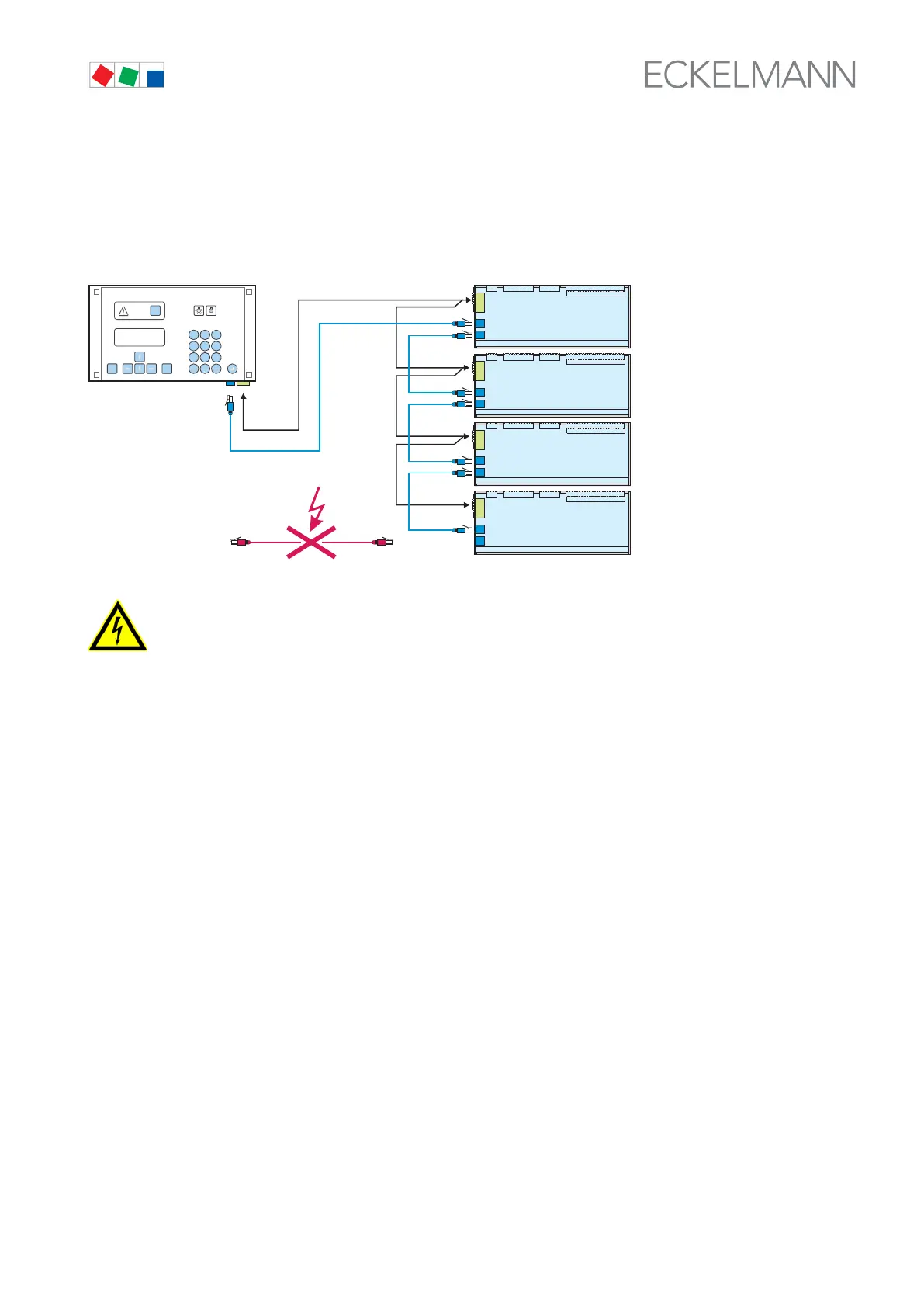
5.5.1 SIOX - Connecting to the store computer
The individual SIOX extension modules are supplied with power from the CI 3000 store computer via the termi
nals 91-95 (SIOX-SUPPLY), i.e. connected to one another in series via the SIOX data cables (SIOX OUT and
SIOX IN via RJ45).
SIOX OUT
SIOX IN
91..95
SIOX OUT
SIOX IN
SIOX OUT
SIOX IN
SIOX OUT
SIOX IN
2. SIOX
1. SIOX
3. SIOX
4. SIOX
CAT5
ZNR. 51203 80 230 DEF1
91..95
91..95
91..95
SIOX
SUPPLY
91..95
SIOX
OUT
RJ45
MODEESC
PRIO 1
PRIO 2
,
9
WXYZ
7
PQRS
8
TUV
6
MNO
4
GHI
5
JKL
3
DEF
2
ABC
1
0
ALARM
RESET
PoE
Danger of destruction of components! SIOX extension modules may only be connected
to each other or the CI 3000 store computer when no voltage is present!
In the event of an Ethernet network cable with PoE (Power over Ethernet) being used instead of the
SIOX data cable (RJ45) damage can occur to participating network devices!
SIOX power supply leads
S For the power supply (terminals 91 - 95), shielded cables with a cross-section > 0.5 mm² must be used. Rec
ommended cables include e.g. LiYCY 4x0,75 mm
2
with 25 Ohm/km.
S Max. permitted cable length is 50 m.
S The power supply of the CI 3000 store computer is designed for a maximum of 4 extension modules.
SIOX data lines
S The data cables (SIOX IN / SIOX OUT) should not be routed in the immediate proximity of high voltage or
high frequency cables.
S When routing the cables care must be taken to ensure that the minimum bend radius is complied with and that
the cables are not routed parallel to cables which have the potential to generate strong interference cou
pling.
S Max. permitted cable length is 50 m.
S CAT5 cable or better must be used.



 To Next Page