Installation and Startup of CI 3000 / SIOX
49
Version 2.09 09. April 2014
5.9 DIP Switch / Jumpers
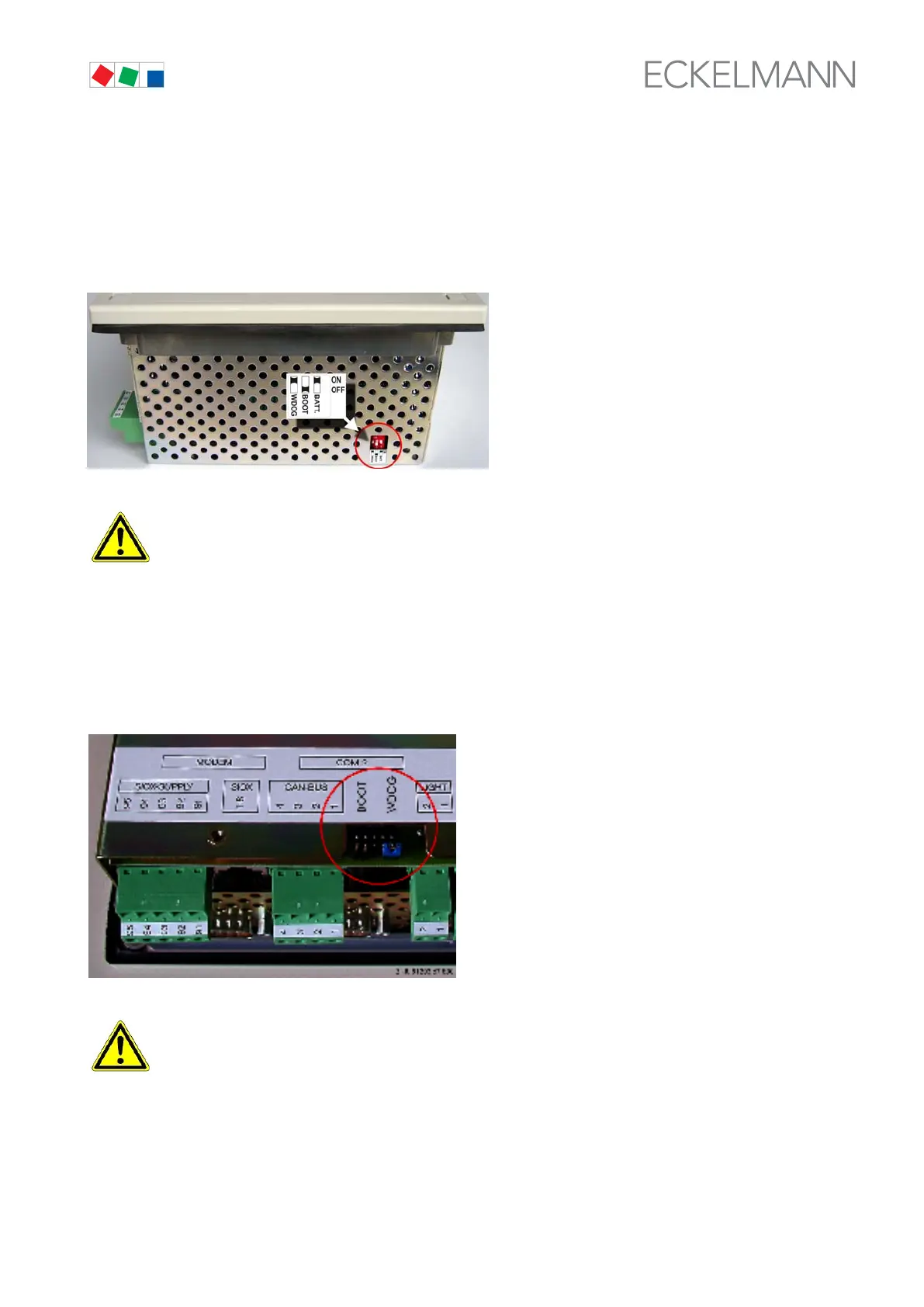
Neue model: Standard settings for the DIP switches
The DIP switches are positioned on the top left hand side of the store computer's housing:
Danger of failure of alarm messaging! During normal operation the DIP switch WDOG
(Watchdog) must be set to ON and the DIP switch BOOT set to OFF! Otherwise the watchdog mon
itoring function is deactivated and reliable operation is not assured. Only in the event of a software
update is it permitted to configure the DIP switches differently, i.e. during the course of the update.
See chapter 5.10.
Previous model: Standard settings for the plug-in jumpers
The two plug-in jumpers BOOT and WDOG (Watchdog) are positioned between the CAN Bus and the LIGHT
plug:
Danger of failure of alarm messaging! In normal operation the BOOT jumper must be open and
the WDOG jumper must be closed! Otherwise the watchdog monitoring function is deactivated and
reliable operation is not assured. Only in the event of a software update is it permitted to configure
the DIP switches differently, i.e. during the course of the update. See chapter 5.10.



 To Next Page