Chapter 4
| Wireless Settings
Radio Settings
– 76 –
Limit Upload — Enables rate limiting of traffic from the VAP interface as it is
passed to the wired network. You can set a maximum rate in Kbytes per second.
(Range: 256-10048576 Kbytes per second; Default: OFF)
Limit Download — Enables rate limiting of traffic from the wired network as it
is passed to the VAP interface. You can set a maximum rate in kbytes per
second. (Range: 256-10048576 Kbytes per second; Default: OFF)
Authentication — When the AP system management is set to ecCLOUD mode
(see “System Settings” on page 81), this options authenticates the AP
communications with the ecCLOUD controller. (Default: Disa
bled)
Wireless Networks —
OpenRoaming
Available when WPA2-EAP security is selected, OpenRoaming (Hotspot 2.0)
provides a standard for public-access Wi-Fi networks to support seamless roaming
between wireless networks. A OpenRoaming AP advertises its public Wi-Fi
capabilities and services so that clients can decide if they want to connect to the
network.
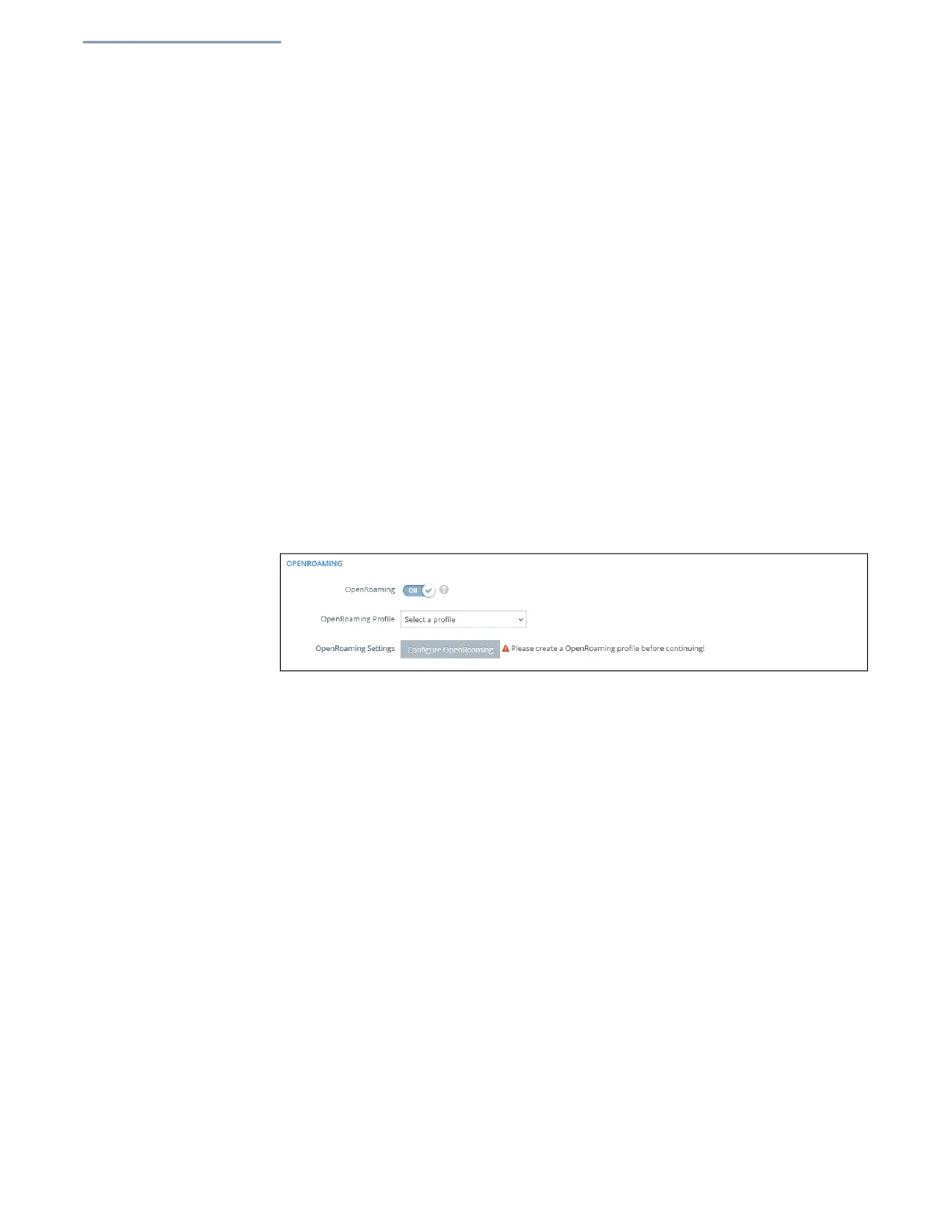
Figure 46: OpenRoaming Settings
The following items
are displayed in this section of the Wireless Settings page:
OpenRoaming — Enables OpenRoaming when WPA2-EAP security is
selected. (Default: Disabled)
OpenRoaming Profile — Selects the profile to apply to the wireless network.
See “OpenRoaming” on page 57 for profile configuration.
OpenRoaming Settings — Click to access the OpenRoaming profile settings
page. See “OpenRoaming” on page 57 for profile configuration.
Wireless Networks —
Open Mesh Settings
Open Mesh is a network of interconnected node APs, of which only one has a
wired connection to the network (and the Internet). The other AP nodes provide
wireless links to each other and some support connections to wireless clients. The
m
esh network not only extends wireless connectivity over a greater distance, but
also provides backup links should one node in the network fail.
When setting up an AP to be a node in a mesh network, select one radio interface
(2.4 GHz, 5 GHz, or 6 GHz) and configure it to operate on a specific channel (do
not select Auto).Se
t up other AP nodes
to operate on the same radio interface,
channel, and with the same SSID.


 To Next Page