Chapter 5
| System Settings
Services
– 92 –
SNMP Simple Network Management Protocol (SNMP) is a communication protocol
designed specifically for managing devices on a network. It is typically used to
configure these devices for proper operation in a network environment, as well as
to monitor them to evaluate performance or detect potential problems.
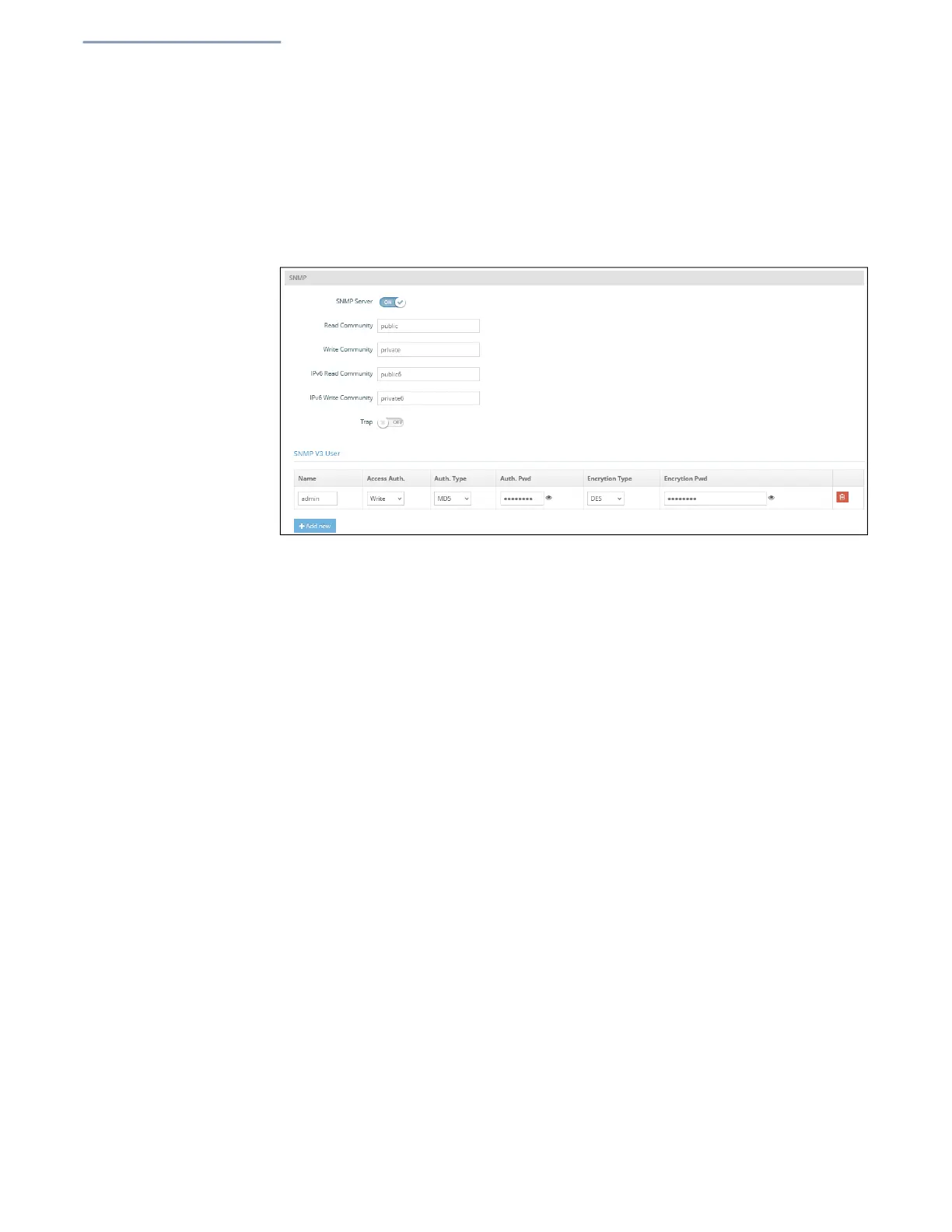
Figure 65: SNMP Settings
The following items are displayed on this page:
SNMP Server — Enables or disables SNMP on the access point.
(Default: Enabled)
Read Community — A community string that acts like a password and permits
read access to the access point’s Management Information Base (MIB).
(Range: 1-32 characters, case sensitive; Default: public)
Write Community — A community string that acts like a password and
permits write access to the access point’s Management Information Base (MIB).
(Range: 1-32 characters, case sensitive; Default: private)
IPv6 Read Community — A community string for IPv6 read access to the
access point’s Management Information (MIB) database. (Range: 1-32
characters, case sensitive; Default: public6)
IPv6 Write Community — A community string for IPv6 write access to the
access point’s Management Information (MIB) database. (Range: 1-32
characters, case sensitive; Default: private6)
Trap — Enables the sending of SNMP trap messages to a specified server. The
access point sends the following trap messa
ges: cold start, warm start, link up,
and link down. (Default: Disabled)
Server IP — Specifies the IP address of the SNMP trap server that will be
sent trap messages.


 To Next Page