Commissioning en│23
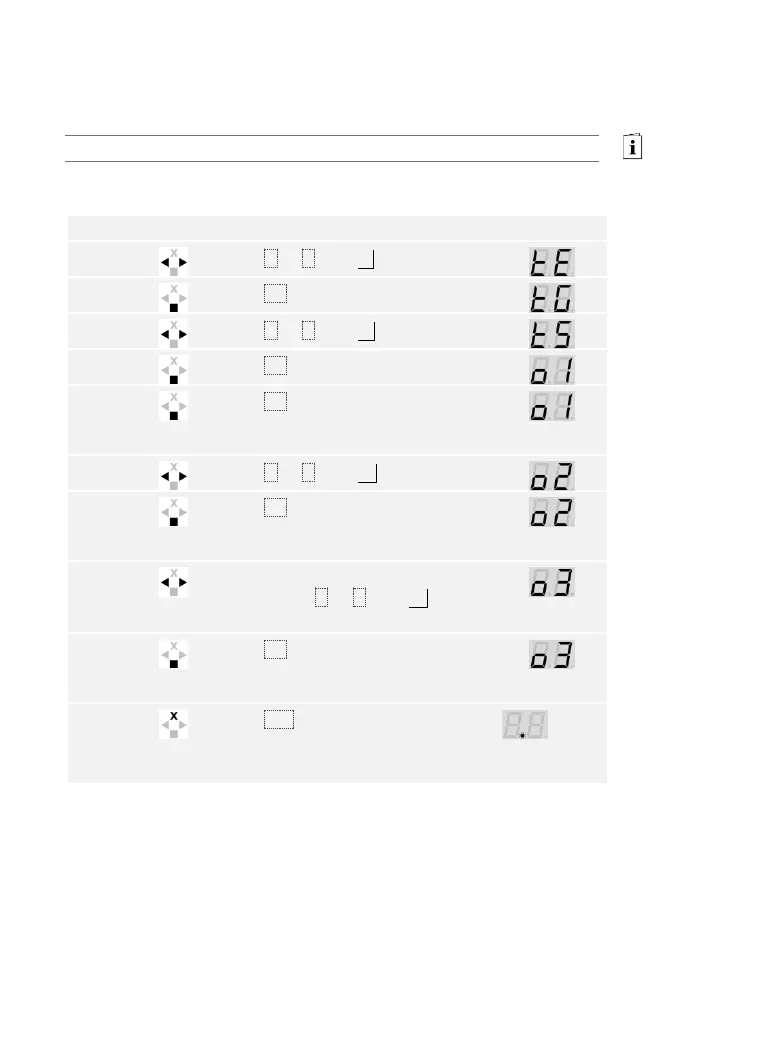
Testing the lock
You can switch the relays individually. The test of the lock is performed
via the main menu.
Enter the security code to access the main menu.
See Entering the security code, page 35.
The system displays the main menu.
Press < or > until tE is displayed.
Press < or > until tS is displayed.
Press OK. Relay 1 switches for the
defined relay switching duration
(default setting: 3 s).
Press < or > until o2 is displayed.
Press OK. Relay 2 switches for the
defined relay switching duration
(default setting: 3 s).
ekey home control panel
WM 3
) Press < or > until o3 is
displayed.
Press OK. Relay 3 switches for the
defined relay switching duration
(default setting: 3 s).
1
point
flashes
on the
left.
The relays have been tested. The system is in normal mode.



 To Next Page