EasyManua.ls Logo

eKey Home - Page 44

eKey Home
77 pages
Print Icon
To Next Page IconTo Next Page
To Previous Page IconTo Previous Page
Loading...
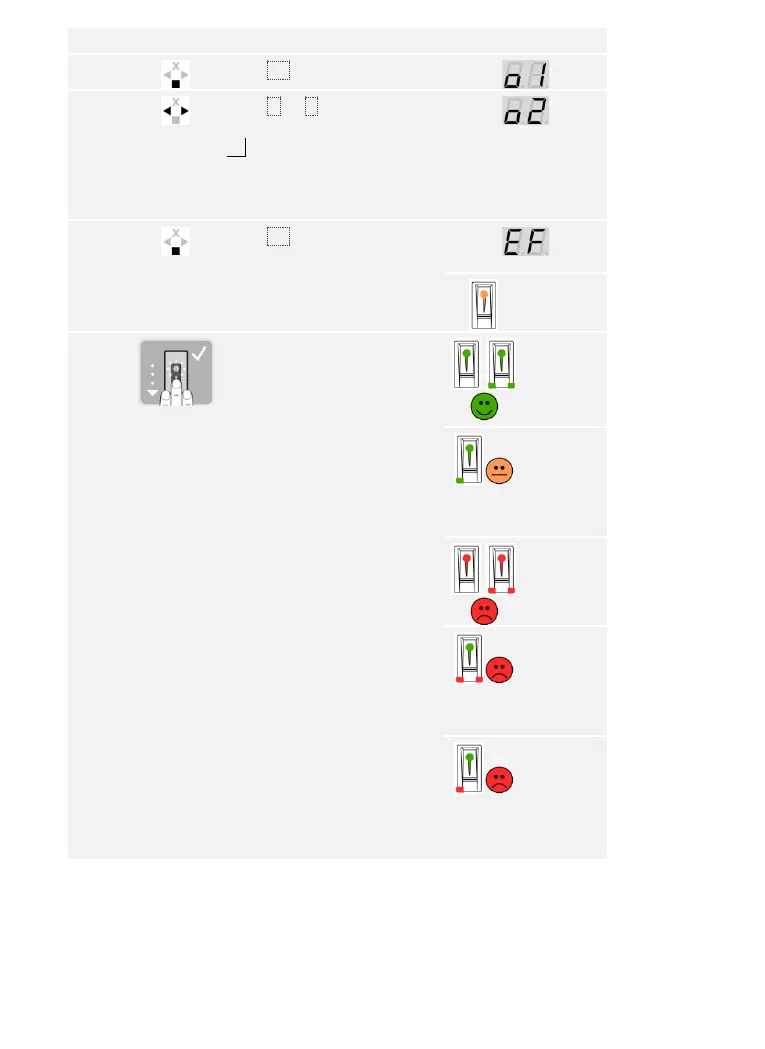
Usage of the finger scanner with the control panel menu en43
Step
Action
Description
Display
7th
Press OK.
8th
Press < or > to select the
relay.
od = double relay (relay 1 +
2). Relay selection is available
on control panels with more
than one relay.
9th
Press OK. The control panel is
ready to store the finger.
The status
LED lights
up orange
10th
Swipe the finger over the
sensor.
See “Swiping the finger” in
“Correct operation of the
finger scanner”, page 10.
Repeat this step at least
twice. Between each
individual finger swipe, the
finger scanner lights up
orange if the finger storing
process is not complete.

/
The status
LED lights
up
green/All
LEDs light
up green.
The status
LED and
the left-
hand
function
LED light
up green.
/
The status
LED lights
up red/All
LEDs light
up red.
The status
LED lights
up green,
the
function
LEDs light
up red.
The status
LED lights
up green,
the left-
hand
function
LED lights
up red.

Table of Contents

Related product manuals