46│en Usage of the finger scanner with the control panel menu
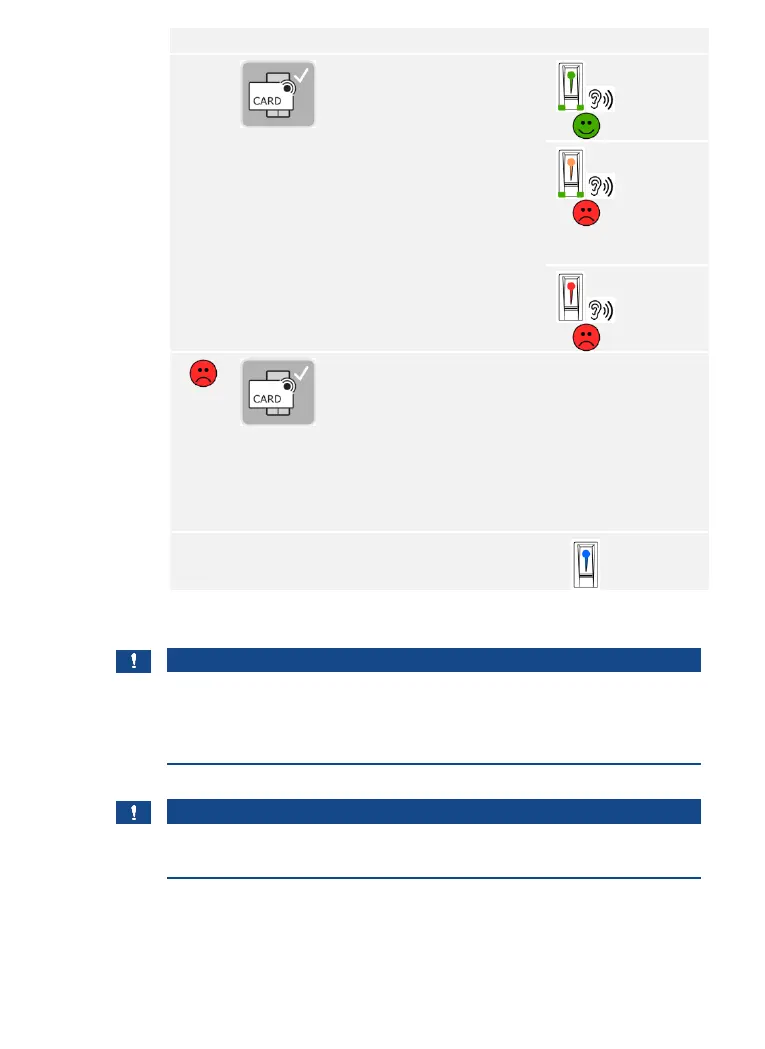
Hold the RFID transponder
over the finger swipe area of
the finger scanner at a
distance of 1 to 5 cm.
See “Holding up the RFID
transponder” in “Correct
operation of the finger
scanner”, page 11.
All LEDs
light up
green.
Short beep.
The status
LED lights
up orange.
The
function
LEDs light
up green.
Long beep.
The status
LED lights
up red.
Long beep.
The RFID transponder was
not stored. Either you did not
hold the RFID transponder
over the finger scanner for
long enough, or it was not
close enough, or this RFID
transponder has already been
stored. Repeat the procedure
beginning at step 1.
The status
LED lights
up blue.
The RFID transponder is stored. The system is in normal mode.
NOTICE
Replacing the control panel: When the control panel is replaced, the
stored RFID transponders can only be used again if the new control panel
has the same serial number as the old one. More information about this
can be obtained from your dealer.
NOTICE
Testing RFID transponders: Test the newly stored RFID transponder on
the finger scanner immediately.



 To Next Page