TRANSIENT3000
65/162
6.1.1 Selection of a language: Deutsch, François, Italian, Espagnol and Beep function
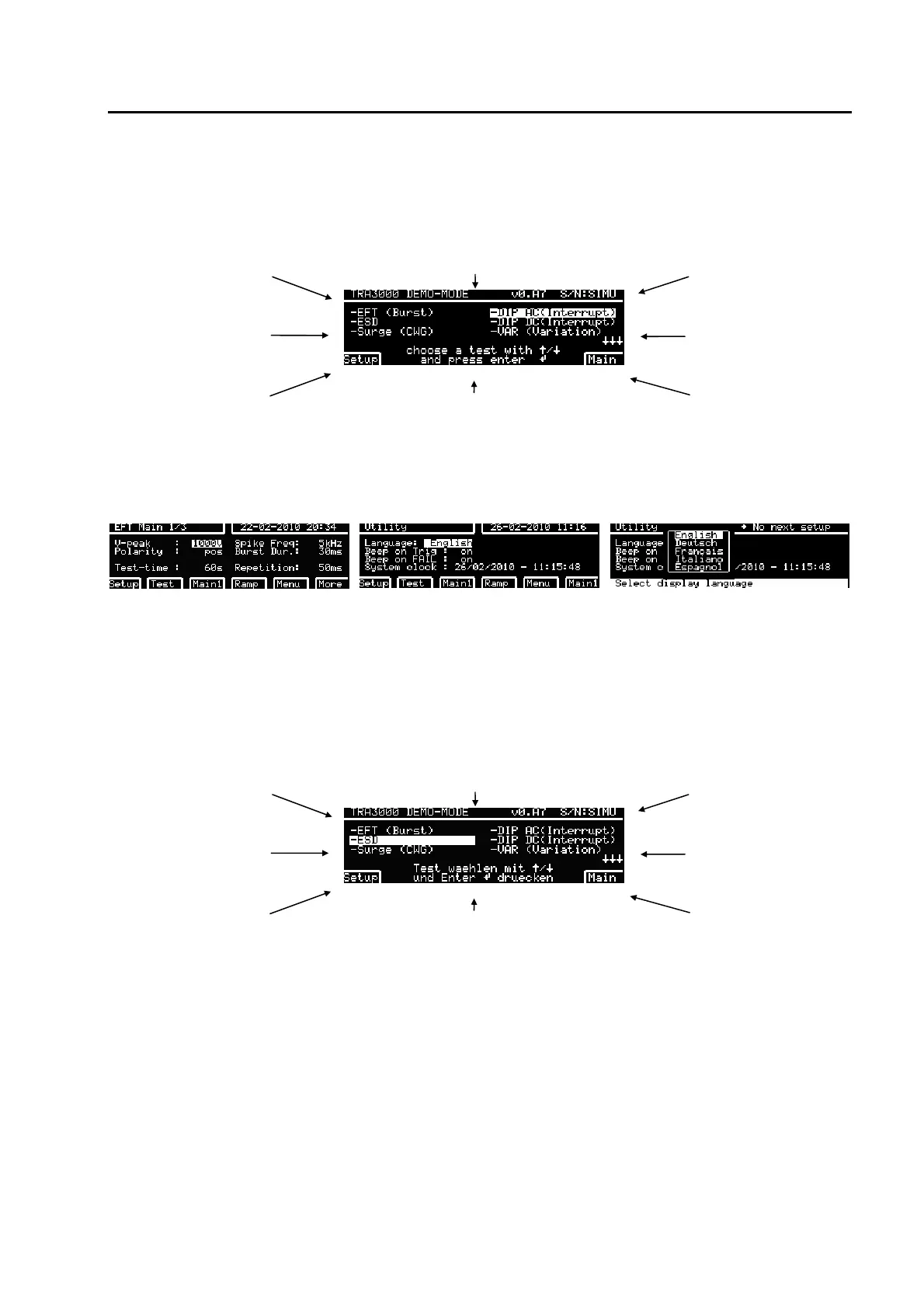
One of the great advantages of the TRA3000 F-S-D-V-C is the language selection. The equipment is
shipped with English language selected. To change the language follow the instructions below.
type of equipment Software version serial number
selectable tests
selectable tests
programmed test set-
ups 1 to 15
dialogue lines gives hints for the actual display
Different languages can be chosen.
main parameter of the
selected test e.g. EFT
Press "Main" - and twice "Menu" - "UTIL" - -EDIT button
display when "Main" has been
pressed
display after pressing twice Menu
and UTIL Turn the beep function
"ON" or "OFF" as personally
preferred..
after pressing "EDIT" button
Choose the desired language (e.g. German) with the arrows and quit with the ENTER button and press soft
key F2 "TEST". The display "TEST" has know changed to
type of equipment Software version serial number
selectable tests
selectable tests
programmed test set-
ups 1 to 15
Most of the impression and the dialogue line will be
showed in the selected language.
main parameter of the
selected test e.g. EFT
Further languages are possible on the GENECS software.
Advantage:
Automatically all expression and remarks on the display and the protocol will be written in german or in the
selected language.



 To Next Page