DCM00002 REV. 16 41
5.3 Menu Options Screen
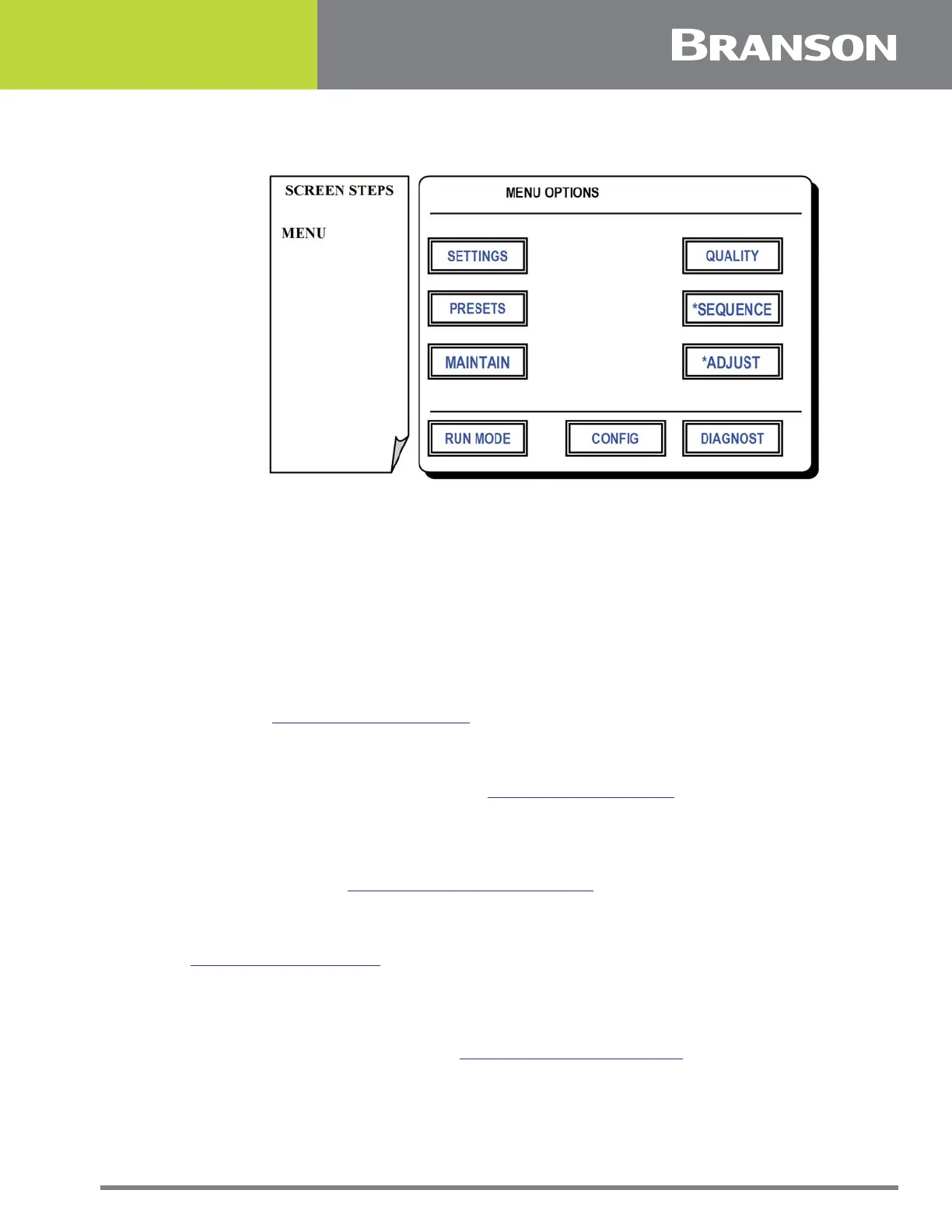
Figure 5.2 Menu Options screen
Menu Options Screen
This screen allows access to the features of the controller. Features are divided in to
related groups. Access to Configuration and Diagnostics are protected by a user
changeable password. The password is initially set to 2677, the last four digits of Branson
Metal Welding’s phone number.
Press one of the following options for this screen:
SETTINGS
To change individual weld parameters which are the basic elements required to make a
weld. See 5.4 Weld Settings Screen.
PRESETS
To name, save and recall specific weld parameter settings which may be stored in the
controller’s non volatile memory. See 5.7 Preset Menu Screen.
MAINTAIN
To allow adjustment and on demand control of the various motion devices in the weld
actuator. Also allows access to maintenance counters which monitor tool life and sending
data functions. See 5.10 Maintenance Menu Screen.
QUALITY
To allow setting min and max parameters for weld time, power, preheight and height. See
5.15 Weld Limits Screen.
SEQUENCE*
To name, save and recall sequences which may be stored in the controller’s non volatile
memory. A sequence is a series of grouped presets which are to be executed in a
particular quantity and order. See 5.16 Sequence Menu Screen.
*Not available on Ultrasplice 40 & ST 40 actuators.



 To Next Page