DCM00002 REV. 16 57
5.15 Weld Limits Screen
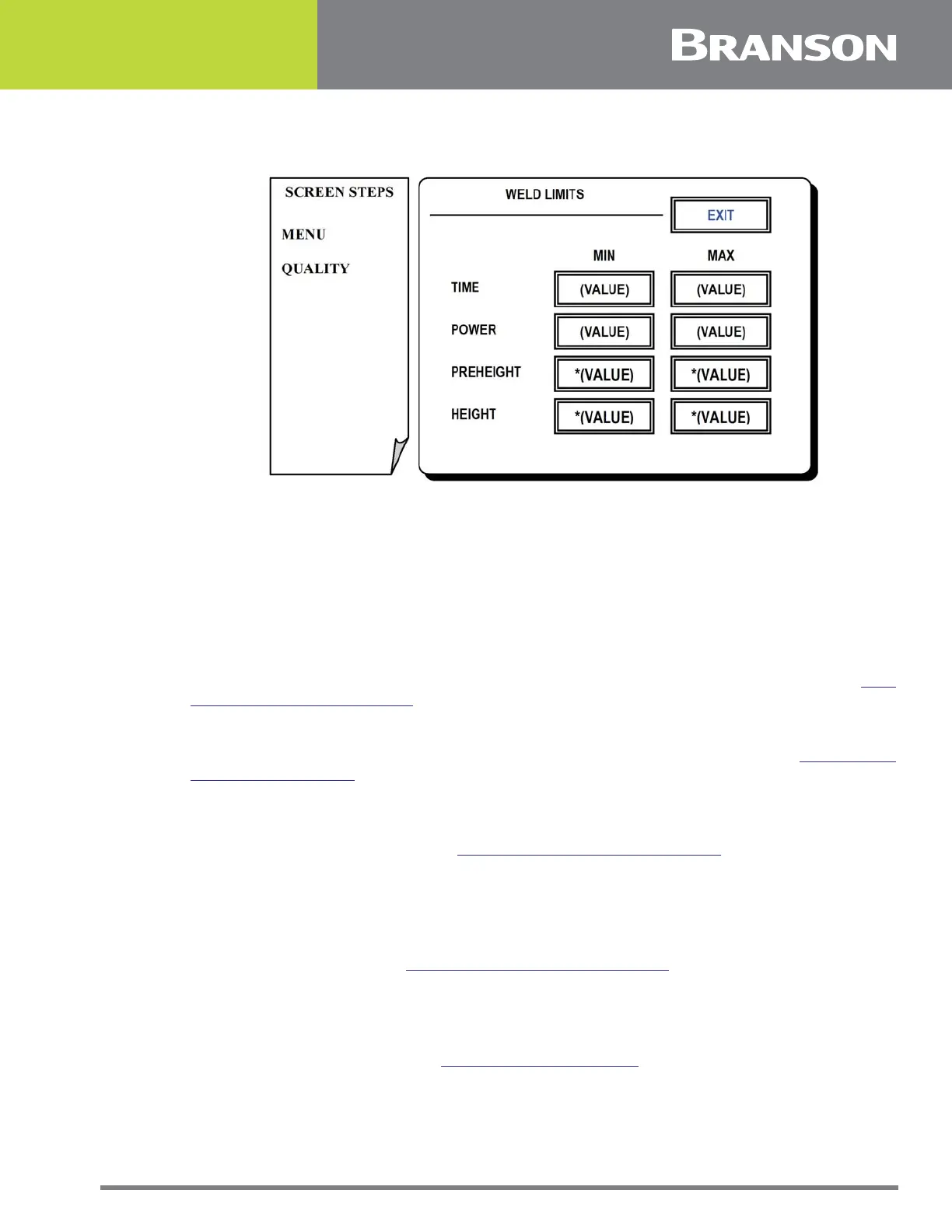
Figure 5.14 Weld Limits screen
Weld Limits Screen
Weld limits assure that certain weld settings fall within a min/max range. This operating
window assures the user of consistency between welds. If values fall outside these limits
an alarm is given.
Press one of the following options for this screen:
TIME MIN or MAX
To set the min/max time (sec) that ultrasonic energy may be applied to a weld. See 5.35
Typical Keypad Entry Screen.
POWER MIN or MAX
To set the min/max power (watts) which may be applied to a weld. See 5.35 Typical
Keypad Entry Screen.
PREHEIGHT MIN or MAX*
To set the min/max pre-height (mm). This is a pre sonic inspection reading from the
height encoder prior to weld. See 5.35 Typical Keypad Entry Screen.
*Available only on Ultraweld 20, Ultraweld 40, MTS 20, & ST 40 actuators equipped with a height encoder which
is set to on.
HEIGHT MIN or MAX*
To set the min/max height (mm). This is a post sonic inspection reading from the height
encoder after welding. See 5.35 Typical Keypad Entry Screen.
*Available only on Ultraweld 20, Ultraweld 40, MTS 20, & ST 40 actuators equipped with a height encoder which
is set to on.
EXIT
To return to Menu Options. See 5.3 Menu Options Screen.



 To Next Page