DCM00002 REV. 16 63
5.21 System Configuration Screen
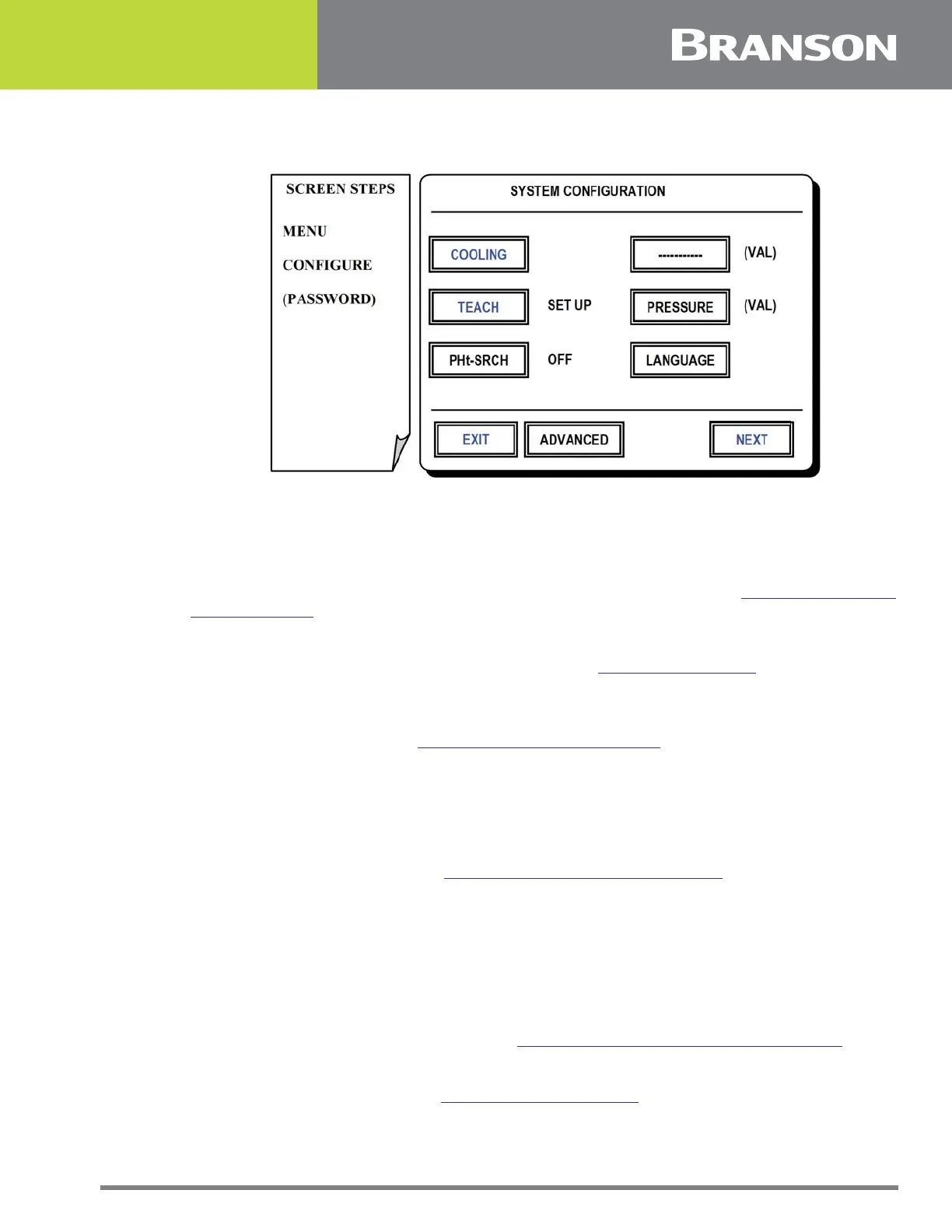
Figure 5.20 System Configuration screen
System Configuration Screen
Features in this screen are global and remain unchanged regardless of other weld setting
or presets that are currently in use. The exception is Advanced settings which serve as
defaults and may be overridden on an individual preset basis. See 5.6 Advanced Weld
Settings Screen for reference.
COOLING
To set timers that control post weld cooling air. See 5.22 Cooling Screen.
TEACH
To set mode and criteria for the teach function. The teach feature is a method for
establishing weld limits. See 5.23 Teach Mode Setup Screen.
PHt-SRCH
To toggle Pre-Height Search function on and off.
ADVANCED (Default)
To set default values for advanced features. The screen and features are identical to those
in Advanced Weld Settings. See 5.6 Advanced Weld Settings Screen for reference.
PRESSURE
To toggle pressure units between PSI and bar.
LANGUAGE
To select a controller display language in English, Spanish, Portuguese, French or German.
NEXT
To view more configuration features. See 5.24 System Configuration Screen (Next).
EXIT
To return to Menu Options. See 5.3 Menu Options Screen.



 To Next Page