60 DCM00002 REV. 16
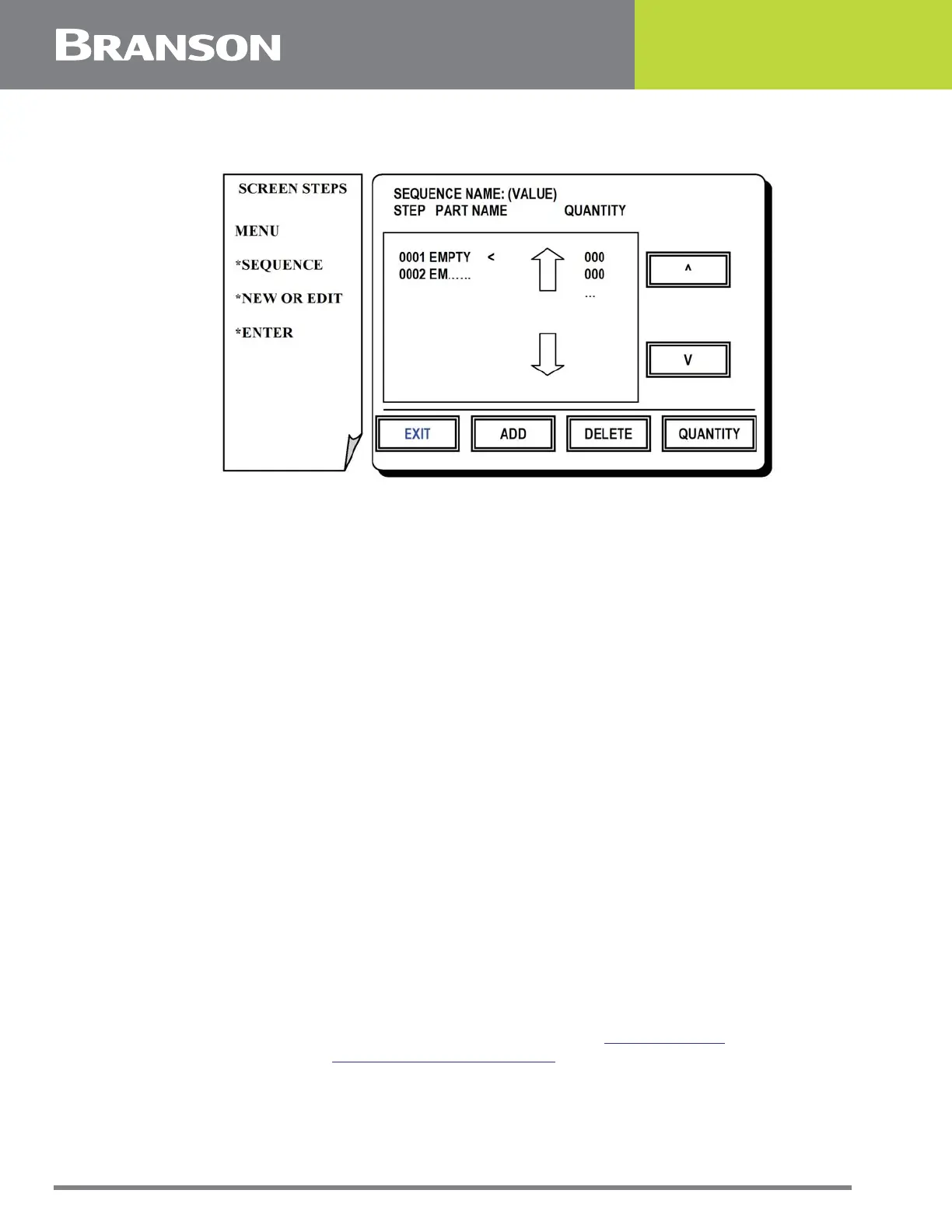
5.18 Sequence Steps Screen
Figure 5.17 Sequence Steps screen
Sequence Steps Screen*
A sequence consists of a series of presets, each of which is executed a designated number
of times. This screen allows selection of presets and assignment of quantities.
*Not available on Ultrasplice 40 & ST 40 actuators.
Press one of the following options for this screen:
UP or DOWN ARROWS
(Inside the storage register display window). To scan sequence steps a page at a time.
UP or DOWN ARROWS
(Outside the storage register display window). To position the selection cursor next to the
storage register you wish to fill, edit or retrieve from.
ADD
To add a preset to the sequence. A screen will appear which allows you to select a preset
from the preset library.
DELETE
To delete the selected preset from the sequence.
QUANTITY
To specify the number of times to execute the selected preset in the sequence (250 times
maximum).
EXIT
When satisfied with the sequence steps. If the sequence is new or has been changed, an
option to try the sequence (return to the Run Screen, see 5.2 Run Screen) or exit (return
to Sequence Menu, see 5.16 Sequence Menu Screen) is given.



 To Next Page