DCM00002 REV. 16 67
5.24 System Configuration Screen (Next)
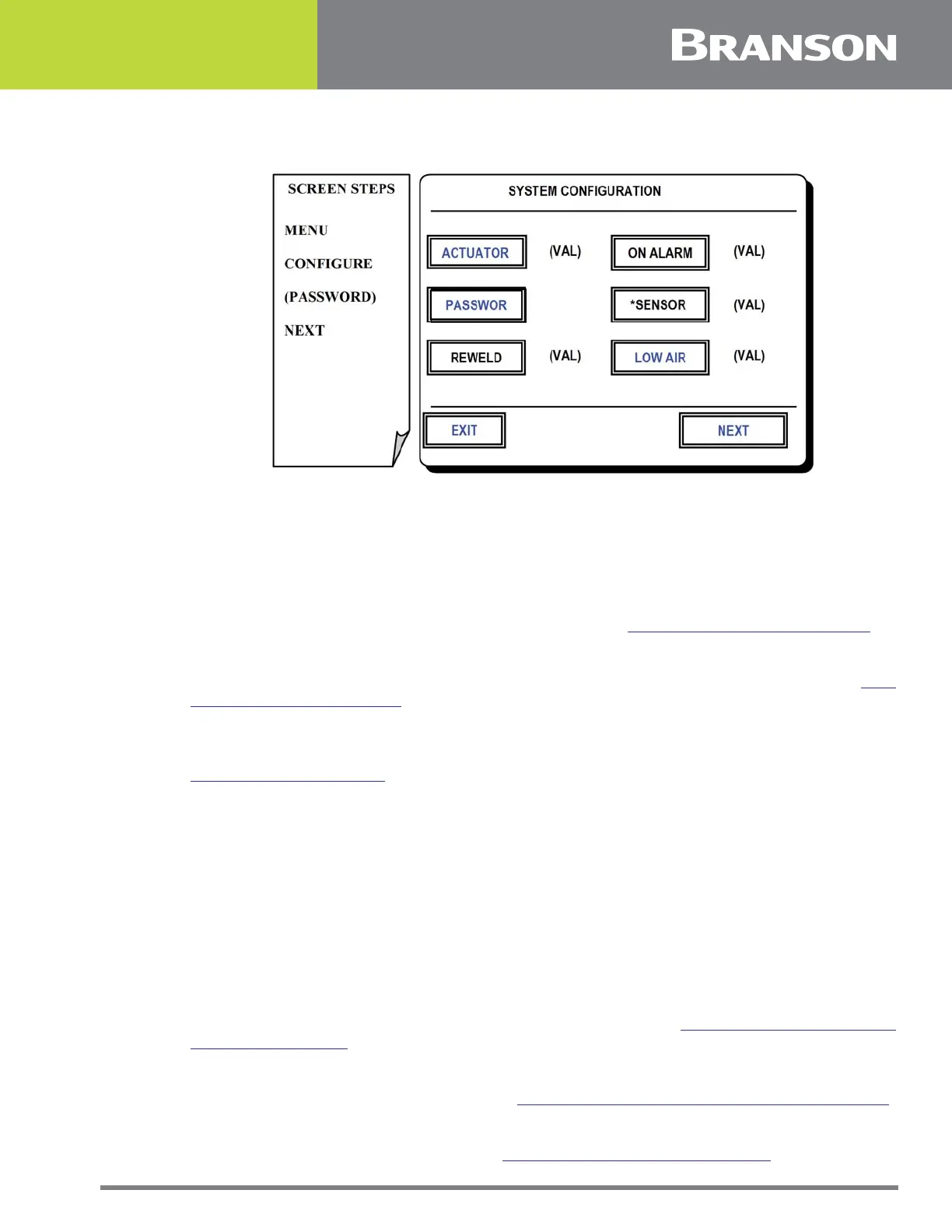
Figure 5.23 System Configuration screen (Next)
System Configuration Screen (Next)
This screen allows access to other configuration settings.
Press one of the following options for this screen:
ACTUATOR
To configure the controller for the correct actuator. See 5.25 Actuator Selection Screen.
PASSWORD
To create passwords that control operator access to the touchscreen commands. See 5.26
Password Changing Screen.
REWELD
To toggle the reweld mode on/off. This provides an option when a weld limit alarm (see
5.15 Weld Limits Screen for reference) occurs. If the reweld setting is on the user may
choose to reweld the same part again. Weld limits are turned off for one cycle while the
reweld takes place.
ON ALARM
To toggle between lock or allow a weld to continue when an alarm condition exists. When
set to lock the actuator will not release the part until a level 1 password is entered.
*SENSOR
To toggle between Full/Half height encoder.
*Make sure the L20 Actuator is selected to enable this function.
LOW AIR
To set options and threshold for low line air pressure. See 5.28 System Configuration
Screen (Next, Next).
NEXT
To view more configuration features. See 5.28 System Configuration Screen (Next, Next).
EXIT
To return to System Configuration. See 5.21 System Configuration Screen.



 To Next Page