54 DCM00002 REV. 16
5.12 Sonic Generator Screen
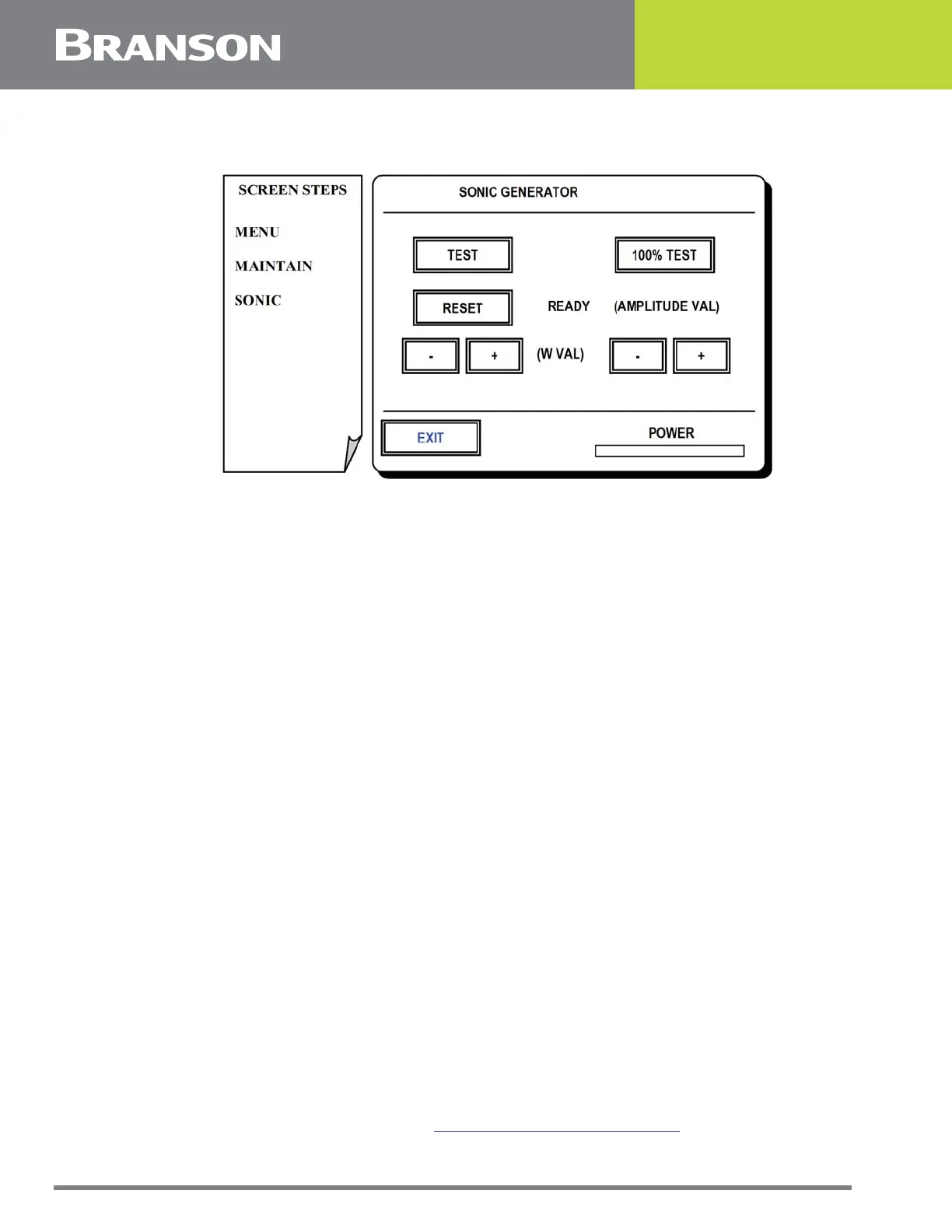
Figure 5.11 Sonic Generator screen
Sonic Generator Screen
This screen allows on demand control of ultrasonic weld energy and calibration of
amplitude.
Amplitude calibration requires a dial indicator to be temporarily mounted in line with and
in front of the horn usually on a magnetic base. The 100% test button is held and gage
reading is viewed.
The gage reading x 2 = total amplitude, this is the value to be entered for the amplitude
value when calibrating.
Press one of the following options for this screen:
TEST
To fire ultrasonic energy at the current amplitude setting.
RESET
To reset the controller if a weld overload should occur.
PLUS or MINUS (W)
Is set by Branson for a given actuator and is not changed. Generally the setting for 20 kHz
actuators is 3300 W and the setting for 40 kHz actuators is 800W.
100% TEST
To fire ultrasonic energy at 100% amplitude. This is used when calibrating amplitude.
PLUS OR MINUS (MICRONS)
To set the amplitude value based on the indicator reading. See above.
POWER
Power rate is displayed in real-time.
EXIT
To return to Maintenance Menu. See 5.10 Maintenance Menu Screen.



 To Next Page