Multi-Function Control ETMFC610 http://www.entecene.co.kr
3. APPLICATION
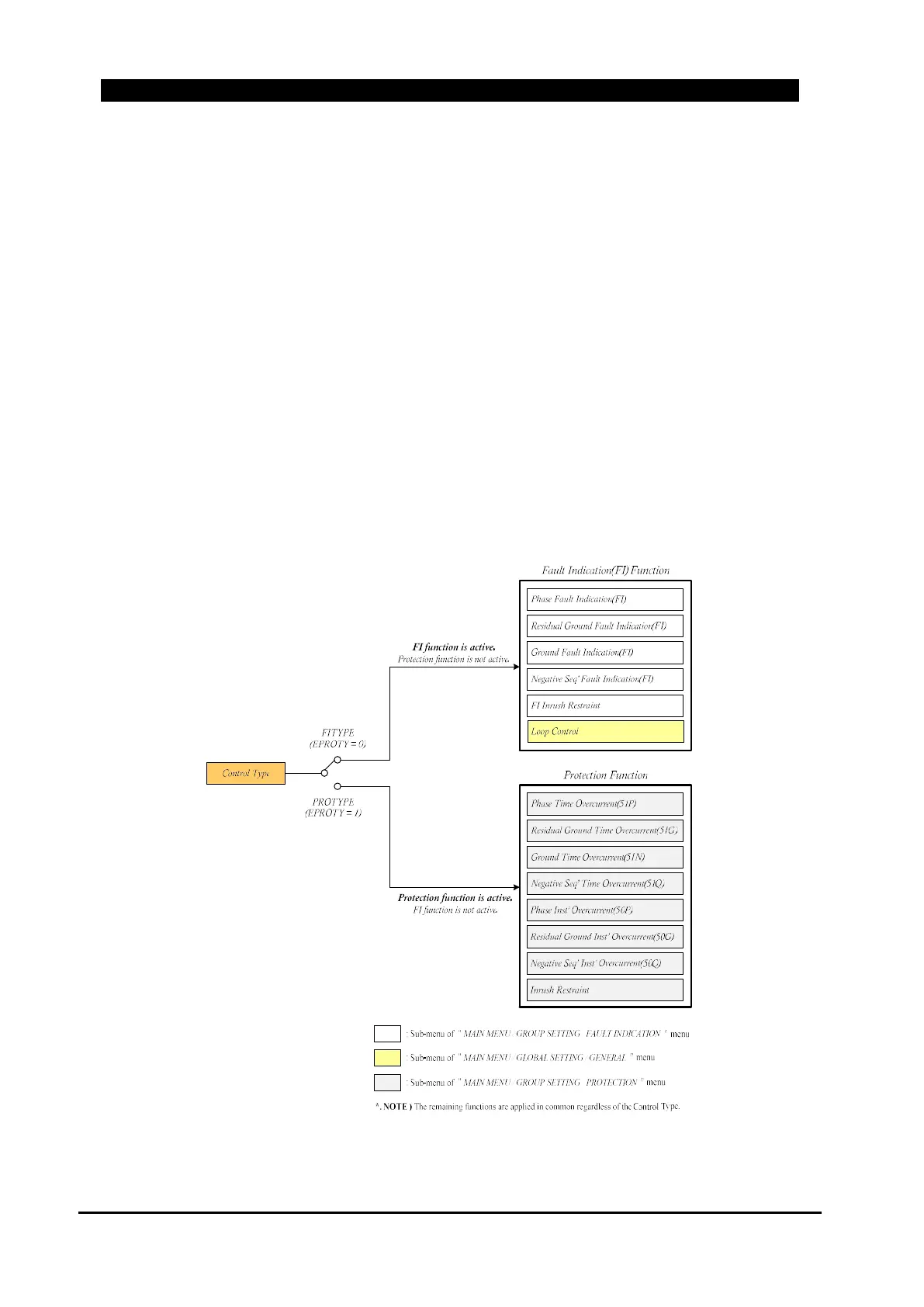
ETMFC610 has two control types (Fault Indication type(default) and Protection type). Control
Type setting is available in the menu “MAIN MENU / GLOBAL SETTING / GENERAL /
DEVICE / CONTROL TYPE”. The control type must be selected according to the installed body.
The fault indication function is active on Fault Indication type, and when the switch body or
sectionalizer body, Sectionalizer type must be selected. If the selected control type and the body
type do not match, erroneous operation or non-operating occurs.
But, the protection function(fault trip) is active on Protection type, and when the CB(or fault
interrupters) body, Protection type must be selected. If the selected control type and the body type
do not match, erroneous operation or non-operating occurs.
Depending on the control type, different setting menus are applied. Applied setting menus are
shown below according to the control type.
Figure 3-1. Control Type Logic Diagram



 To Next Page