52 |
training
Monitoring
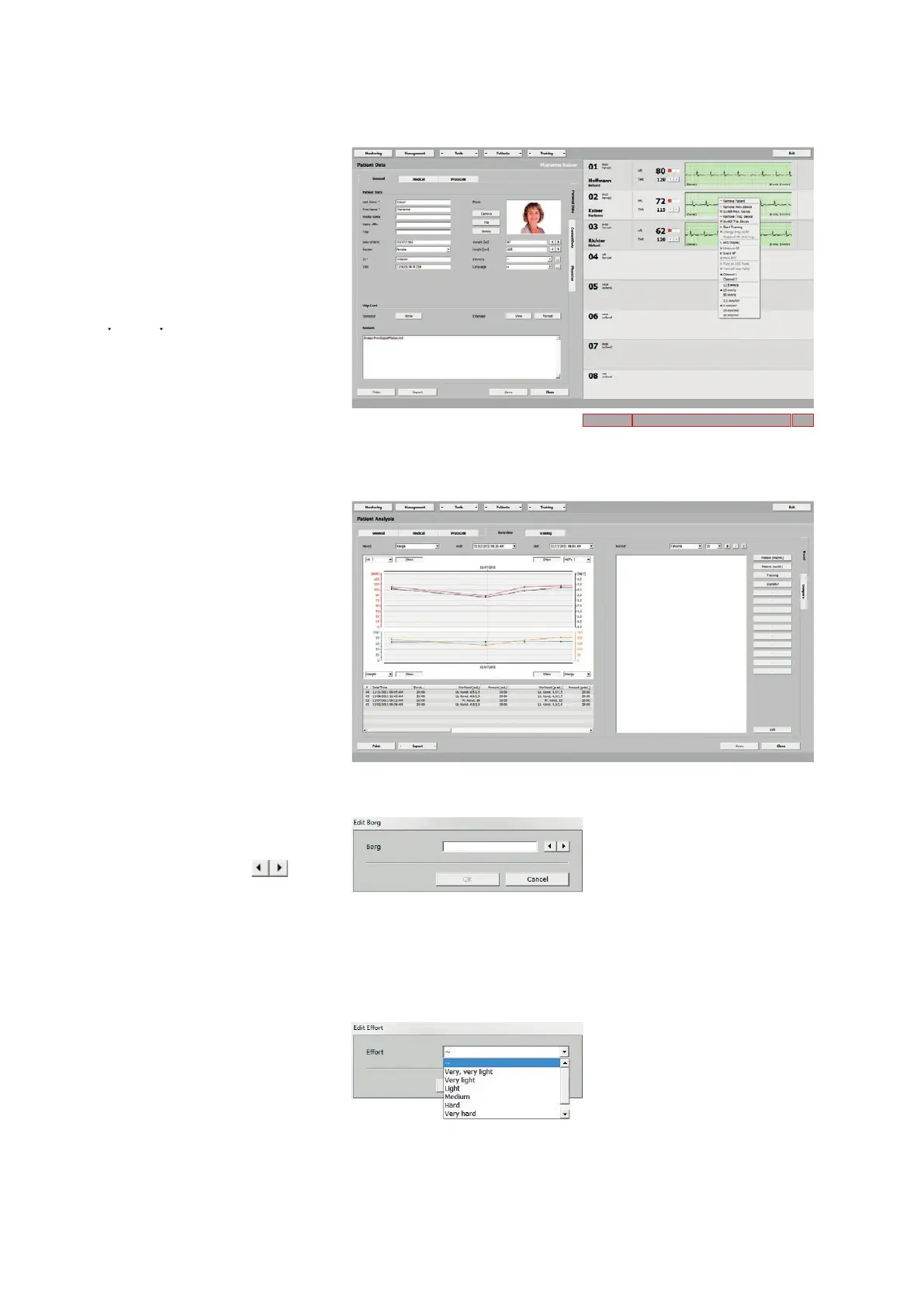
Patient Data
Via the shortcut menu (in area 1), you
go to the Patient Data, while all training
stations and ECGs remain displayed on
the right side.
With [ Patients ], Patient Data and se-
lection of a patient, you also reach the
Patient Data window. The shortcut menu
is available here, too.
Patient Analysis
By selecting Patient Analysis from the
shortcut menu (in area 1), you display the
overview of all analyses.
With [ Print ] you can print an overview
(diagram, activities and report), with
[ Export ] you create a CSV file (comma
separated values, default storage path
C: \ ers2 \ ers2exchange).
Editing the Borg Value
Right-click (in area 1) to edit the Borg
value either by typing it into the text box
or by using the arrow buttons (de-
pending on your configuration, the value
may not be displayed).
Editing Effort
From the shortcut menu (in area 1), se-
lect Edit Effort. You can enter the pa-
tient's perceived exertion level in the
window that opens. Choose an option
and confirm with [ OK ] (depending on
your configuration, the value may not be
displayed).
Area 1
Area 2 Area 3



 To Next Page