VIP-X System Manual
Revision 1.0 VIP-X - 3
EVERTZ
ROUTER
X-LINK
ENABLED
16
XLINK-BHP-3 (32 signals)
7767VIPX16x2
7767VIPX16x2
16
7767
VIPX-
RP2
7767
VIPX-
RP2
7767
VIPX-
RP2
8
7767VIPX8x2
7767VIPX8x2
8
8
7767VIPX8x2
7767VIPX8x2
8
XLINK-BHPS-3
(32 SIG)
1
6
S
I
G
N
A
L
S
1
6
S
I
G
N
A
L
S
PRODUCT INPUTS
STANDARD VIDEO
OUTPUTS
X-LINK OUTPUTS
TOTAL ROUTER
OUTPUTS
Xenon 4RU
64 3G/HD/SD 64
96
(3*X-LINK)
160
Xenon 8RU
128 3G/HD/SD 128
192
(6*X-LINK)
320
EQX 16RU
288 288
288
(9*X-LINK)
576
EQX 26RU
576
576+
32 Mon outs
256
(8*X-LINK)
864
Table 1-1: X-LINK Enable Router Outputs
1.2. X-LINK INTERCONNECT
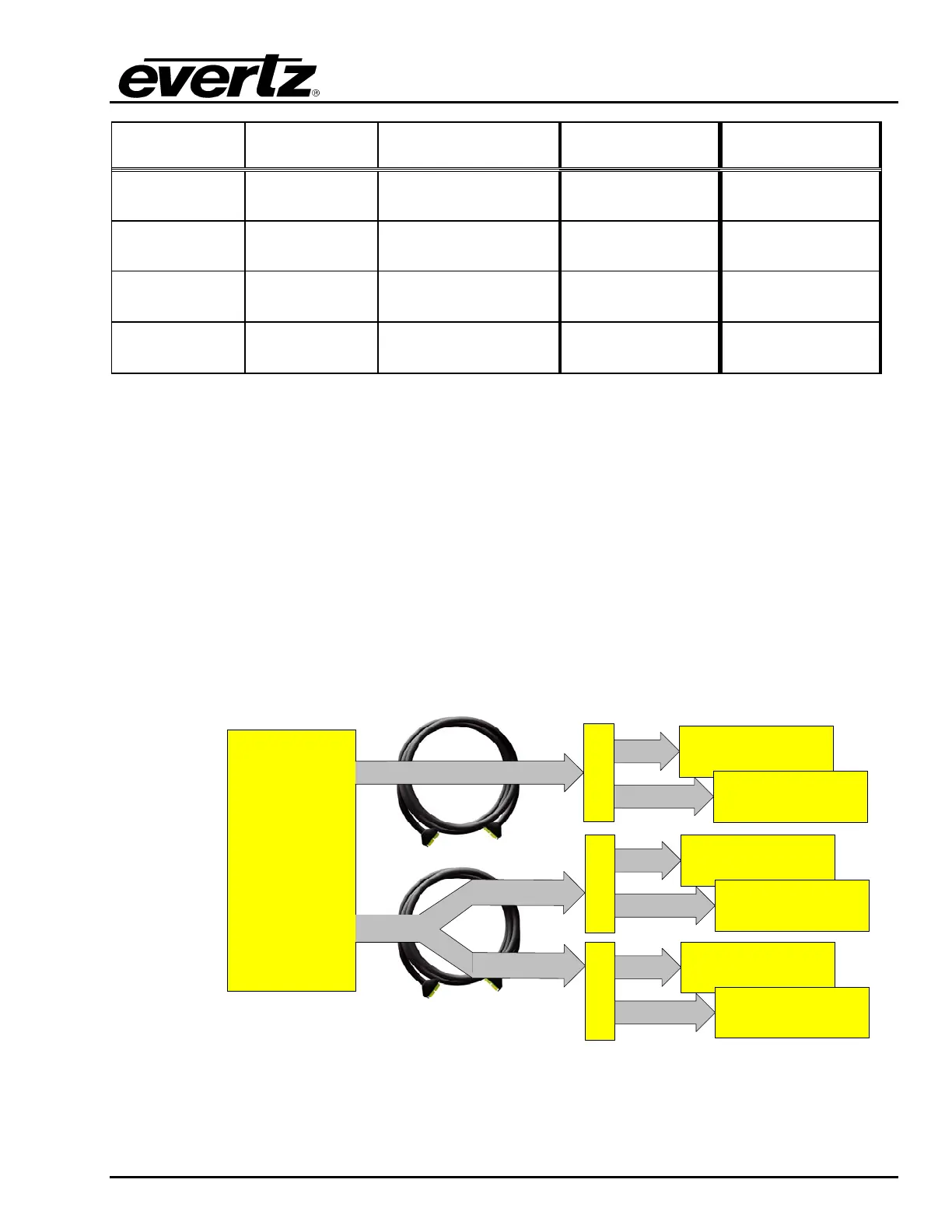
X-LINK is used to directly connect the 7767VIPX display modules to the router to enable multi-image
display outputs from the router. Figure 1-3 details how a single X-LINK output from the router is used
to connect to multiple 7767VIPX modules dependent on the type of display module used. A single
XLINK-BHP-3 (3m X-LINK cable) is used to connect up to two 7767VIPX16x2 display modules,
providing up to 16 connections to each module via a single 7767VIPX-RP2 rear plate. A single XLINK-
BHPS-3 (3m split X-LINK cable) is used to connect up to four 7767VIPX8x2 display modules, providing
up to 8 connections from the router to each module via two 7767VIPX-RP2 rear plates. The X-LINK
connections are destinations from the router; therefore, any source to the router can be routed to any
X-LINK destination independently. This enables the 7767VIPX display modules to display any source
from the router on any display, at any size and aspect ratio, and no limits to the number of instances of
a source on the display or the sizes of each instance.
Figure 1-3: X-LINK Interconnect



 To Next Page