IN1806 and IN1808 Series Scaling Presentation Switchers • Installation 18
Q
IPCP control processor (IN1808 IPCP SA and IN1808 IPCP MA 70 only) — The
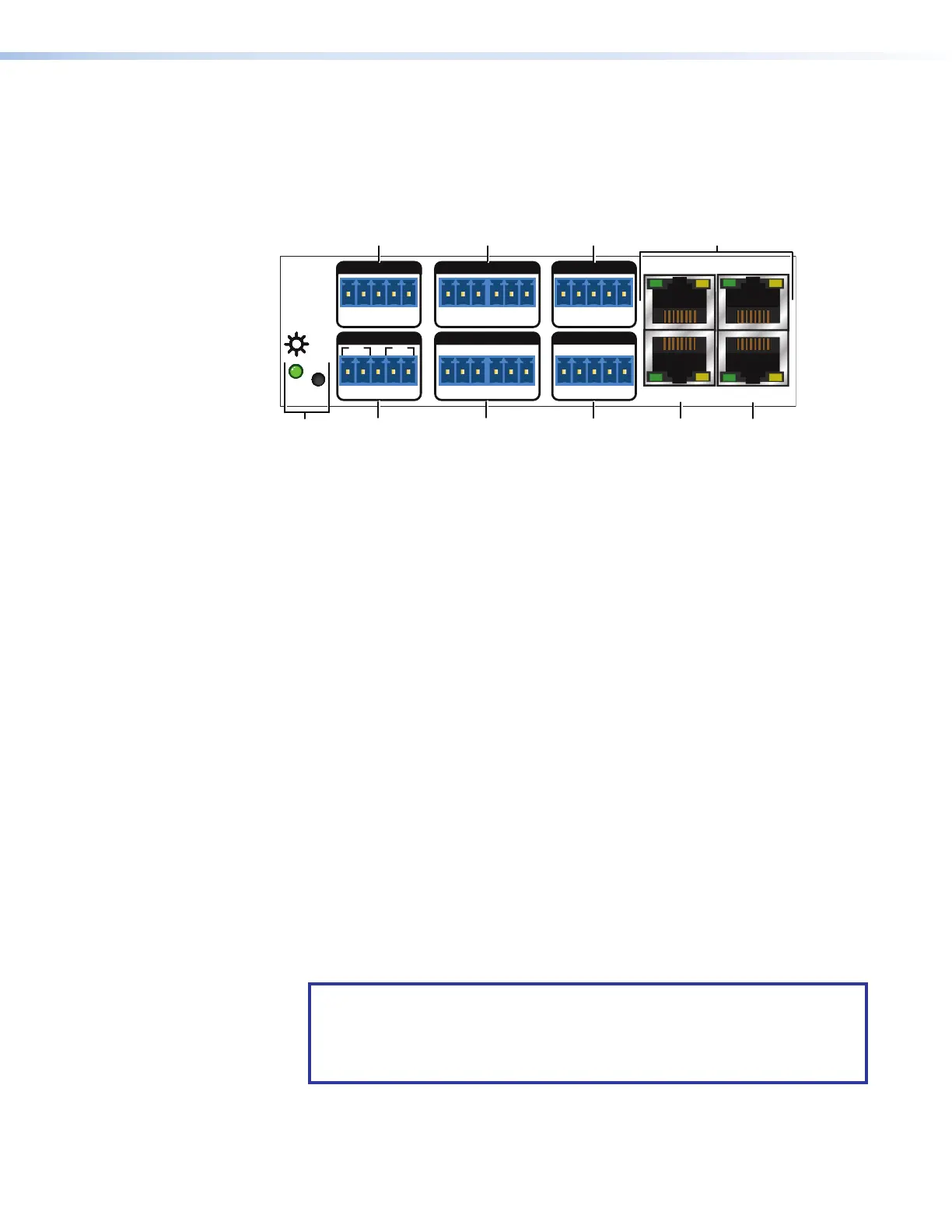
IN1808 IPCP models include a built-in IPCP Pro 355M Control Processor (see figures 5
and 6 on page 13). For these models, the LAN connector is incorporated in the IPCP
control processor. For connection and installation details of this control processor, see
the IPCP Pro Series User Guide at www.extron.com.
The IPCP module contains the following:
Tx Rx
RTSCTS
G
Tx Rx GTxRxG
R
1234G
DIGITAL I/OCOM 3COM 2COM 1
SSGG
1
1
2
2
C34C
G
+5
+V
PWR OUT = 6W
RRRRRRRRRR
R
R
R
R
R
R
R
R
R
R
R
R
R
IR/SERIAL eBUSRELAYS
LANAV LAN 1
AV LAN 2
AV LAN 3
1 2 3
4
78
-5
1
COM 1 Port
4
AV LAN ports
7
Relay ports
2
COM 2 and COM 3 ports
5
LAN port
8
IR/Serial ports
3
Digital I/O port
6
eBUS port
9
Reset button and LED
Figure 9. IPCP Control Module (IPCP Models Only)
The IPCP module ports are configurable via Global Configurator (GC) software, available
at www.extron.com.
1
COM 1 port — 5-pole captive screw bidirectional RS-232/RS-422/RS-485 port for
Tx/Rx/G/RTS/CTS
2
COM 2 and COM 3 ports — Bidirectional 3-pole captive screw RS-232 ports for
Tx/Rx/G
Use the COM ports for serial control of a display or other device and to receive status
messages from the connected devices.
3
Digital I/O ports — 5-pole captive screw connector, supporting four TTL level
digital inputs or outputs, with or without +5 VDC pull-up. Connect switches,
sensors, LEDs, relays, or similar items to these ports, which enable monitoring of
connected devices and trigger functions on the control processor.
4
AV LAN ports 1 - 3 — Network switch with its own network interface that keeps
the AV subnetwork separate from the corporate network for security purposes and
to reduce traffic on the corporate or outside network.
To connect the IPCP to an Ethernet network (for configuration and control of the
IPCP module and the devices connected to it), connect an internet cable between
any of these RJ-45 sockets and a network switch, hub, router, or PC connected to
a local network or the Internet.
AV LAN ports 1 - 3 use a separate network interface from that of the LAN port.
NOTE: A dedicated AV LAN safeguards AV systems from outside intrusion
or interference by separating device control and other network traffic from a
corporate or campus network. To ensure the control processor LAN and AV
LAN connections (ports) are connected to separate networks, the LAN and AV
LAN IP address schemes must be on different subnetworks.
9













 To Next Page