Chapter 4 Installation and Wiring
PAGE 4-28
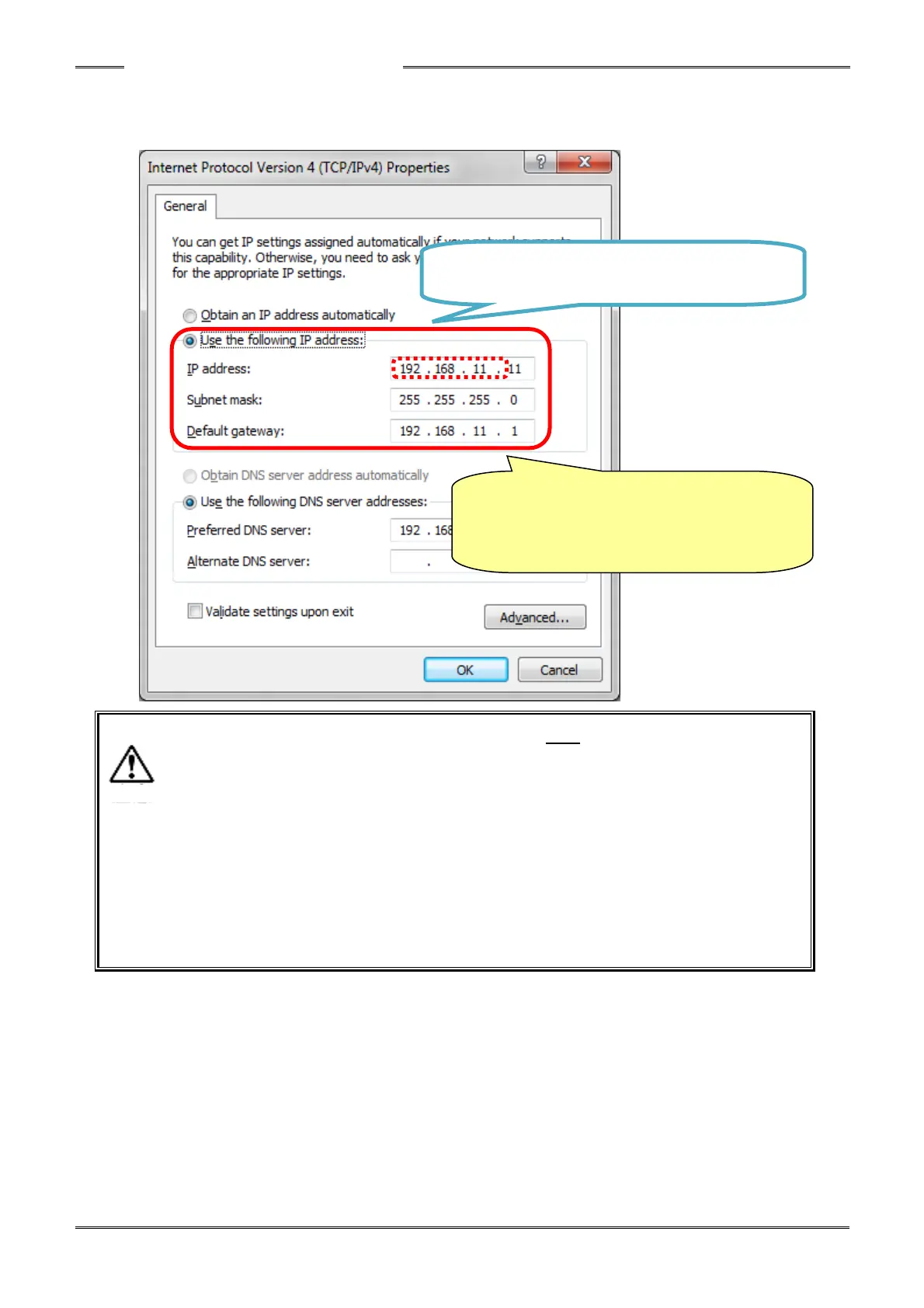
6. In Internet Protocol Version 4 (TCP/IPv4) Properties, select “Use the following IP address” and
change the IP address, the subnet mask, and the default gateway.
・ Set the IP address of the PC so that it does NOT match the value set in the
controller (i.e. IP address must be a different number – if the controller is set as IP
192.168.11.10, then the PC can be 192.168.11.11, 192.168.11.12, etc.). If anything else
is on the same network, then make sure the IP address setup in the PC does NOT
match ANY other number in the network.
・ Set the subnet mask of the PC to the same values as the factory set values of the
Unit.
・ Make note or write down the settings that were used before you make this change,
you will most likely need to return the PC to the prior settings if you try to connect
back to your PC network.
* Reference Example
IP address: 192.168.11.11
Subnet Mask: 255.255.255.0
Default Gateway: 192.168.11.1



 To Next Page