KNOWING YOUR VEHICLE
14
For vehicles with keys with remote
control
, if one or more doors are open,
the doors will not be locked.
This situation is indicated by a rapid
flashing of the direction indicators
(where provided). The doors will be
locked if the load compartment is open
instead.
For vehicles with electronic keys
, if one
or more doors are open, the doors are
locked anyway and this is indicated
by a rapid flashing of the direction
indicators (where provided).
The doors prepare for locking, which
is active from the moment they are
closed. The doors will unlock again only
if the key presence is detected inside
the passenger compartment.
Opening the load compartment
Press the button once to open the
load compartment remotely (where
provided).
The direction indicators will flash twice
to indicate that the load compartment
has been opened.
REPLACING THE
BATTERY IN THE KEY
WITH REMOTE CONTROL
1)
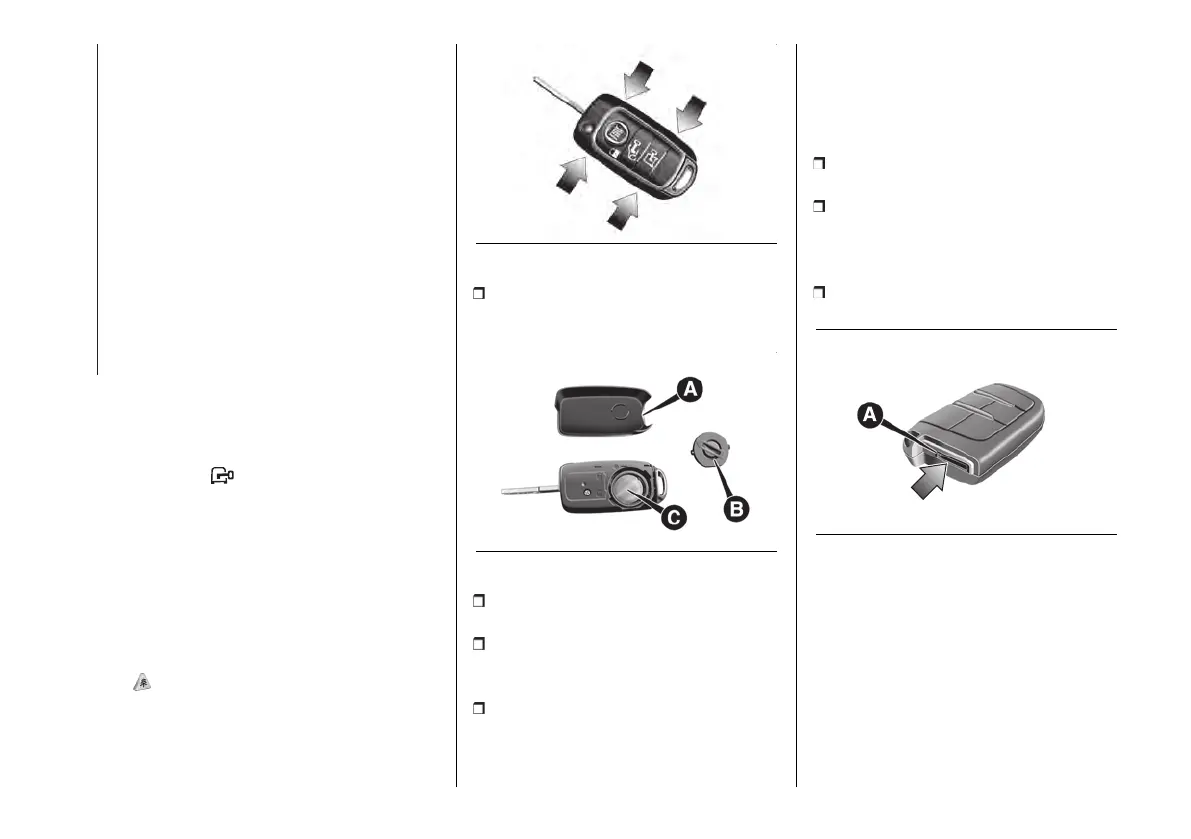
To replace the battery, proceed as
follows:
13 F1A0617
apply a small bit screwdriver to the
points indicated by the arrows fig. 13
then remove the rear casing (A) fig. 14;
14 F1B0010C
use a coin to turn inspection flap (B)
anticlockwise and remove it;
replace battery (C) with a new one of
the same specifications, respecting its
polarity;
refit flap (B) turning it clockwise, then
re-close the rear casing by pressing
gently and making sure it is correctly
locked.
REPLACING THE
ELECTRONIC KEY
BATTERY
To replace the battery, proceed as
follows:
extract the metal insert in the
electronic key (see description above);
gently inserting the flat part of the
screwdriver supplied with the vehicle
into the seat (A) fig. 15 of the key to
open it in two parts;
remove the battery (B) fig. 16
(CR2032 type);
15 F1A0735












 To Next Page