89
153 F1A0637
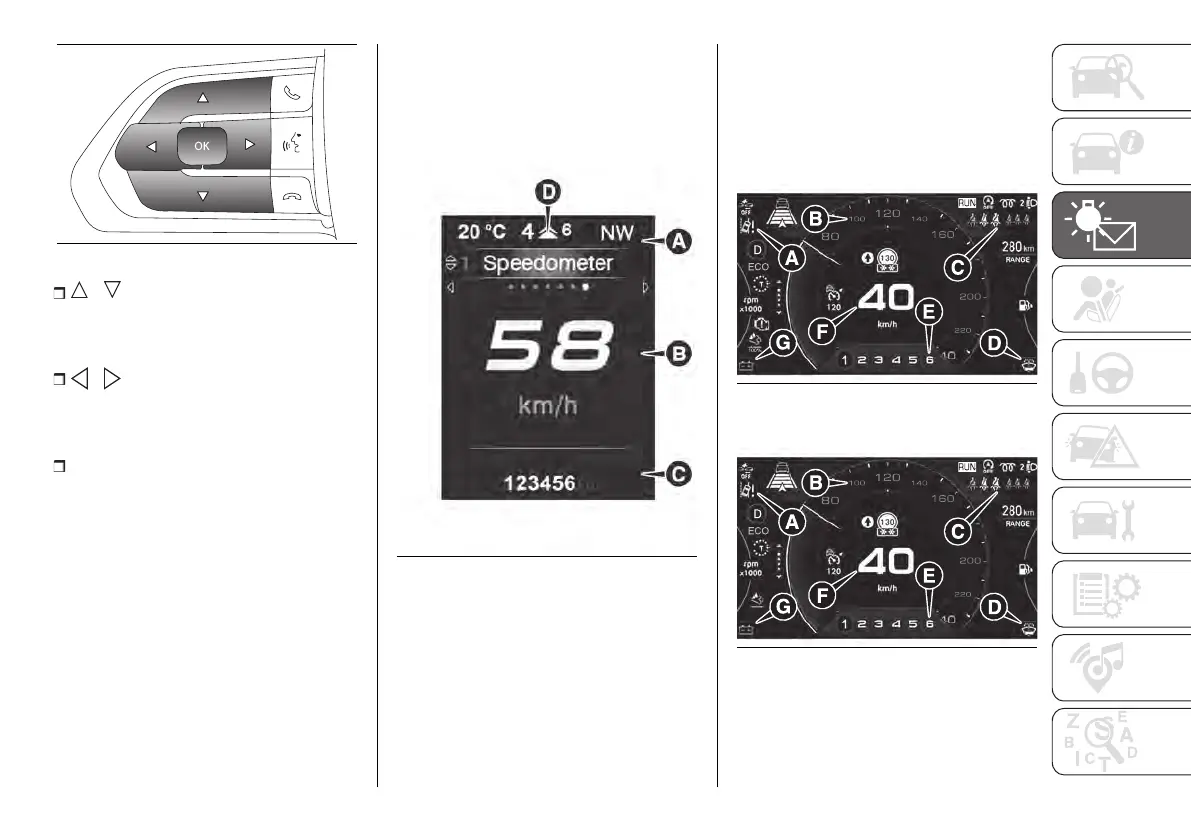
/ : press and release the
buttons to access the Main menu and
to scroll the menu and the submenus
upwards or downwards.
/ : press and release the
buttons to access the information
screens or the submenus of an item of
the Main menu.
OK: press this button to
access/select the info displays or the
submenus of an item of the Main
menu. Hold the button pressed for 1
second to reset the displayed/selected
functions.
3.5” DISPLAY
The display fig. 154 will show the
following information:
A Headlight alignment position,
indication of the gear engaged,
outside temperature, compass (where
provided), date
B Vehicle speed, warning
messages/any failure warnings
C Total kilometres (or miles) run and
symbols of any failure indications
D Gear shift indication (GSI).
154 F1A0770
7” DISPLAY
The display fig. 155 and fig. 156 will
show the following information:
A Driving assistance device indications
B Multi-function dial indicator:
speedometer and driver assistance
system indication
C Seat belt status indication
D Yellow symbols
E GSI indications - reconfigurable area
F Speedometer and driving assistance
device indications
G Red symbols
Heavy Duty Version
155 F1A0654
Light Duty Version
156 F1A0657
DISPLAY SCREENS
You can navigate through the following
main and detail screens using the
controls on the steering wheel:












 To Next Page