IN CASE OF EMERGENCY
234
remove the protective rubber cover
(A) fig. 266;
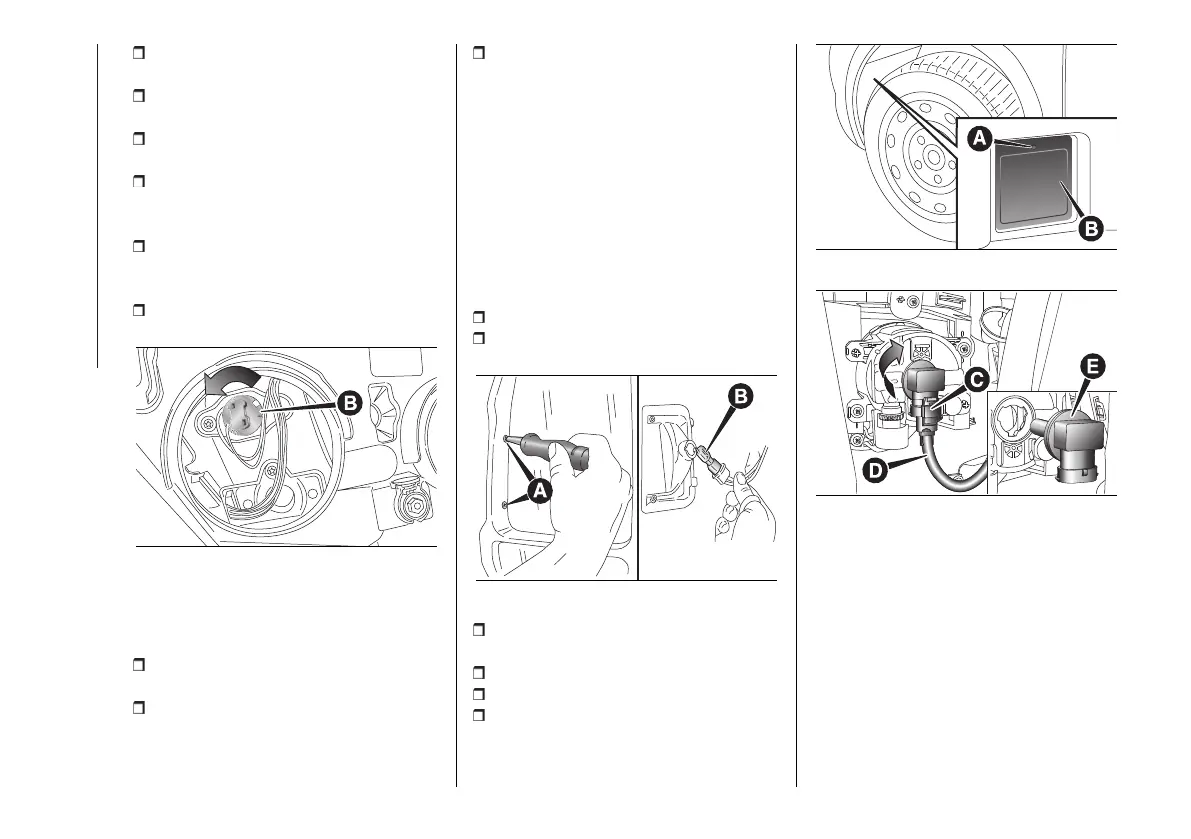
turn the bulb holder (B) fig. 270
anticlockwise;
extract the bulb by pulling and
replace it;
remove the bulb by pushing it slightly
and turning it anticlockwise (bayonet
mount);
refit the bulb holder (B) by turning it
clockwise and making sure that it locks
correctly;
refit the protective rubber cover (A)
fig. 266.
270 F1A0317
Side
To change the bulb, proceed as follows
fig. 271:
move the mirror manually to permit
access to the two fixing screws (A);
using the Phillips screwdriver
provided, undo the screws and extract
the bulb holder assembly, releasing it
from the teeth;
undo the bulb and replace bulb (B),
turning it anticlockwise.
VERSIONS WITH LED
LIGHTS
(for versions/markets, where provided)
For replacing these bulbs, contact a
Fiat Dealership.
FOG LIGHTS
(for versions/markets, where provided)
To replace the front fog light bulbs,
proceed as follows:
steer the wheel completely inwards;
undo the screw (A) and remove the
flap (B) fig. 272;
271 F1A0195
adjust the clip (C) fig. 273 and
disconnect the electrical connector (D);
turn and remove the bulb holder (E);
release the bulb and replace it;
refit the new bulb and carry out the
procedure described previously in
reverse.
272 F1A0361
273 F1A0362
REAR LIGHT CLUSTERS
The bulbs are arranged inside the light
cluster as follows fig. 274:
(A) brake/side lights
(B) sidelights
(C) Direction indicators
(D) reversing lights
(E) rear fog lights
To change the bulb, proceed as follows
fig. 275, fig. 276:












 To Next Page