71
COMPARTMENT
BENEATH PASSENGER
SIDE FRONT SEAT
Proceed as follows to use the
compartment:
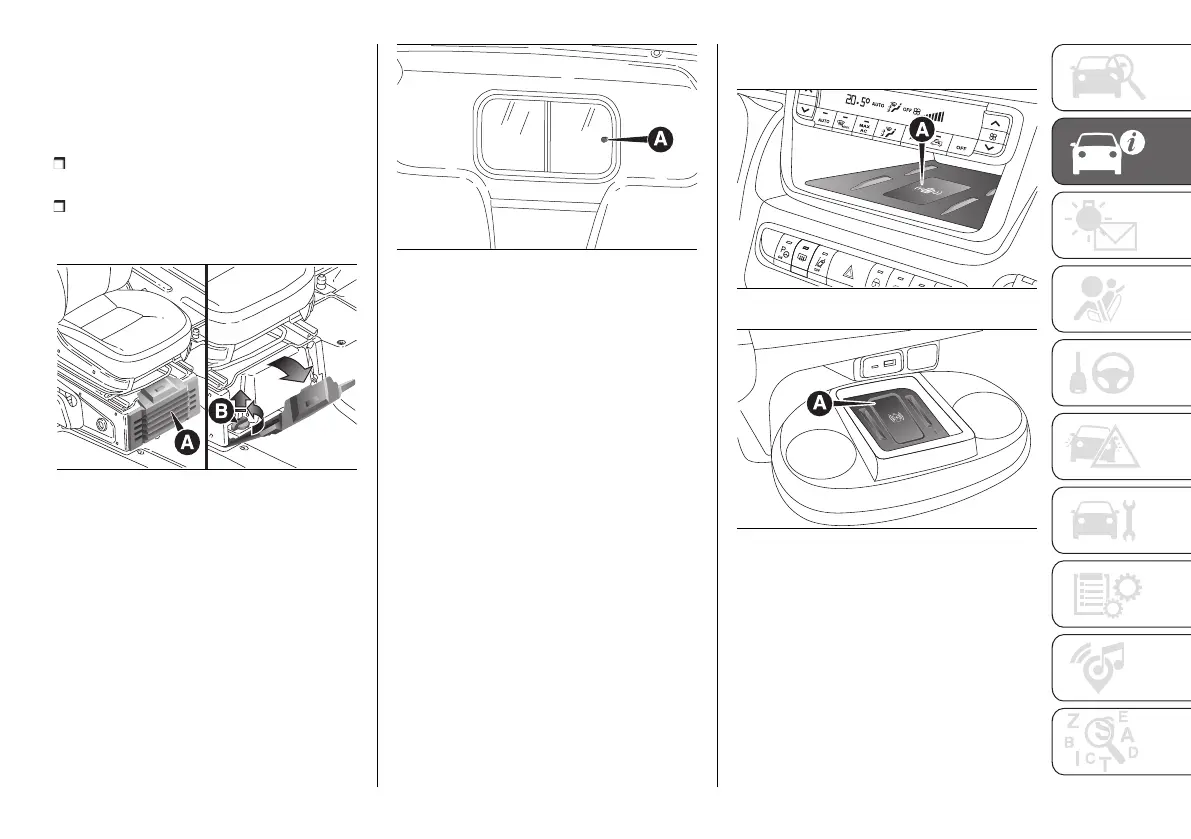
Open the flap (A) fig. 123 and remove
it as shown;
turn the lock knob (B) anticlockwise
and remove it to allow the
compartment to be removed.
123 F1A0095
REAR BULKHEAD
The vehicle may be equipped with
a solid rear partition or with a sliding
glass partition.
To open/close the sliding glass
partition, use the knob (A) fig. 124.
124 F1A0096
Certain outfits are equipped with a
protective grille on the window of the
partition inside the load compartment.
WIRELESS CHARGING
SYSTEM– WCPM
(Wireless Charge Pad
Module)
(where provided)
The wireless charging system is
activated automatically when a
mobile phone is placed in the holder
in the glovebox (A) in fig. 125 or in
the compartment between the two
cup holders at (A) in fig. 126, if the
mobile phone is compatible with the
Qi
®
standard.
NOTE The wireless charger device
is equipped with an NFC antenna
and therefore the "Apple Pay Wallet"
function could be activated on iPhone
phones: this will not involve any
economic transaction or interruption of
charge.
125 F1A0627
126 F1A0685
If the mobile phone is removed from
the housing during the wireless
charging phase, this will automatically
be interrupted.
The wireless charging system is
enabled when the vehicle is in running
condition and the vehicle battery is
sufficiently charged.
By interacting with the wireless charger
system and placing the mobile phone












 To Next Page