STARTING AND DRIVING
198
The system allows the vehicle to be
held at the desired speed without
needing to press the accelerator. It also
allows holding the distance set by the
driver from the vehicle ahead.
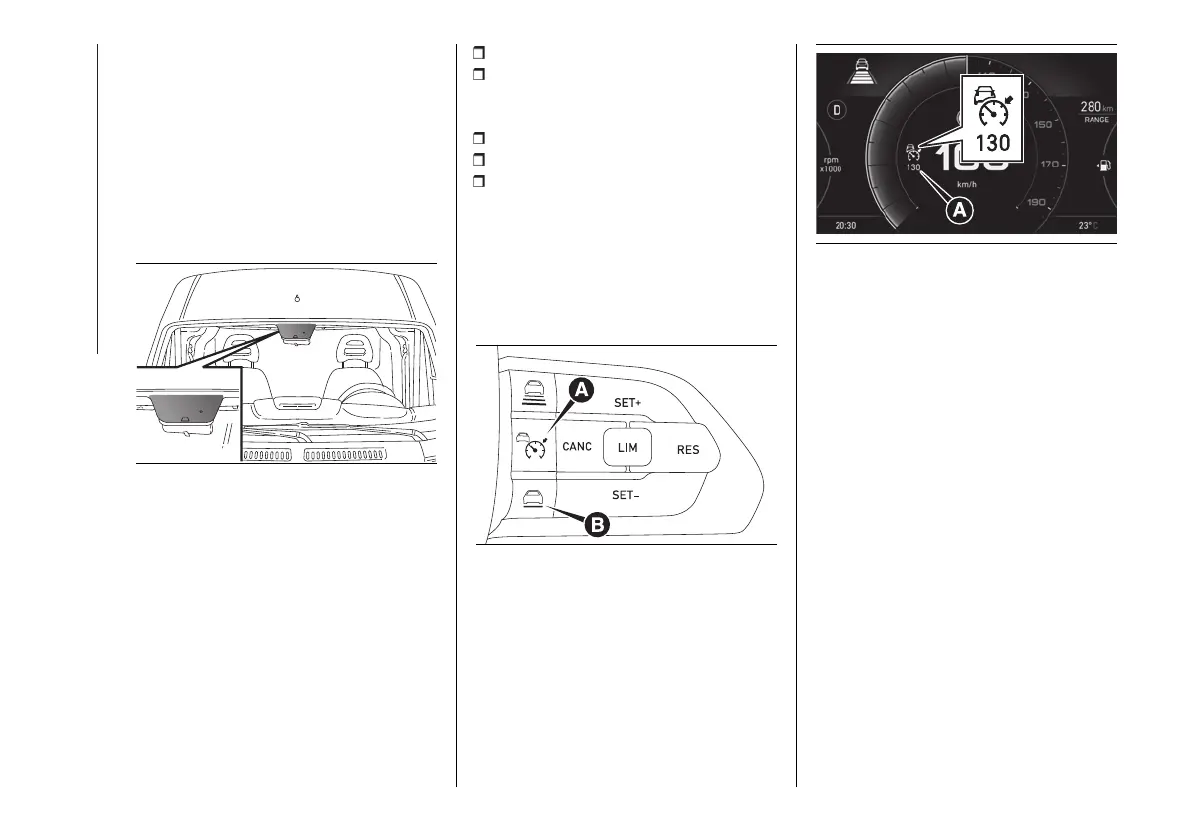
The system uses a radar sensor,
located behind the front bumper and a
camera, located in the middle area of
the windscreen fig. 236, to detect the
presence of a vehicle close ahead.
236 F1A0998
WARNINGS
If the sensor does not detect any
vehicle ahead, the device will maintain
a fixed set speed.
If the sensor detects a vehicle ahead,
the device automatically intervenes
by braking (or accelerating) slightly in
order not to exceed the original set
speed, so that the vehicle keeps the
preset distance, seeking to adapt to
the speed of the vehicle ahead.
It is advisable to turn the device off in
the following cases:
driving in fog, heavy rain, snow;
driving near a bend (winding roads),
icy, snowy, slippery roads or with steep
slopes and descents;
entering a turn lane or on a slip road;
towing a trailer;
when circumstances do not allow
safe driving at a constant speed.
ACTIVATION /
DEACTIVATION
Activation
To activate the device, press and
release the button (A) fig. 237.
237 F1A0734
With the system enabled and ready for
operation, the display shows a graphic
indicating the "readiness" of the system
(A) fig. 238.
238 F1A0739
WARNING It is dangerous to leave
the device activated when it is not
used. There is a risk of inadvertently
activating it and losing control of the
vehicle due to unexpected excessive
speed.
Deactivation
With the device active, to deactivate
it press and release the button (A)
fig. 237.
SETTING THE DESIRED
SPEED
The device can only be set with the
speed over 0 km/h (0 mph) and under
130 km/h (81 mph).
When vehicle reaches the desired
speed, press and release the button
SET + or SET - to set the speed to the
current speed. The display will show
the set speed. Then take your foot
off the accelerator pedal. Press the












 To Next Page