58
4
Movie Recording and Playback
Vlog
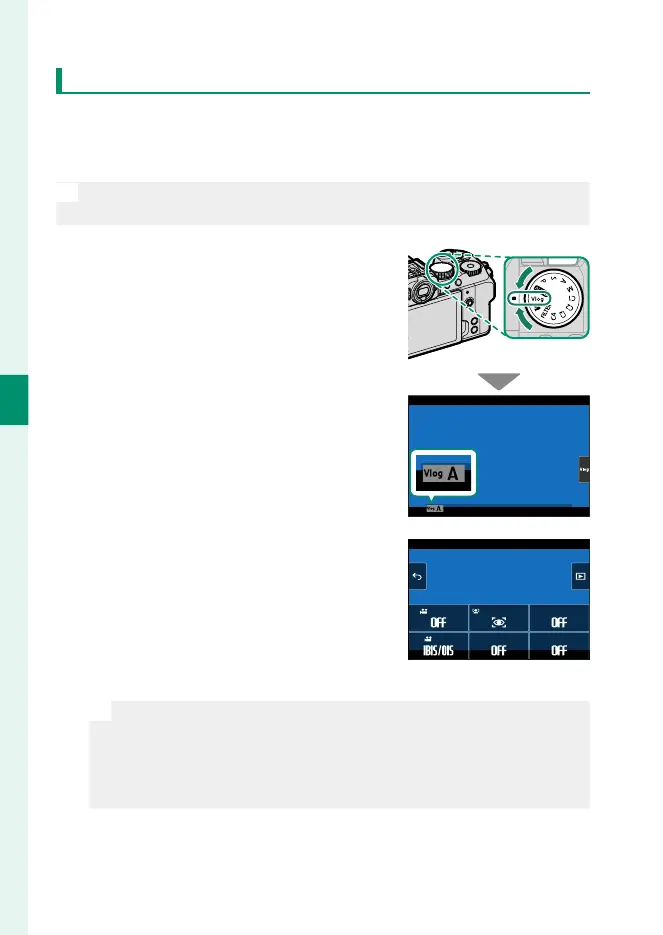
When the mode dial is rotated to Vlog, the shutter button can be
used to record movies at settings appropriate for vlogs (video
blogs). Settings can be adjusted using touch controls.
N
Settings for Vlog mode are stored separately from those used when
movies are recorded in F mode or via the t (movie) button.
1
Rotate the mode dial to Vlog.
Vlog will appear in the display.
To view shooting settings, tap the
h button.
•
Tap i to return to the shooting
display.
•
To exit to full-frame playback, tap
j (P 64).
FACE/EYE DETECTION SETTING
PRODUCT PRIORITY MODE
BACKGROUND DEFOCUS MODE
HIGH SPEED REC
SELF-TIMER
IS MODE
N
•
Selecting ON for BACKGROUND DEFOCUS MODE xes aper-
ture at the widest value for the lens.
•
To maintain focus on an object in the foreground, as for exam-
ple when lming a product review, select ON for PRODUCT
PRIORITY MODE.













 To Next Page