NO
JUMPER
Protocol Pins
JUMPER
PEC
GILBARCO
Protocol Pins
INSTALLATION
33
PULSE Installaon, Commissioning and Servicing Manual - Revision 19
9.4 Forecourt Communications
The Forecourt Controller must be compatible with one of the following forecourt
communication protocols:
1. PEC Pump Communication Protocol Document.
2. Gilbarco Australia Two-Wire Pump Protocol Specification.
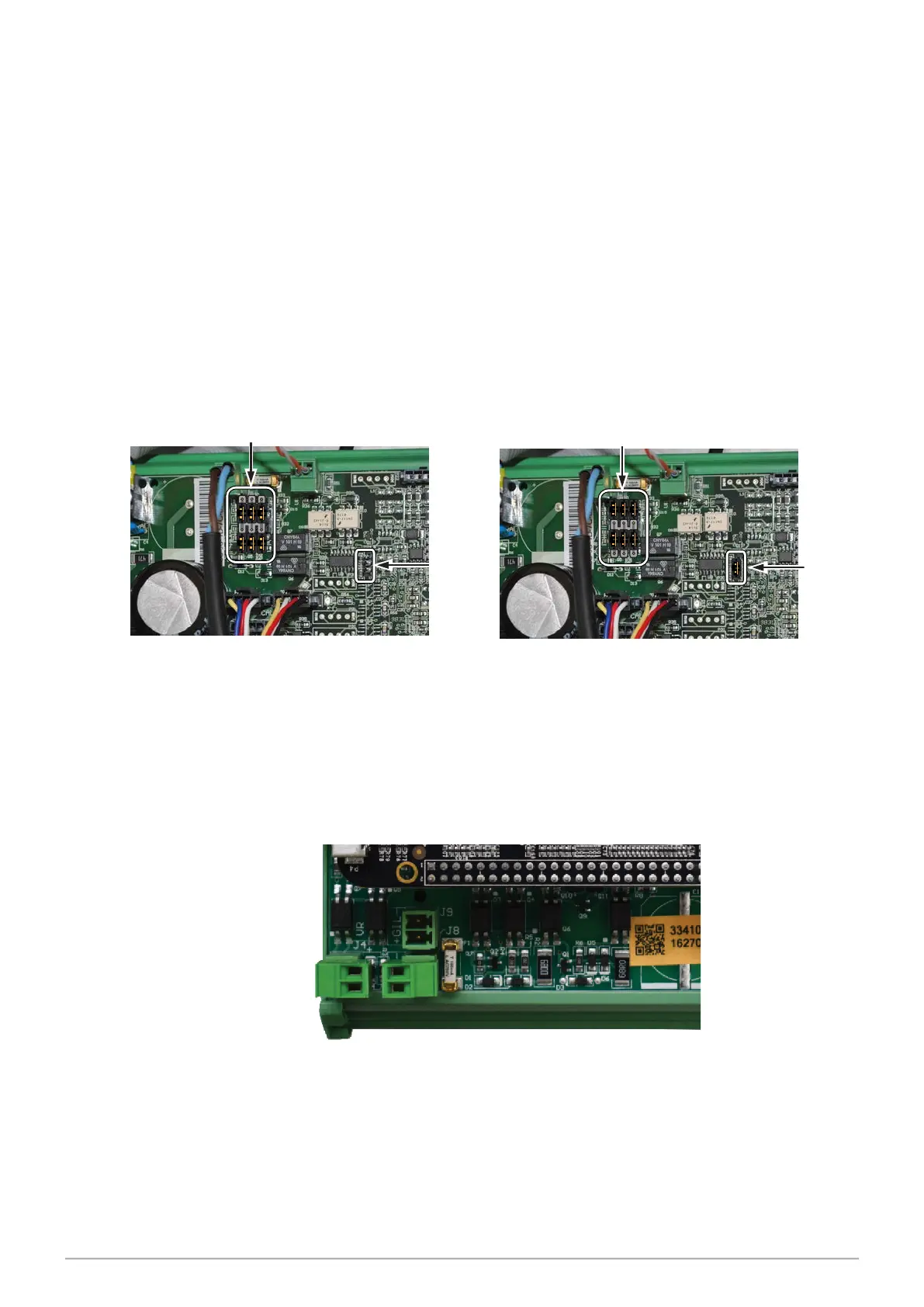
The location of the protocol pins and their settings for PEC and Gilbarco protocols are
shown in the illustrations below.
NOTE that the Gilbarco setting has an additional jumper which must be removed for
the PEC protocol.
The configuration file within the dispenser must match the protocol. Contact
Gallagher if this requires changing.
Figure 10. Location and Positioning of Protocol Pins
9.4.1 Central Controller DCE
The Data Centre Enabled (DCE) Central Controller does not require jumpers. Plug into the
top for Gilbarco or bottom for PEC and set the protocol in the Service Menu.
Figure 11. Central Controller DCE
GilbarcoGilbarco
PECPEC


 To Next Page