INSTALLATION
43
PULSE Installaon, Commissioning and Servicing Manual - Revision 19
3. Prepare for a test delivery by lifting the nozzle but do not commence delivering
fuel.
4. Press and release the Calibration Switch (SW1) on the Encoder PCB. This will be
registered by a 5 flash blink sequence performed by the LED, followed by a single
flash once per second. The encoder is now in calibration mode.
5. Fill the vessel to the calibration mark (Do not hang up the nozzle).
6. Press and release the Calibration Switch (SW1) again. If the recorded delivery
volume was within the expected range, then there will be an immediate short blink
sequence of a length related to the recorded error from the nominal for the vessel
(no flash if the error is zero). This will be followed 1.5 seconds later by a 5 flash
blink sequence to indicate successful completion of the calibration process.
7. If the recorded delivery volume was outside of the expected range, then there
will be a 25 flash blink sequence to indicate an unsuccessful calibration run. The
encoder calibration will then be restored to its previous (accurate) state in this
case.
8. Hang up the hose nozzle.
9. Re-fill the test vessel to confirm a successful calibration run.
10. Replace the encoder cover by refitting the three M4 nuts. Provision is made for a
locking wire with lead seal.
6.4 Calibration Procedure for Blending Units
The procedure for calibrating the various grades of a blending unit is as follows:
Grade 1 98 Nomal procedure
Grade 2 95 No calibration possible
Grade 3 91 Normal procedure
Grade 4 Diesel Normal procedure
If Grade 2 is out of the acceptable toerance, recalibrate Grades 1 and 3.
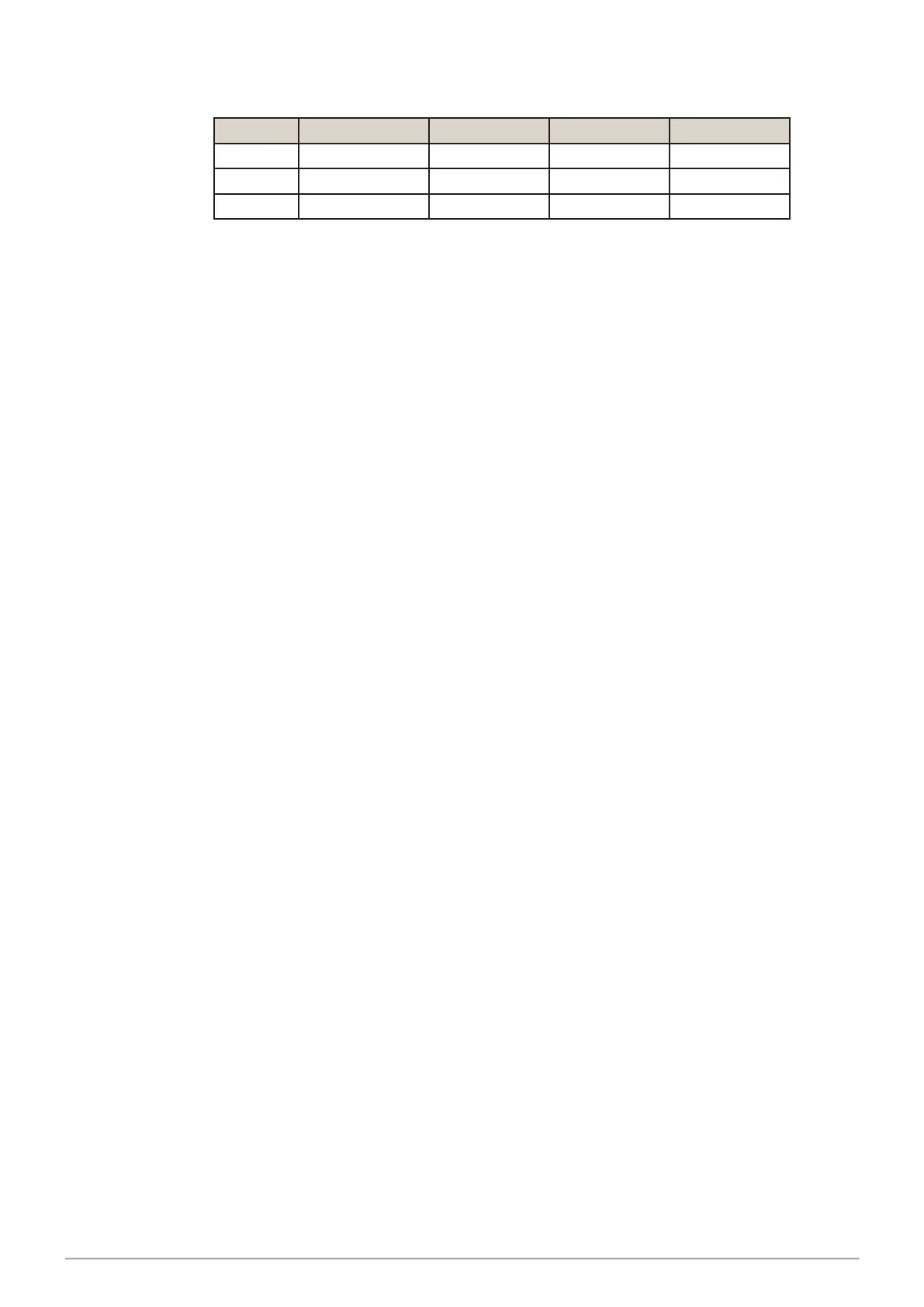
Volume SW2.1 SW2.2 SW2.3 SW2.4
220 Litre Off Off Off Off
200 Litre Off On Off Off
100 Litre Off Off On Off
Table 1. Encoder SW2 DIP-Switch settings
2. Select the calibration vessel volume using SW2 DIP-switches 2, 3 & 4.


 To Next Page