SERVICING
77
PULSE Installaon, Commissioning and Servicing Manual - Revision 19
12.8 Errors - ERRORS
The ERROR function displays the numbers and types of fatal errors that have occurred
since the error log was last cleared. The errors are displayed for each fuelpoint.
A PULSE dispenser logs all errors to the SD Card (even those that have been cleared) in a
form that is not easily read. Gallagher Technical Support can interpret dispenser logs and
provide a more detailed description of errors.
$
L
$
L
$
L
$
L
$
L
$
L
1.
2.
5.
6.
4.
3.
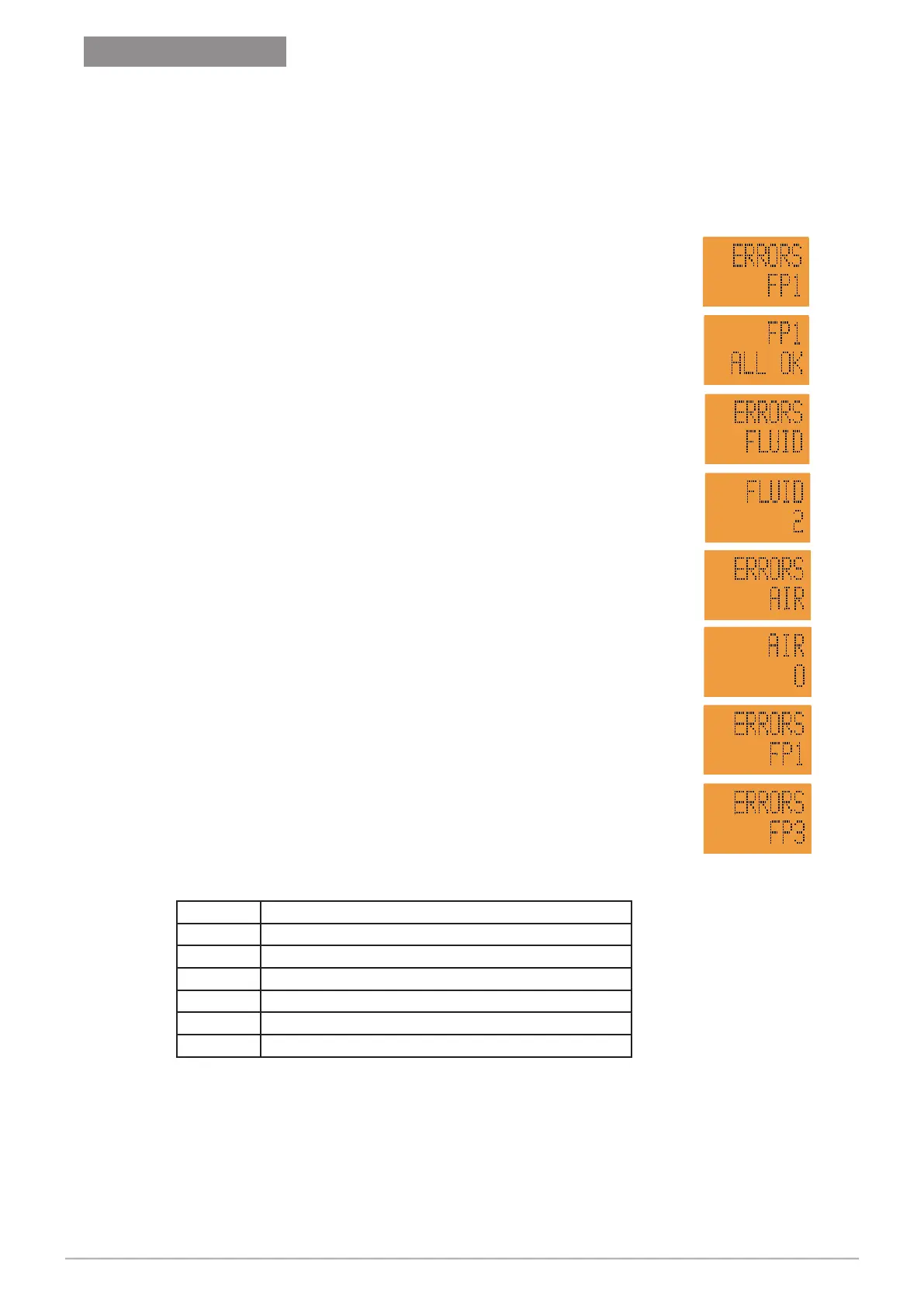
In Service Mode, scroll to ERRORS FP1 (1)
Press
5
view the current error status of the fuelpoint. (2)
ALL OK
= dispenser is not currently in an error state.
ERROR = dispenser is currently in an error state.
Press
5
to exit.
Press
F
and use
4
or
6
to scroll through specific errors.
FLUID, POS, ENCODER, AIR, ERRO5, ERRO6, etc (3)
Press
5
to view number of instances of each type of error
(since last cleared). (4)
Press
5
to exit.
Press
6
to scroll to the next error type. (5)
Press
5
to view number of instances of each type of error
(since last cleared). (6)
Press
5
to exit.
To clear an error press
0
, then
0
again.
Press
4
to return to the initial ERRORS screen. (7)
Press
4
or
6
to move to another Fuel Point. (8)
$
L
7.
8.
$
L
Interpreting Error Codes
Name Meaning
FLUID The oat switch has been acvated
POS Communicaons have been lost for an extended period
ENCODER Encoder operaon outside normal parameters
AIR Air sensor switch has been acvated
ERROR 5 Not used
ERROR 6 Not used
FATAL ERRORS require the dispenser to be repowered to clear the error. If the error
persists some action will be required to address the cause.
NON-FATAL ERRORS are cleared by lifting and rehanging a nozzle. These errors are not
displayed using the method outlined previously. Non-fatal errors are recorded to the SD
Card.
C
Version 1.11


 To Next Page