64 65
IIDTool
GAP Diagnostic 2023-09-12 All Rights Reserved
User Manual G3 units : Version 37, Firmware V4.0
2.9.6 Permissions
Purpose
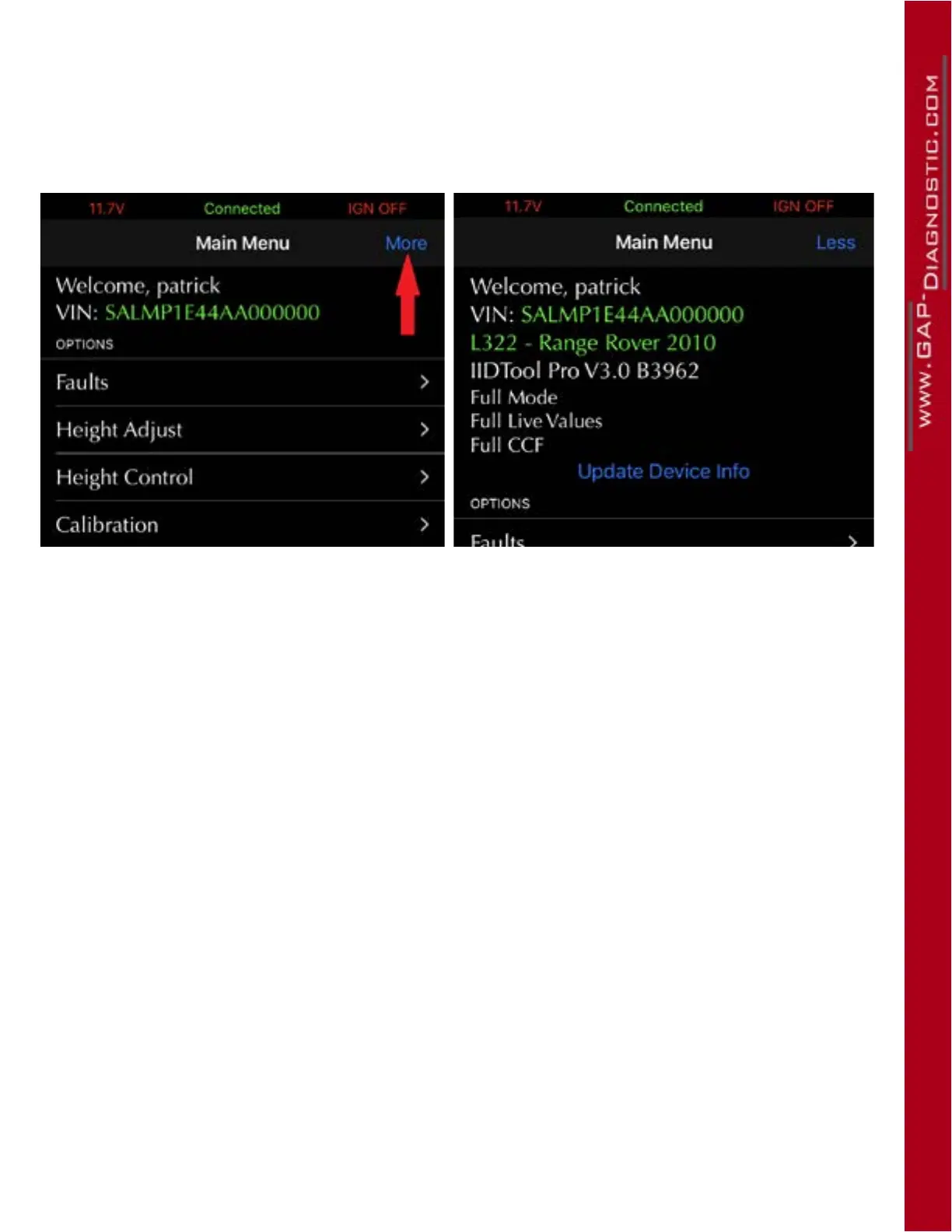
Indicates which permissions are available when a tool is connected to a specic vehicle. Click on the
More button located on the top bar to show permissions.
Figure 35. Viewing permission example
Denitions
• Limited Mode/Full Mode: Limited Mode gives access to Diagnostic functions while Full Mode
also allows usage of Advanced programming functions, see section 1.4.2.
• Full Live Values: This allows viewing tested and untested live values, section 4.8
• Full CCF: This allows viewing and editing of tested and untested CCF settings, section 4.10
Updating permission
• From Limited Mode to Full Mode: This requires the tool to be activated as per section 2.9 or
an additional licence to be added for a specic car section 2.9.5.
• Full Live Values: This is available without any intervention. The tool may not oer Full Live
Values for all supported vehicles. In which case, the Untested list will be empty,
• Full CCF: This is available upon request. The tool may not oer Full CCF for all supported vehi-
cles. In which case, the Untested list will be empty.
If changes were made, simply click on the Update Device Info button.



 To Next Page