92
IIDTool
GAP Diagnostic 2023-09-12 All Rights Reserved
User Manual G3 units: Version 37, Firmware V4.0
4.5 Function “ Height Control ” (L319, L320, L322, L405, L494, L460, L461, L462.
L560, L663)
4.5.1 Denition
This function changes the current height mode (Normal, O-Road or Access). An additional option for
lowering the rear axle down to the bump stops is also available.
4.5.2 Buttons description
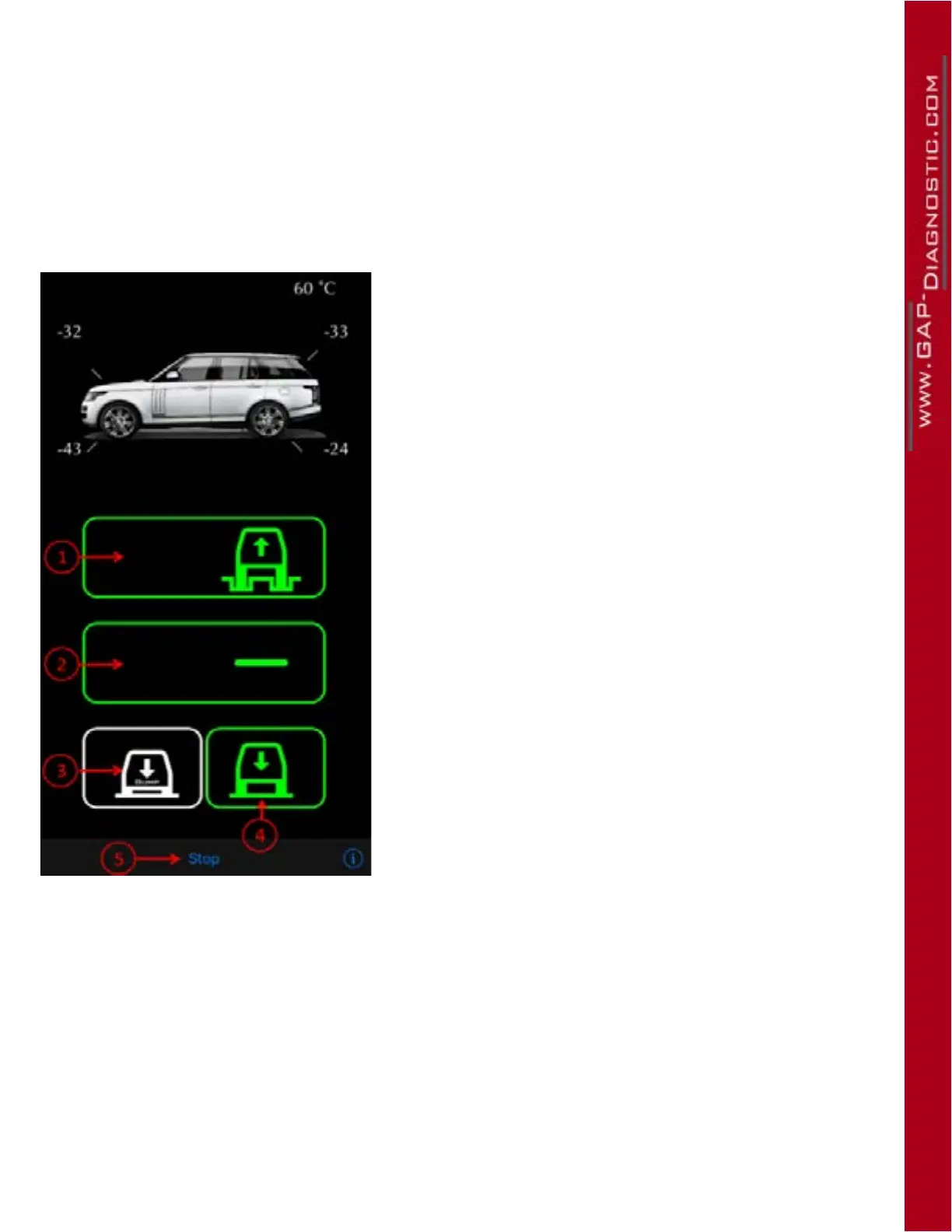
Figure 50. Height Control
Buttons :
1- O-Road Height
2- Normal Height
3- Lower both axles to the bump stops
4- Access Height
5- Stop/Exit the function
Colours :
• White -
>
Current position
• Green -
>
Possible positions
• Flashing White and Red -
>
Height change in progress
• Red -
>
Overheat condition (see below)
Current heights: are displayed on each wheel around the
vehicle.
Compressor temperature: indicated at top right
When the compressor is overheating, the selected mode will be red. Once the compressor cools down,
the system will resume service to complete the current operation. The compressor temperature is
shown at top right.
WARNING: If the vehicle is tted with non-standard wheels and/or tires (or tyres), using the
lowering to bump function may cause a clearance issue. Tires may come in contact with wheel
arch or other. Make sure no object are present under the car.



 To Next Page