ZP3 Fire Control Panel Installation, Commissioning and Maintenance Manual
Page 8 REV 11 (ISS 08/03/2010)
Panel overview
Display and controls
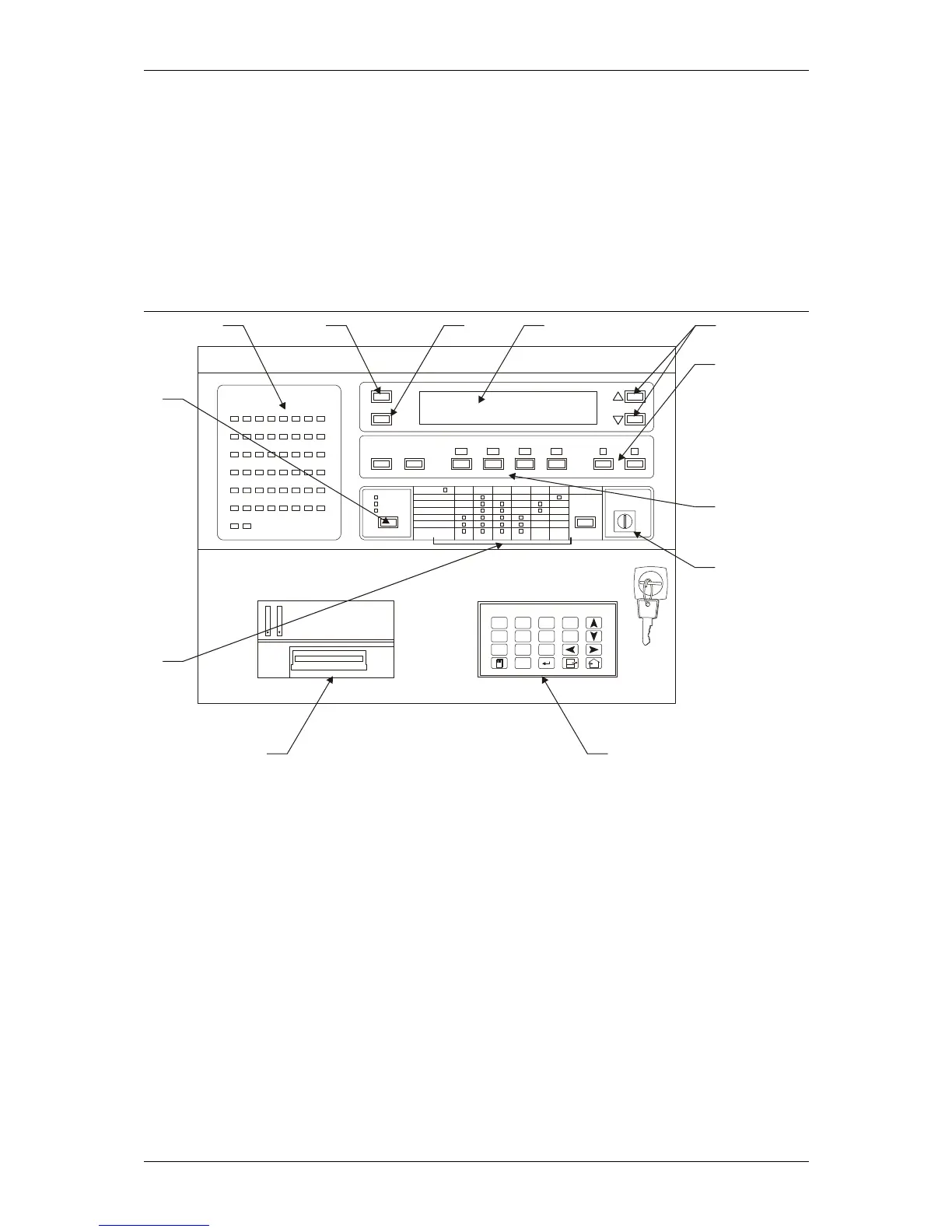
The fascia of the ZP3 fire panel has the necessary indicator lamps, text display screen, controls,
menu keyboard, and printer to provide the operator with the status of the system at all times. It
also has a reporting system for alarms, faults, and other events. Figure 3 shows the main features
of the front panel.
Figure 3: ZP3 Fire control panel - main features
LOCAL ZONES
1
9
17
25
33
41
49
2
10
18
26
34
42
50
3
11
19
27
35
43
4
12
20
28
36
44
5
13
21
29
37
45
6
14
22
30
38
46
7
15
23
31
39
47
8
16
24
32
40
48
ZP3 FIRE ALARM SYSTEM
HELP
ACCEPT
MUTE
BUZZER
RESET FIRE FAULT DISABLED OTHER
SILENCE
ALARMS
SOUND
ALARMS
MORE
VIEW
POINTS
DISABLED
DELAYED PRE-ALM TEST ENABLE
CONTROL
ON
OFF
FAULTACTIVEPOWER ON
SYSTEMNIGHT
ZONEDAY
POINTMORE TIME
SOUNDERS
REMOTE ALARM
CONTROL OUTPUTS
RESTORE
DISABLED
ALARMS
1
ABC
2
DEF
3
GHI
F1
F2
4
JKL
7
STU
8
VWX
0
[ ]
9
YZ
5
MNO
6
PQR
ESC
2351-02
12 34 5
6
7
8
910
11
12
ZI TON FIRE SYSTEM
Mon 01/01/2008 12:00
Legend:
Item Description Item Description
1 Zone fire indicator 7 View buttons
2 Help key 8 Access control
3 Views devices key 9 Keypad
4 Text display 10 Printer
5 Scroll buttons 11 Status indicators
6 Sounder control keys 12 Day/night module
The display of information is designed to comply with the requirements of EN54-2. In addition to
alarms and events being reported on the text screen, they are also indicated on zone lamps
where applicable. Operation of controls is structured by access level, with four levels being
provided. The printer is an optional item.



 To Next Page