ZP3 Fire Control Panel Installation, Commissioning and Maintenance Manual
Page 24 REV 11 (ISS 08/03/2010)
Accessory plate
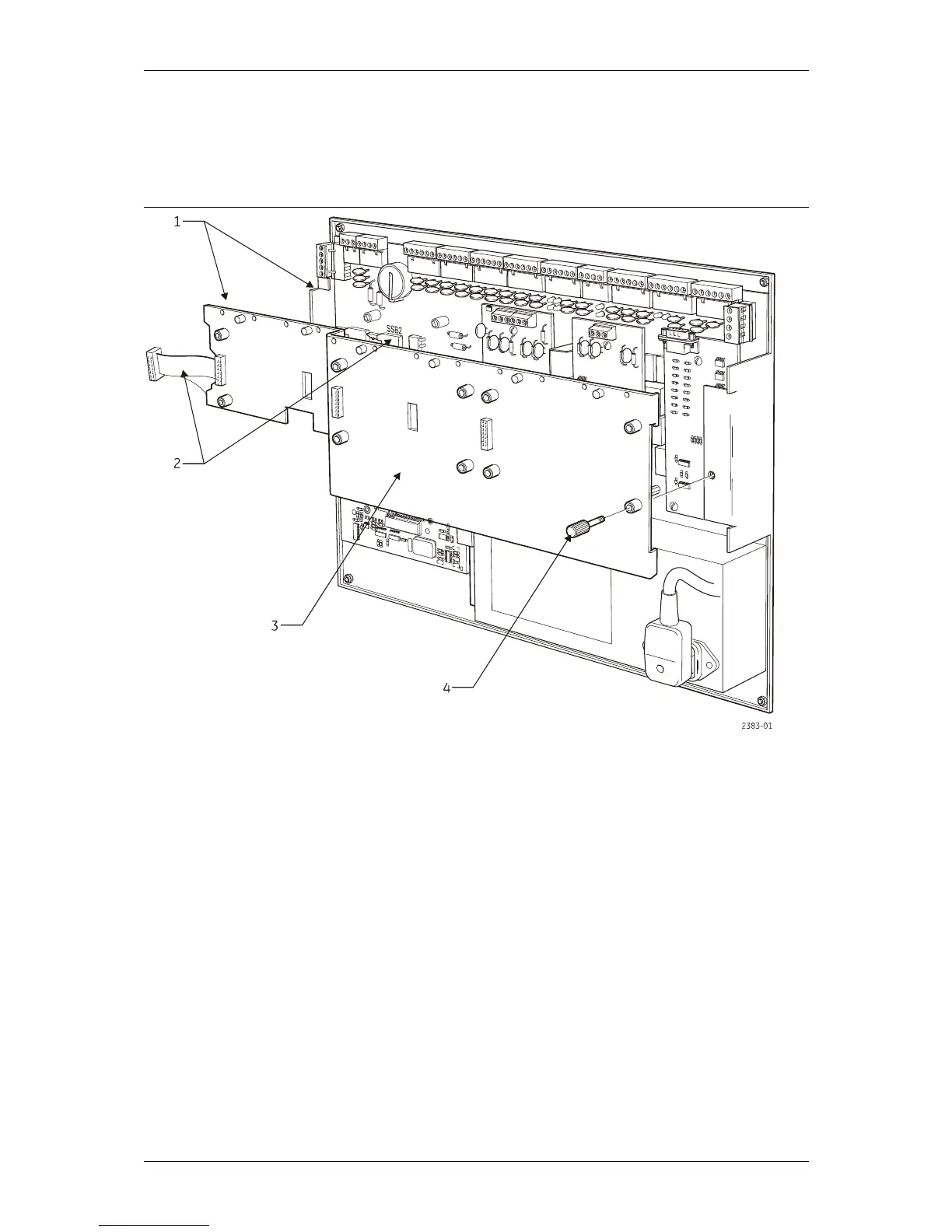
An accessory plate can be installed for the purpose of mounting optional auxiliary boards. The
accessory plate mounts onto the main chassis, as shown in Figure 18.
Figure 18: ZP3 Fire control panel – accessory plate
Legend
Item Description Item Description
1 Chassis located under clips 3 Accessory plate
2 Connect ribbon cable to SSB2 4 Thumb screw
A ribbon cable is fitted to the accessory plate. Connecting the ribbon cable to the socket as
shown in Figure 18 automatically connects all auxiliary boards to the ZP3 main board. The
accessory plate enables easy access to the main board after installation.



 To Next Page