ZP3 Fire Control Panel Installation, Commissioning and Maintenance Manual
Page 46 REV 11 (ISS 08/03/2010)
Power supply
Mains supply
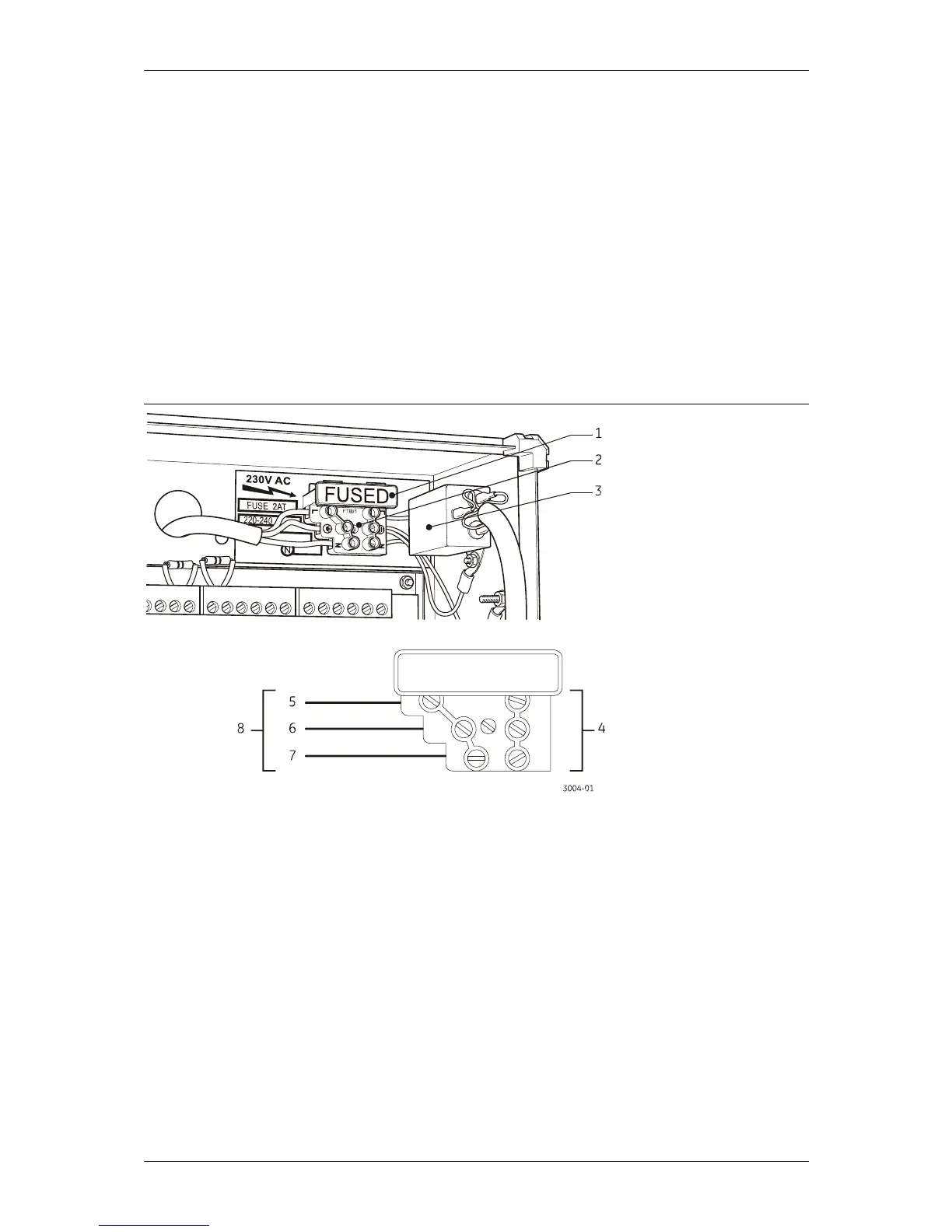
Refer to Figure 38. A terminal block (item 2) is located at the top right hand side of the fire panel
for connecting the mains supply. The terminal block incorporates a fuse holder (item 1) in the live
leg of the supply. A mains filter (item 3) is located next to the mains terminal block, which in turn is
wired to the power supply unit.
The front door of the panel is electrically connected to mains earth via earth straps.
When connecting the mains supply to the panel, make sure that the incoming power is from a
clean source that has a solid earth connection. Connecting the panel to a secure earth is very
important.
Figure 38: Mains power supply connection
Legend:
Item Description Item Description
1 Fuse 5 Live
2 Terminal block 6 Earth
3 Mains filter 7 Neutral
4 Internal connections 8 230 VAC
Make sure that the mains supply wiring is correctly connected. The wiring should be as short as
possible within the panel and should be kept away from Z-loop wiring, data cables, and other low
voltage wiring.



 To Next Page