page | 2
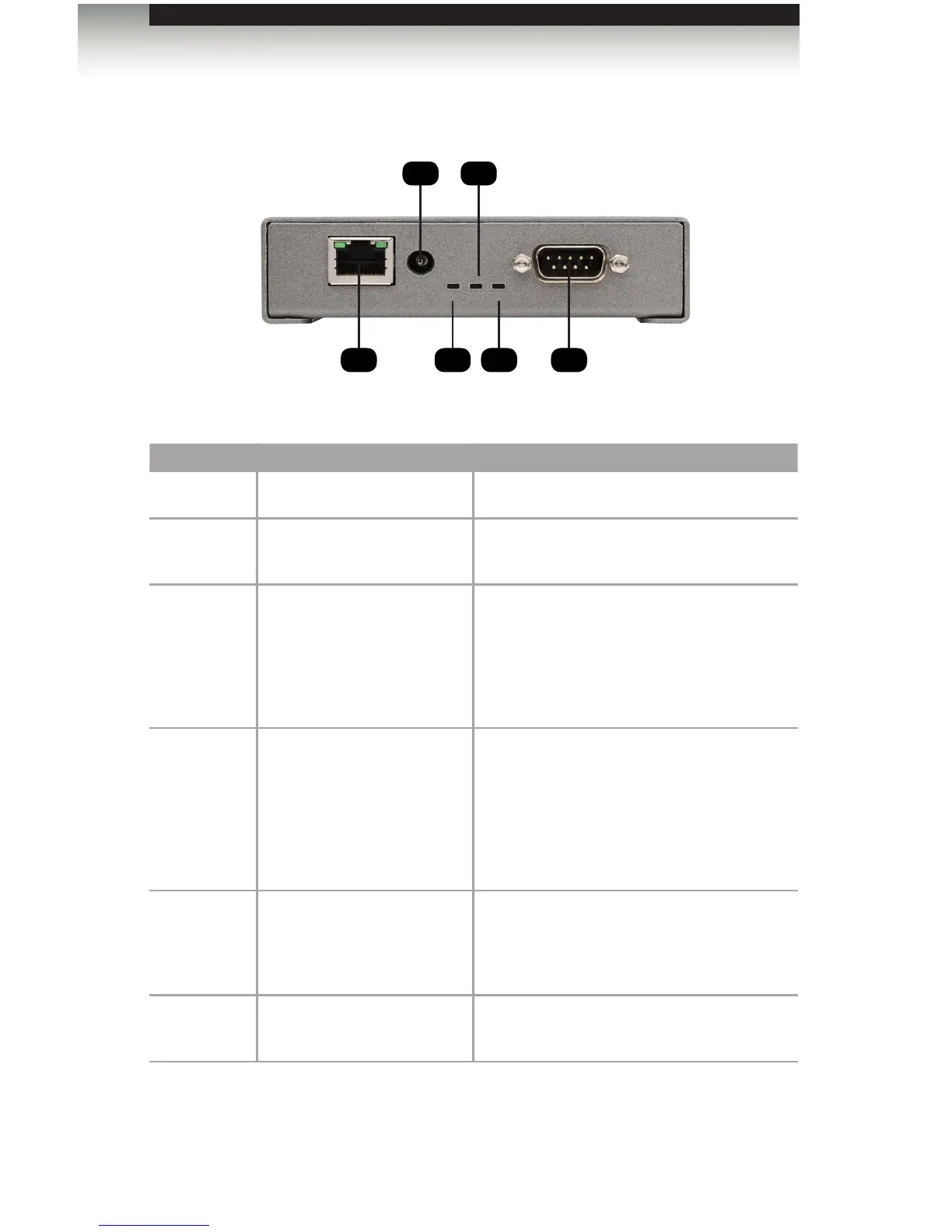
Panel Layout
Left Side
ID Name Description
1 LAN Connect the GAVA to a network.
2 12V Connect the included power supply to this
power receptacle.
3 Controller LED This LED indicator ashes bright green
when the GAVA is operating properly and
when the VPN connection is enabled. When
the VPN is enabled, this indicator ashes
approximately twice every few seconds.
Otherwise, it ashes about once per second.
4 Program LED This LED indicator glows bright green when
the “daemon” (the invisible portion of the
program that runs in the background and
controls the system operation) is running
properly. The HTML5 Server is the “visible”
portion of the program that provides the
Graphical User Interface (GUI).
5 Read LED This LED indicator glows bright green when
the program is being updated and data is
being copied to the internal memory from a
USB port.
6 RS-232 This port can be used to control a device via
bidirectional RS-232 serial control.
61
2 4
3 5
Getting Started



 To Next Page