EasyManua.ls Logo

Gefen EXT-GAVA - GAVA Installation

Gefen EXT-GAVA
192 pages
Print Icon
To Next Page IconTo Next Page
To Previous Page IconTo Previous Page
Loading...
page | 4
Installation
Getting Started
Connecting the GAVA
1. Connect an Ethernet cable between the GAVA and the network.
2. Connect the included 12V DC power supply to the power receptacle on the GAVA.
3. Connect the included AC power cord from the power supply to an available electrical
outlet.
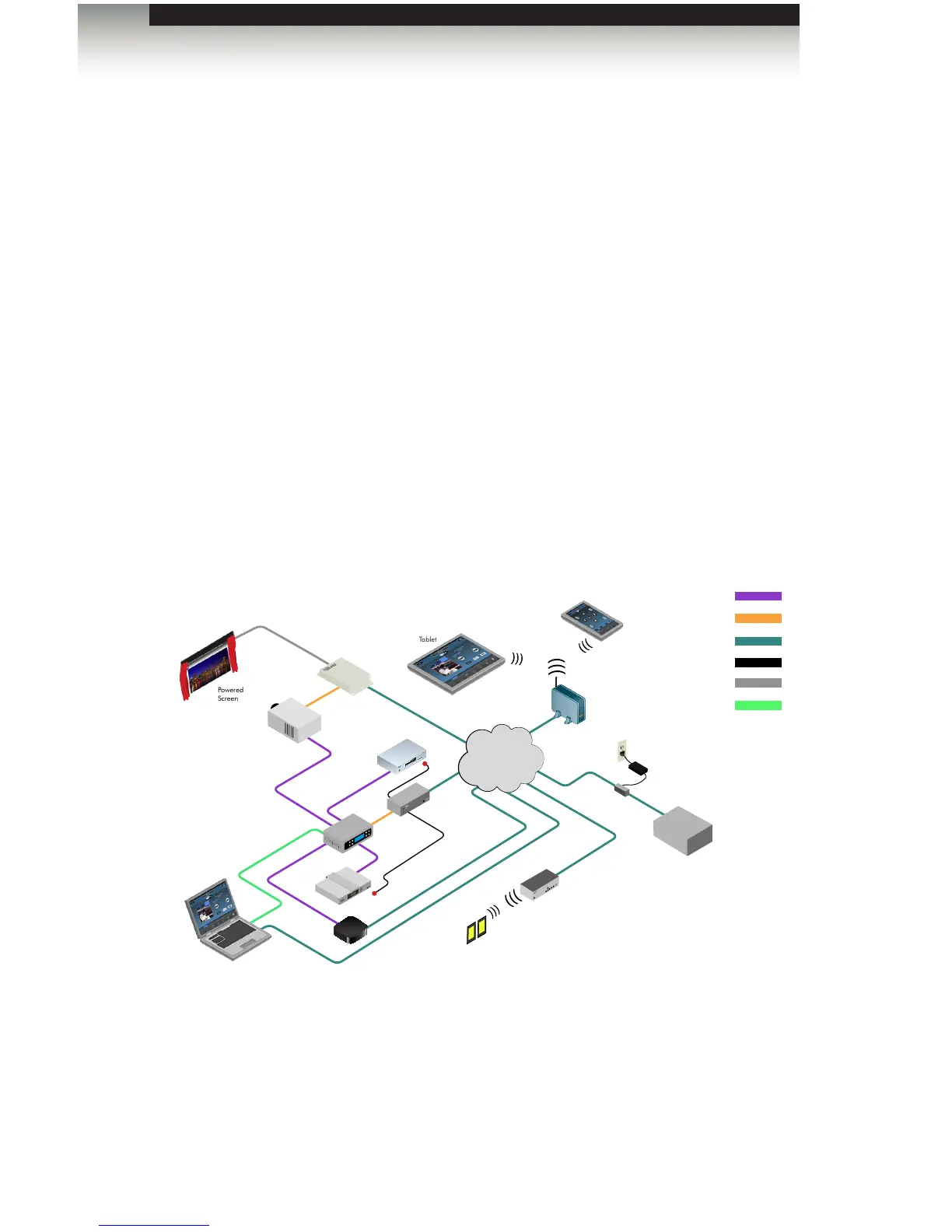
Sample Wiring Diagram
Network
Projector
Powered
Screen
EXT-PACS
Lighting Controller
(Z-Wave or Lutron)
Dimmers
A/V Receiver
(GTV-AUDDEC-N)
GTB-MINI-PACS
Set Top Box
Apple TV 2
Blu-ray Player
EXT-GAVA
(GAVA Control System)
Power Injector
Wireless Access Point
PC or MAC
(For Configuration
and iTunes)
Tablet
Smartphone
IR
RS-232
HDMI
ETHERNET
12V/GND TRIGGERS
AUDIO
GTV-AUDDEC-N

Table of Contents

Related product manuals