page | 82
Adding Rooms
Using the GAVA Wizard
Adding System Sources (Selecting Matrix Inputs)
You can add sources that are available to many or all Rooms through an Audio/Video
Matrix. The procedure is identical to adding a source directly to a Room, except that the
source is added to a Matrix input. The source will appear in every Room that is connected
to the Matrix. When that source is selected, GAVA will automatically switch the Matrix to
the proper input for the source, and select the Matrix Output for that Room.
1. Click ADD NEW... to add more sources to the matrix.
2. Fill in the information under each tab, as required.
3. When all sources have been added, click the Back to main menu tab in the lower-left
portion of the screen to return to the Rooms tab. The Rooms tab will now display the
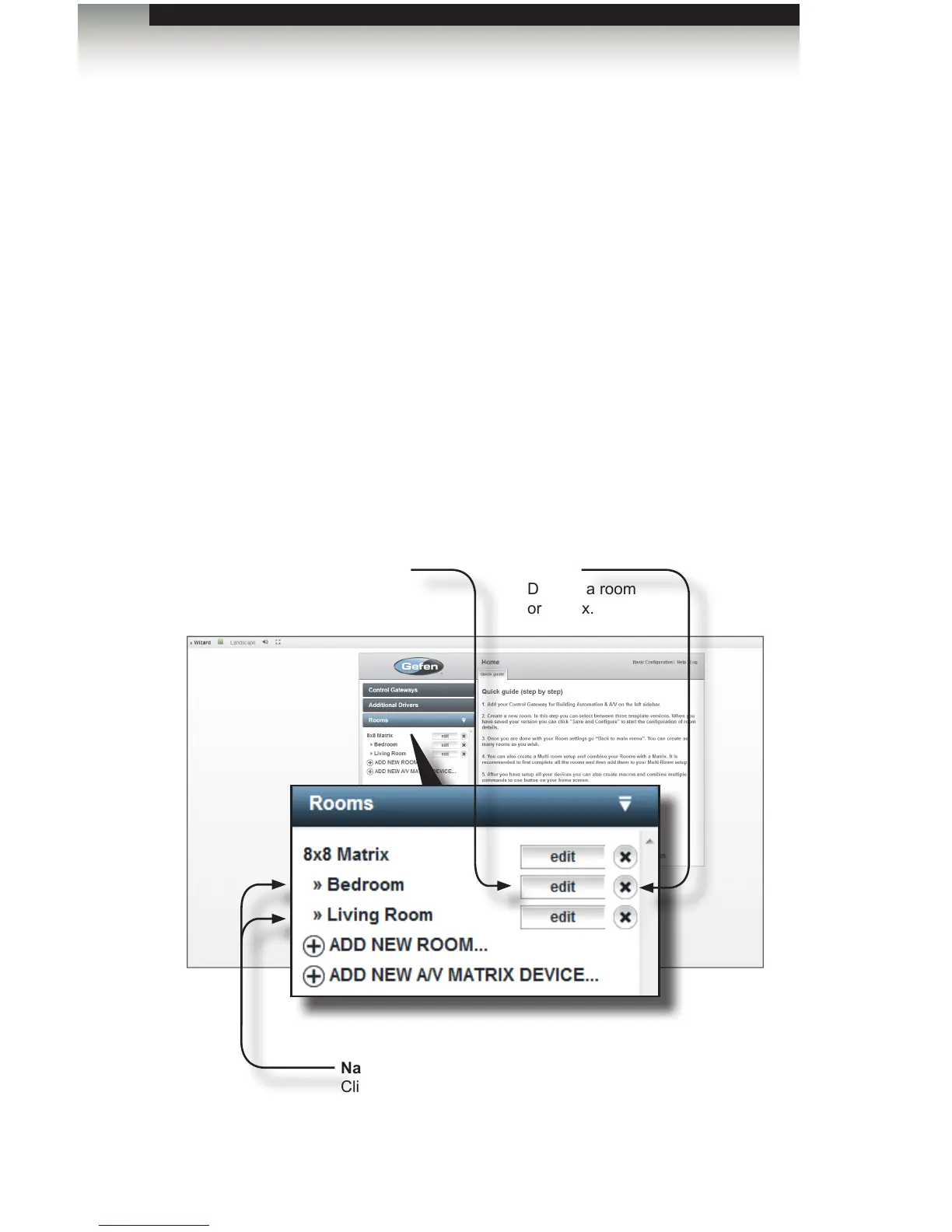
system hierarchy in relation to the matrix. In the example below, the Bedroom and
Living Room are highlighted and indented to indicate that they are connected to the
matrix.
4. Click the Finish Project tab to proceed to the Views tab.
edit
Click to change the name
of the room or matrix.
Name
Click on the name of the room
or matrix to edit / add / delete
devices.
Delete
Deletes a room
or matrix.



 To Next Page