11
3rd Wave User Manual
Working with Multi-Parts
To change which active parts you are editing:
• Hold down the mode button and and press any Part button that is
solidly lit to turn editing on for the part. The button will begin to blink
indicating that you are editing the corresponding part.
• Hold down the mode button and and press any Part button that is
blinking to turn editing off for the part. The button will stop blinking,
indicating that you are no longer editing the corresponding part.
• An alternative way to change which parts are being edited is to simul-
taneously double press the active Part buttons you would like to edit.
After doing so, only the buttons you double pressed will be blinking,
indicating what you are editing.
volume
tuning
100
multi-part volume
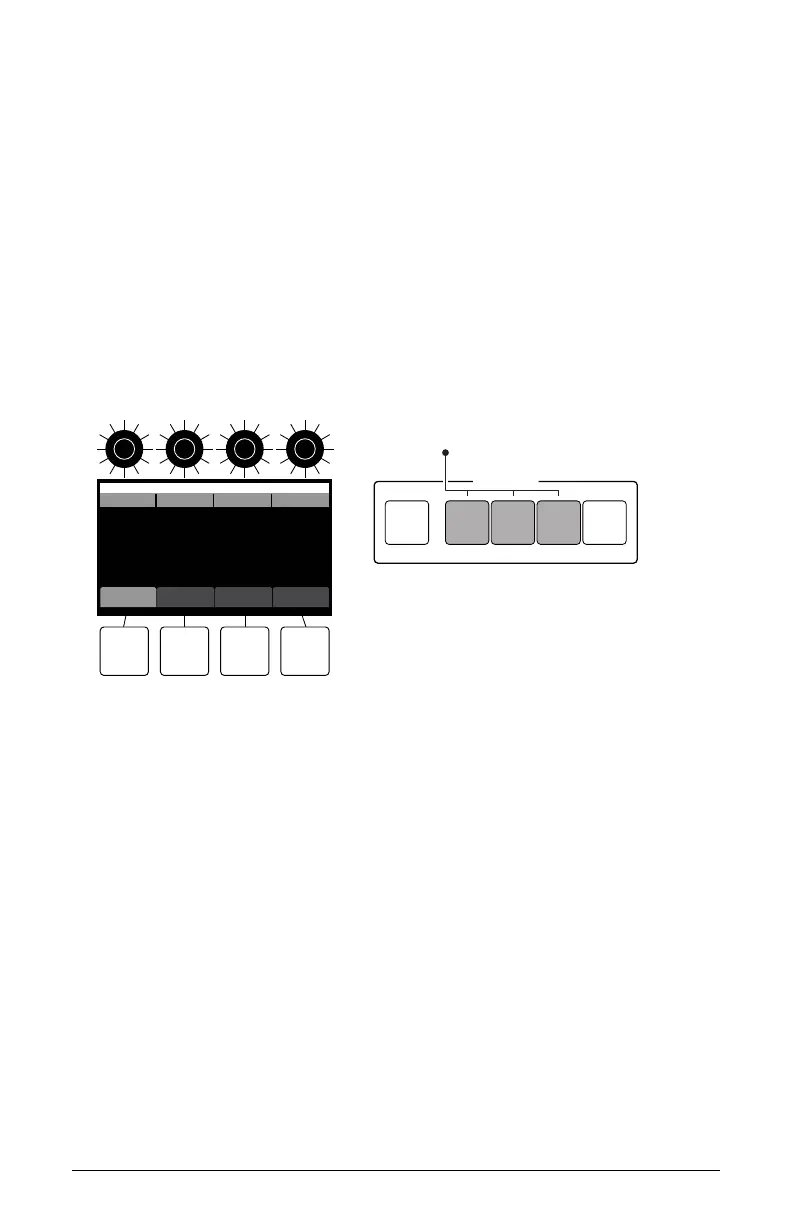
Part 1 Part 2 Part 3 Part 4
100 100 100
pan splits parts
OS v1.0
Zone 1 Zone 2 Zone 3
MULTI-PART
MODE 1 2 3 4
Parts 1,2,3 are active, and if flashing, will be edited simultaneously
Editing multi-parts
To adjust the volume level of each program in a multi-part:
1. Press the mode button. In the display, the multi-part volume/tuning
parameter is selected by default (soft button 1).
2. Use soft knobs 1-4 to adjust the volume for the individual parts.
To adjust the tuning of each program in a multi-part:
1. Press the mode button. In the display, the multi-part volume/tuning
parameter is selected by default (soft button 1).
2. Press soft button 1. This toggles the controls in the display to multi-part
tuning.



 To Next Page