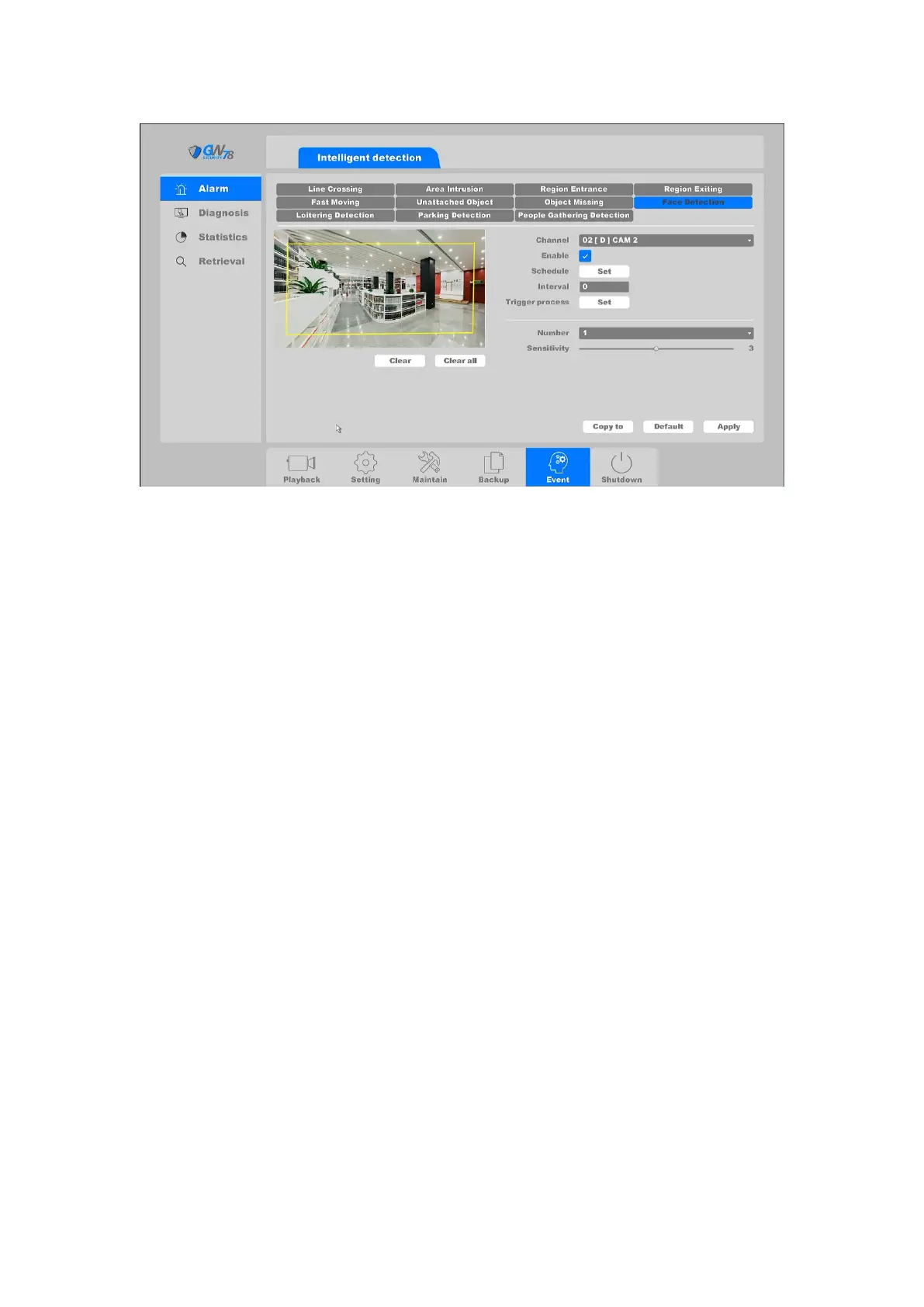
Figure 4-96 Face Detection
Channel: Select the channel.
Enable: Face Detection enable toogle.
Schedule: Set the time slot to detect intrusion. You can take the setting of chapter
4.3.3.1 motion detection for reference.
Interval: Set the time interval of Face Detection triggered.
Action: Set the handling action of intrusion detection; please take the setting of
chapter 4.3.3.1 motion detection for reference.
You can add a virtual area to the surveillance area using the following steps:
1. Choose the area number, the maximum number of the area is 4.
2. Adjust the sensitivity. Range from 1-100. The higher the value is, the more easily the
detection alarm can be triggered.
3. Click the Apply button to save the settings.
4.6.1.9 Loitering Detection
Click on the " Event -> Alarm -> Loitering Detection", as shown in figure 4-97.
There are three types for Loitering Detection: Journey, Weight, Offsets.
Journey: When people walk into and wander in an area, once the length he has wandered over
half of the longest diagonal line of this area, it will trigger the alarm.
Weight: When people go back and forth at least 3 times, or go in a non-linear path within a pre-
defined virtual region; certain actions can be taken when the alarm is triggered.
Offsets: When people change his original direction and walk for over half of the area, then it will
trigger the alarm.



 To Next Page