User Manual
Page 32
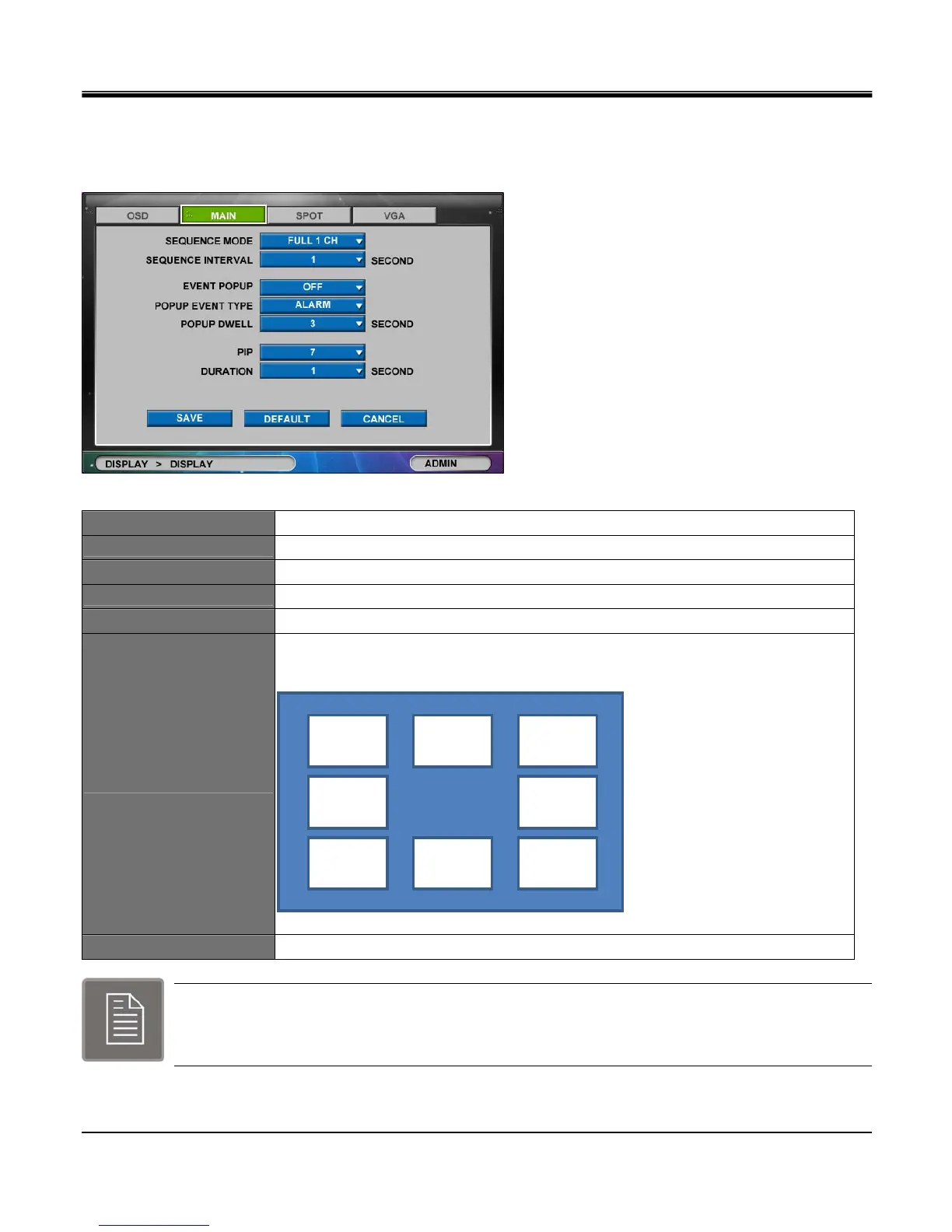
[2]MAIN
To enable sequencing of camera, the “EVENT POPUP" should be at “OFF" setting.
The “EVENT POPUP" will enable the event triggered camera to be displayed on single channel view on the live view.
SEQUENCE MODE
Define layout to sequence between Full 1ch and 4ch split.
SEQUENCE INTERVAL
Set sequence interval to 1, 2, 3, 4, 5, 10, 15, 20, 30 seconds.
EVENT POPUP
Select “ON" or “OFF" to enable popup screen for event trigger.
POPUP EVENT TYPE
Select event trigger type between motion detection and Alarm.
POPUP DWELL
Set dwell time between 1, 2, 3, 4, 5, 10, 15, 20, 30 seconds.
PIP
Set location of picture in picture window (Upper part :0~2, Middle part: 3~4, Lower part:
5~7 )
[PIP Position location]
DURATION
Set dwell time for the PIP between 1, 2, 3, 4, 5, 10, 15, 20, 30 seconds.
Channel 1 always remains the top priority to pop up when events are (Motion or Alarm) triggered
simultaneously in several channels.
Position 0 Position 1 Position 2
Position 5 Position 6 Position 7
Position 3 Position 4



 To Next Page