User Manual
Page 33
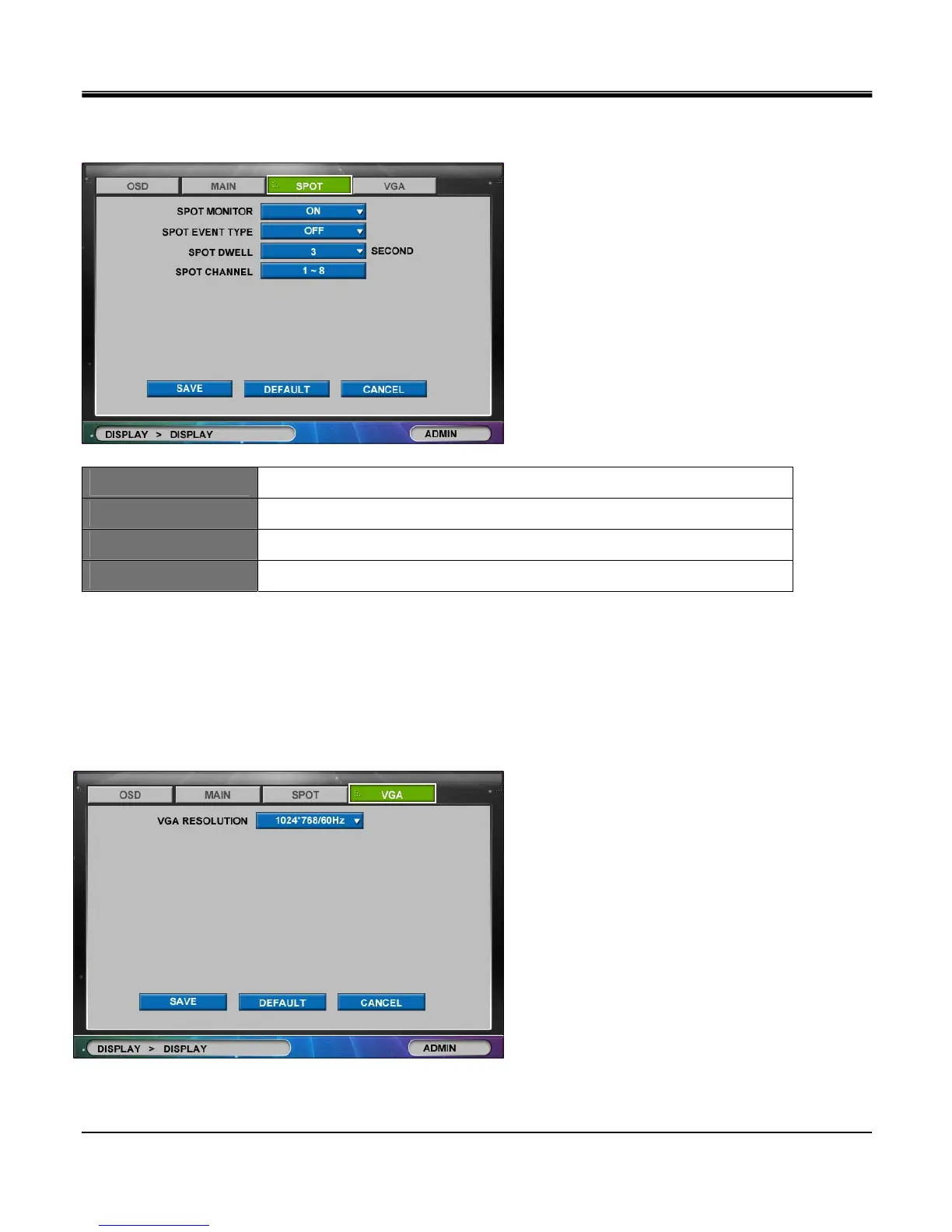
[3]SPOT
SPOT MONITOR
Set Spot monitor “ON” or “OFF”.
SPOT EVENT TYPE
Select Event type among MOTION, ALARM and ALL..
SPOT DWELL
Set dwell time between 1, 2, 3, 4, 5, 10, 15, 20, 30 seconds.
SPOT CHANNEL
Invokes “SELECT SPOT CHANNEL” popup menu.
[4]VGA
Users can configure VGA type monitor in VGA Tab window. DVR must have VGA Card pre installed (Optional purchase
item) in order to connect DVR to TFT LCD or CRT monitors. Please check the resolution range of your VGA monitor and
select “VGA RESOLUTION" among list below:
Supported VGA Resolutions
- 640 X 480 / 60 HZ
- 800 X 600 / 60HZ
- 1024 X 768 / 60HZ
- 1280 x 1024 / 60 HZ
- 640 x 480 / 75 HZ
- 800 x 600 / 75 HZ
- 1024 x 768 / 75 HZ
- 1280 x 1024 /75 HZ



 To Next Page