101
Using the Sequencer
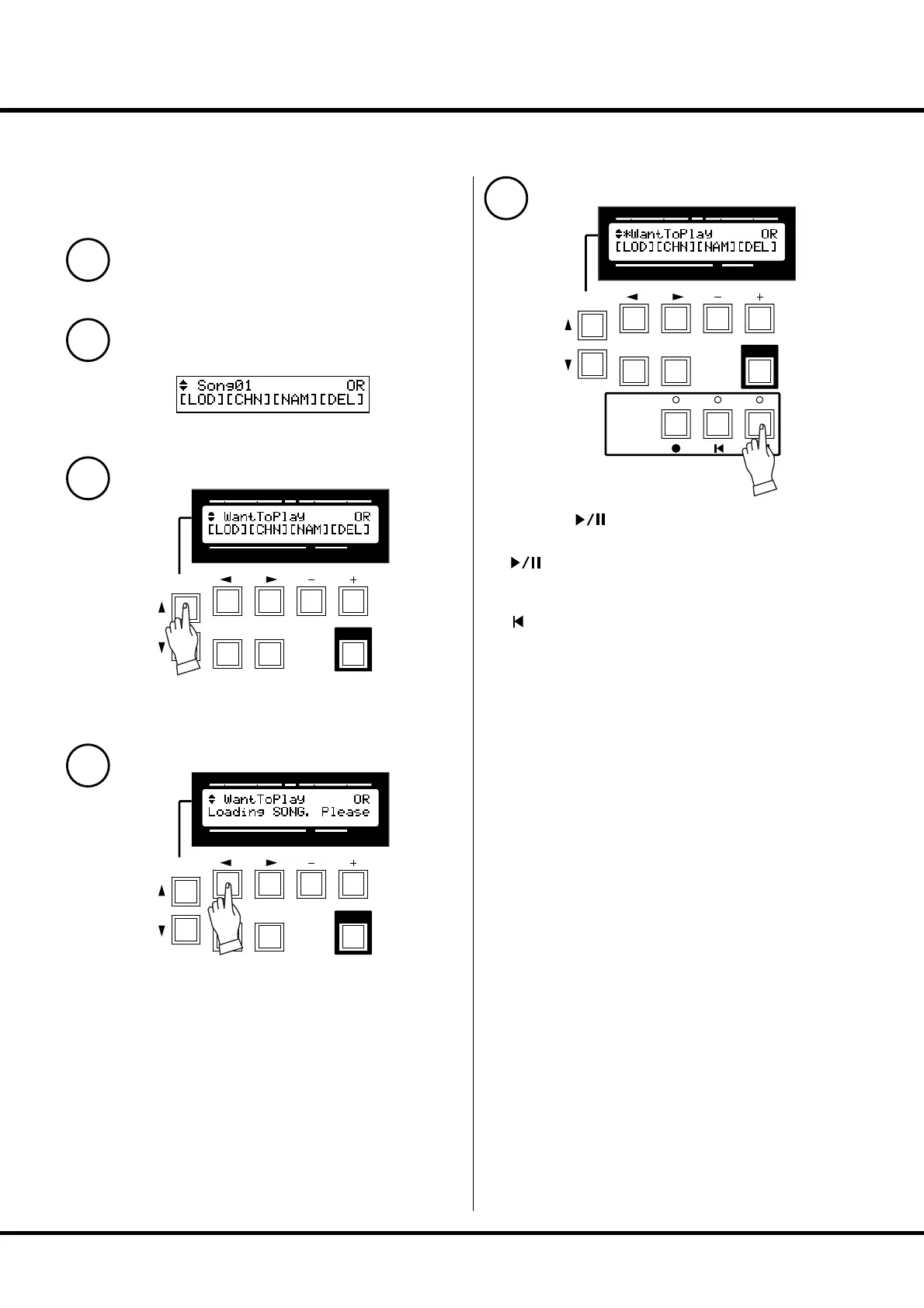
Playback the song
After the operation, the settings already in this organ
will be replaced by the newly loaded SONG. So you
had better save them as new song in advance.
1
Check that the CF Card is correctly inserted.
2
Come to the SONG mode.
3
Choose the SONG fi le to load by the [PAGE/SONG] button.
4
Touch the [1] LOD button.
e SONG will be loaded in a few seconds.
Once loading is completed, “*” appears on the left of the song
name.
5
Touch the [ ] button.
e SONG starts.
[ ] Play / Pause
Temprarilly stops playing. If you press this button again, it re-
starts playing from the point.
[ ] Rewind
Stops playing and jumps to the top of the song.
SWELL
PRESET
TRANSPOSE
PEDAL GREAT
PLAYJUMPMENU
PAGE/ PARAM.
1234
VALUE
SONG
SWELL
PRESET
TRANSPOSE
PEDAL GREAT
PLAYJUMPMENU
PAGE/ PARAM.
1234
VALUE
SONG
SWELL
PRESET
TRANSPOSE
PEDAL GREAT
PLAYJUMPMENU
SEQUENCER
PAGE/ PARAM.
1234
VALUE
SONG


 To Next Page