6 Job Setup
User Guide 57
6.8.3 SERIES EXPOSURE PROCEDURE
After having loaded the substrate and the design, the substrate is ready to be exposed.
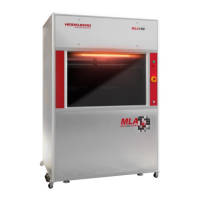
You are in the Series panel of the Series mode.
In this panel several values have to be set for series exposure. Find the explanation of
the panel elements below:
Mode: Three different selections are possible: Dose, Defoc
or Dose and Defoc.
Number of fields: Use the spin button to select the number
of fields to be exposed
In the Dose Series table, you set the parameters for the
series with varying energy values.
In the Defoc Series table, you set the parameters for
exposing the design with varying defoc values. The defoc
allows fine tuning of the exposure focus.
In the bottom table, the Step size in x and y direction is
determined.
Pay attention to the value in the Total range fields. If the
total range requires more space than available on the
substrate, an error message pops up.
For information about Auto-Unload and Unload see 6.9
Unload Substrate.


 To Next Page