360077-1/O 110
Horizon Series™ - Laboratory, Pharmacy, and International Blood Bank Models
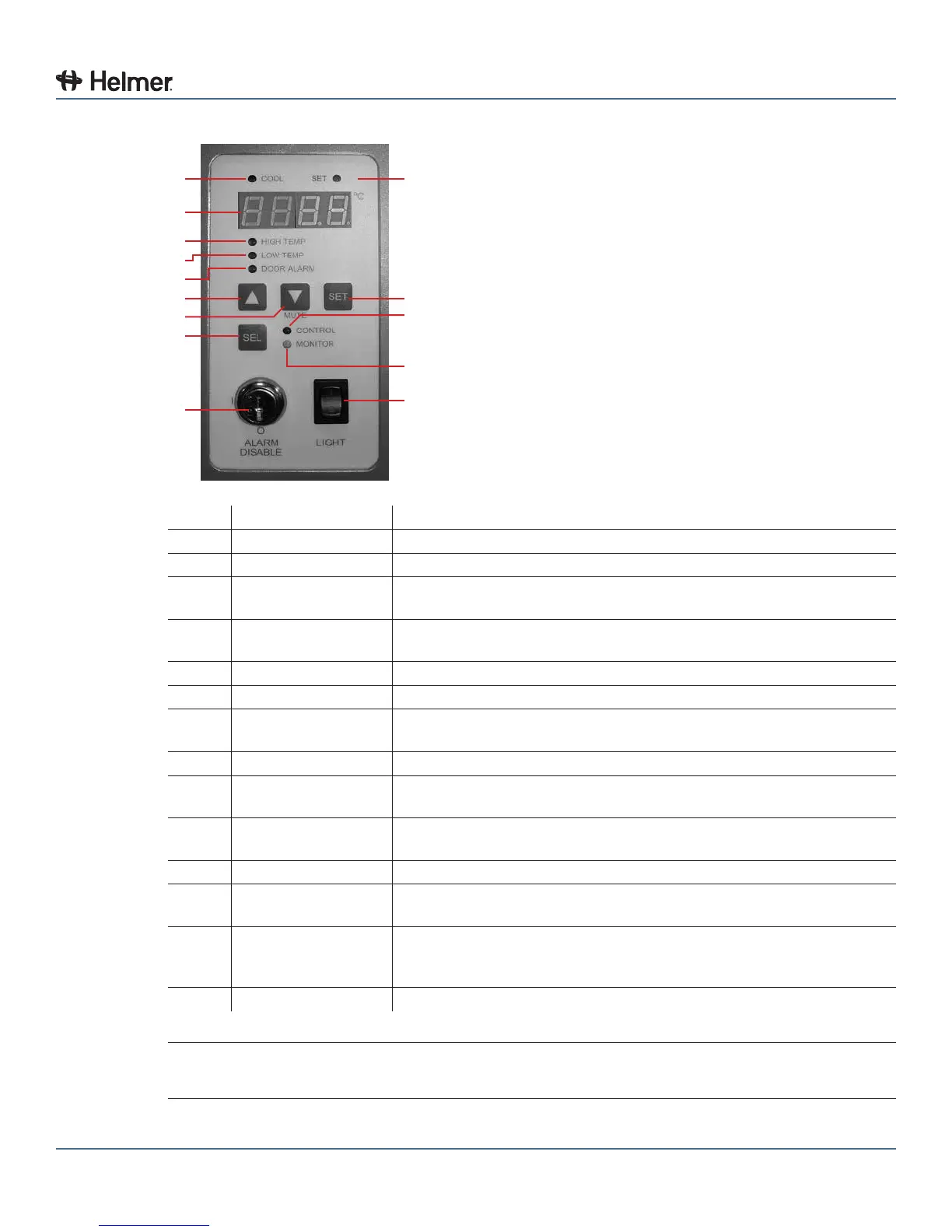
24.1 Monitor and Controller Interface
A
B
C
D
E
F
G
H
I
J
K
L
M
N
Label Description Function
A COOL lamp Indicates the compressor is running.
B Display Displays real-time temperature information, setpoints, and alarms.
C HIGH TEMP lamp Indicates when the refrigerator is in a high temperature alarm condition.
Also indicates high alarm temperature setpoint is being changed.
D LOW TEMP lamp Indicates when the refrigerator is in a low temperature alarm condition.
Also indicates low alarm temperature setpoint is being changed.
E DOOR ALARM lamp Indicates when the door is open.
F UP ARROW button Increases a temperature setting.
G DOWN ARROW /
MUTE ALARM button
Decreasesatemperaturesetting.Alsomutestheaudiblealarmforve
minutes.
H SEL button Toggles between alarm monitor and control modes.
I ALARM DISABLE
key switch
Disables all audible alarms. This switch does not affect alarm lamps or
signals sent through the remote alarm interface.
J SET lamp Indicates when temperature setpoint or alarm setpoint is being
changed.
K SET button Allows settings to be selected, prior to changing settings.
L CONTROL lamp Indicates when the reading from the control temperature probe is
displayed.
M MONITOR lamp Indicates when the display is showing temperature readings from
the chamber probe. Also indicates when alarm setpoints are being
changed.
N LIGHT switch Turns the chamber light on or off
NOTE The Alarm Disable key switch disables all audible alarms. This switch does not affect
alarm lamps or signals sent through the remote alarm interface.



 To Next Page