Faxitron CT Specimen Radiography System User Guide
Chapter 6: Faxitron CT Software Operation
Page 60 5081-9544 Revision 004
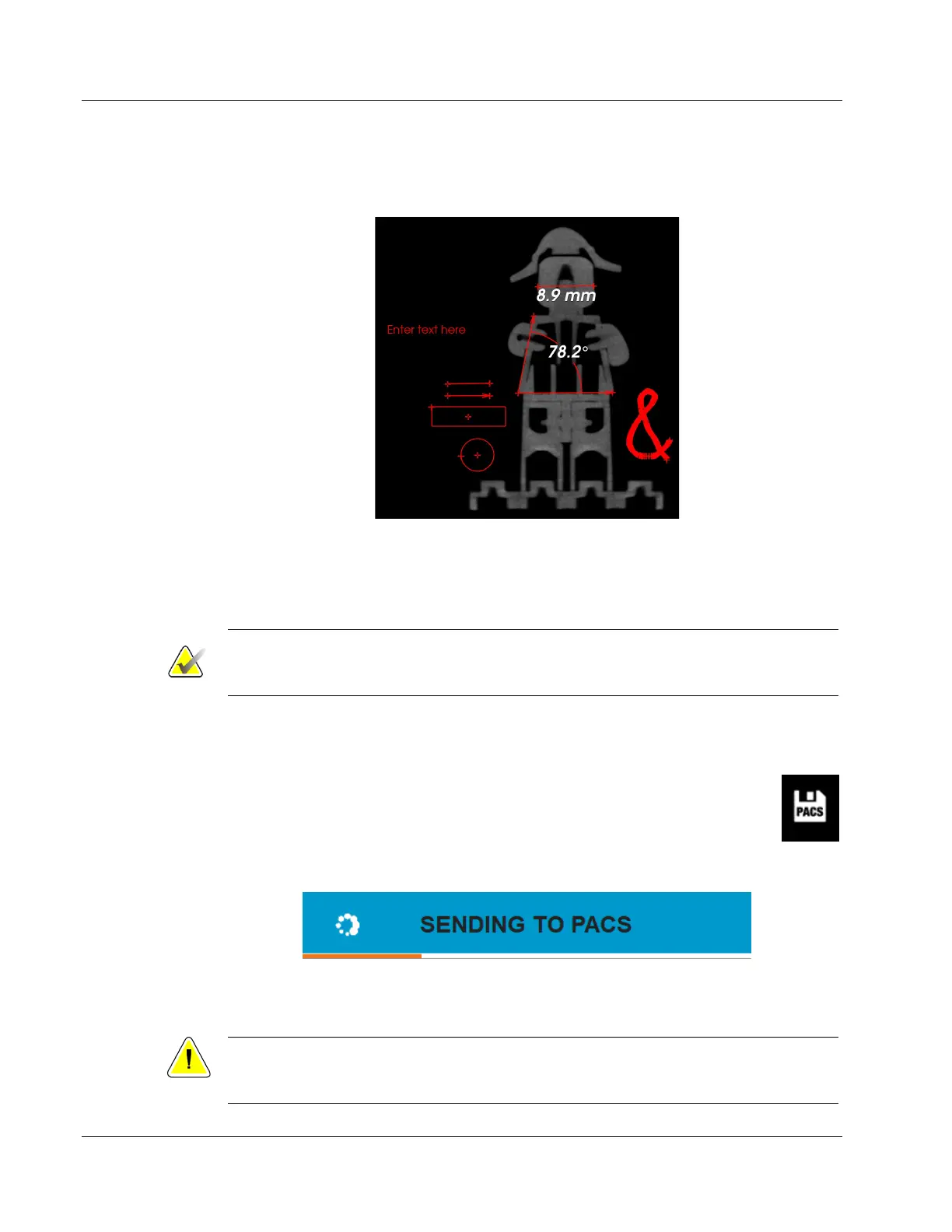
The following figure shows all annotation tools selected. Note the end points (or
handles), center points, and the nodes in the Polygon Open Line Tool (the Ampersand).
Figure 62: All Annotation Tools/Objects Selected
Selecting Save or Close from this dialog box will save the current annotations to the
window or will close the annotation dialog. It will also return you to normal imaging
mode.
Note
Annotations may be toggled on or off using the Show/Hide Image Annotations button
in the right tool bar. See Section 6.7.2.
6.6.6 Save Image data to PACS (Save)
The button shown will only function when the system is connected to a medical
facility’s PACS network. Click the PACS Store button and the active images in
the viewer will be sent to the PACS server.
Figure 63: PACS Store Button
The button in the bottom right corner will show the status.
Figure 64: Sending to PACS Status Bar
A confirmation will appear once the transfer is complete.
Caution:
Do not shut down the system when images are being sent to PACS. 3D images are
very large and may take several minutes to send to the server.













 To Next Page