Faxitron CT Specimen Radiography System User Guide
Chapter 6: Faxitron CT Software Operation
Page 76 5081-9544 Revision 004
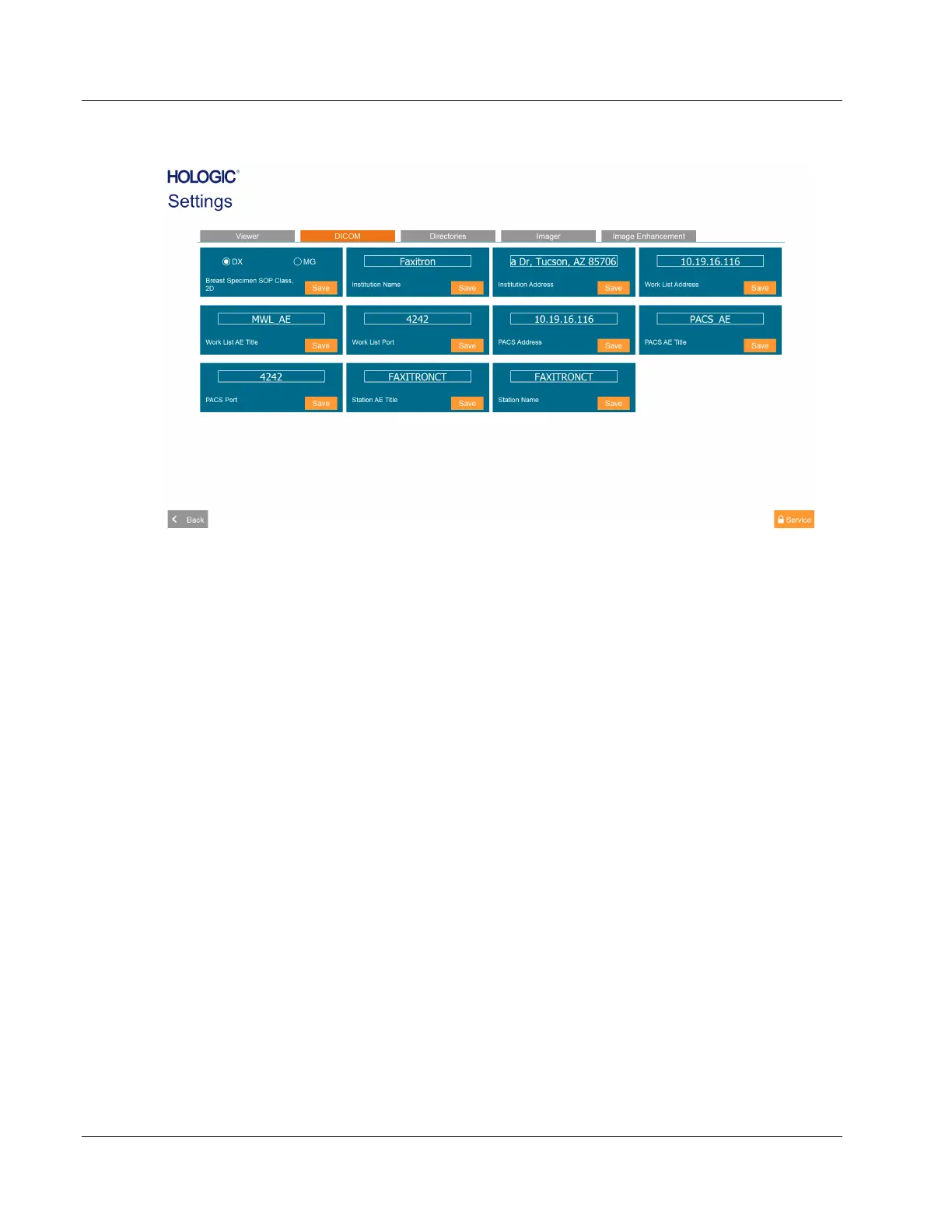
Figure 100: DICOM Settings
Local Settings
•
Institution Name, Institution Address, Station Name: Information included in
DICOM images.
• Station AE Title: Identification of Faxitron CT in DICOM Store and DICOM Modality
Worklist communications.
DICOM Store Settings
•
Breast Specimen SOP Class, 2D: Images of breast tissue specimens can be transferred
in Digital Mammography X-Ray Image Storage – For Presentation (MG), or Digital X-
Ray Image Storage – For Presentation (DX) format, when Body Part is set to Breast in
the Patient Information Editor dialog. All tissue specimens of other anatomy, or
when Body Part is left blank, are transferred in Digital X-Ray Image Storage – For
Presentation (DX) format.
• PACS Address, PACS AE Title, PACS Port: Identification of PACS that is to receive
Faxitron CT images in DICOM format.
DICOM Modality Worklist Settings
•
Work List Address, Work List AE Title, Work List Port: Identification of DICOM
Modality Worklist provider that will respond to queries for scheduled specimen
imaging procedures using Select from Work List.
6.12 Settings
DICOM settings are described in Section 6.11.













 To Next Page