1
PANEL DESCRIPTION
1-3
Front panel (Continued)
@0
@1
@2
@6
#3#4
@8@9 @3
#1 #0
@5@7 @4
#2
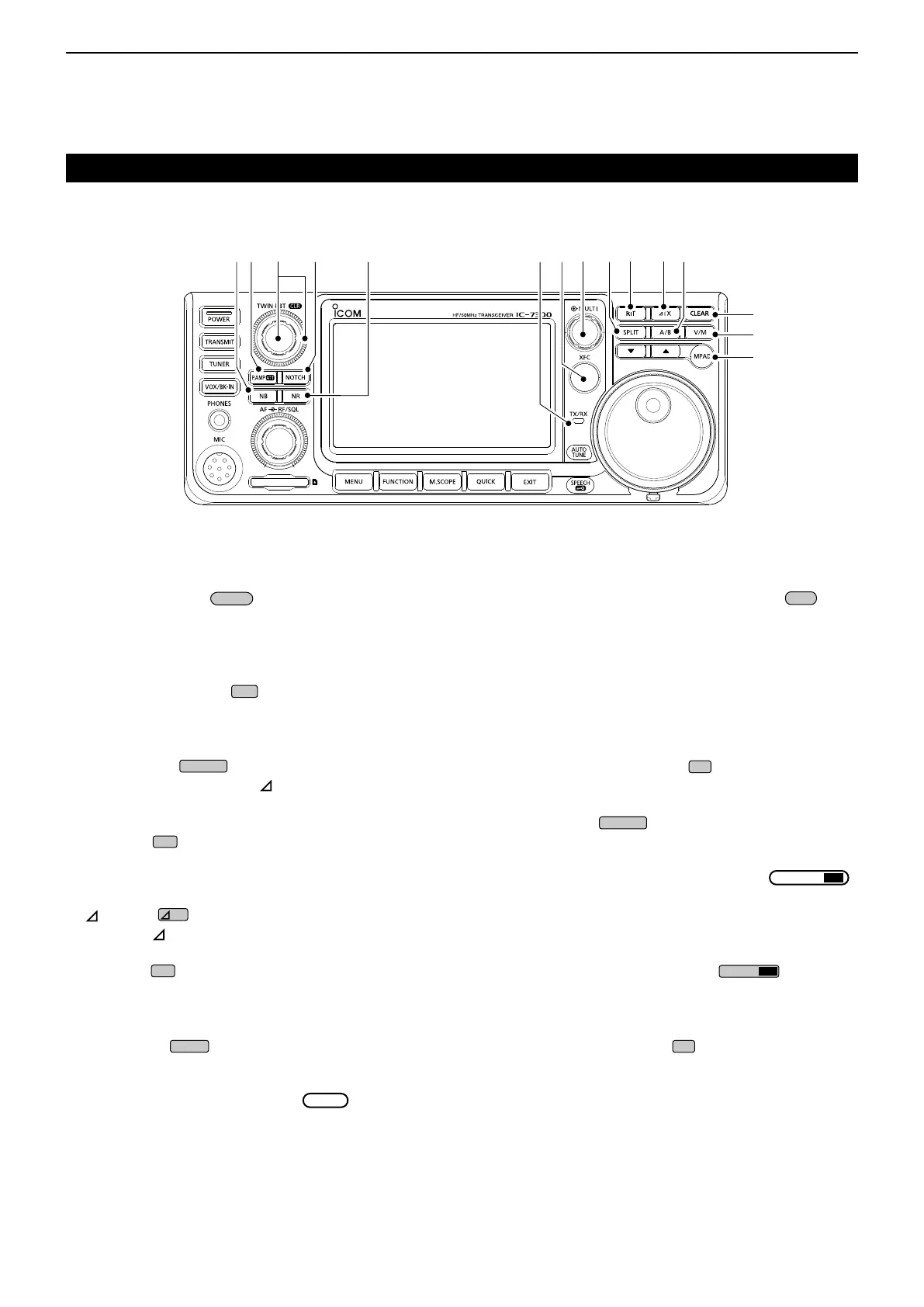
@0 MEMO PAD KEY
(p. 9-6)
Sequentially calls up the contents in the Memo
Pads, or saves the displayed contents into the
Memo Pad.
@1 VFO/MEMORY KEY
(p. 3-2)
Switches between the VFO and Memory mode, or
copies the memory channel contents to the VFO.
@2 CLEAR KEY
Clears the RIT (p. 4-3) or TX shift frequency
(p. 4-11).
@3 A/B KEY
(p. 3-2)
Switches between VFO A and VFO B, or sets the
selected VFO’s frequency to the other VFO.
@4 TX KEY
(p. 4-11)
Turns the TX function ON or OFF.
@5 RIT KEY
(p. 4-3)
Turns the Receiver Incremental Tuning (RIT)
function ON or OFF.
@6 SPLIT KEY
(p. 4-13)
Turns the Split function ON or OFF.
@7 MULTI-FUNCTION CONTROL
(p. 1-7)
Displays the Multi-function menu for various
adjustments, or selects a desired item.
@8 TRANSMIT FREQUENCY CHECK KEY
(p. 4-13)
Enables you to monitor the transmit frequency while
holding it down in the Split mode.
@9 TX/RX INDICATOR (p. 3-10)
Lights red while transmitting and lights green while
receiving.
#0 NOISE REDUCTION KEY
(p. 4-9)
Turns the Noise Reduction function ON or OFF.
#1 NOTCH KEY
(p. 4-9)
TurnstheNotchlterONorOFF.
#2
TWIN PASSBAND TUNING CONTROL
CLR
(p. 4-5)
AdjuststheIFlter’spassbandwidthbyrotating,
and clears the setting by holding down for 1 second.
#3 PREAMP/ATTENUATOR KEY
(p. 4-3)
Turns ON or OFF, and selects one of two receive
RFpreampliersorturnstheAttenuatorONorOFF.
#4 NOISE BLANKER KEY
(p. 4-8)
Turns the Noise Blanker ON or OFF.



 To Next Page