1
PANEL DESCRIPTION
1-5
Touch screen
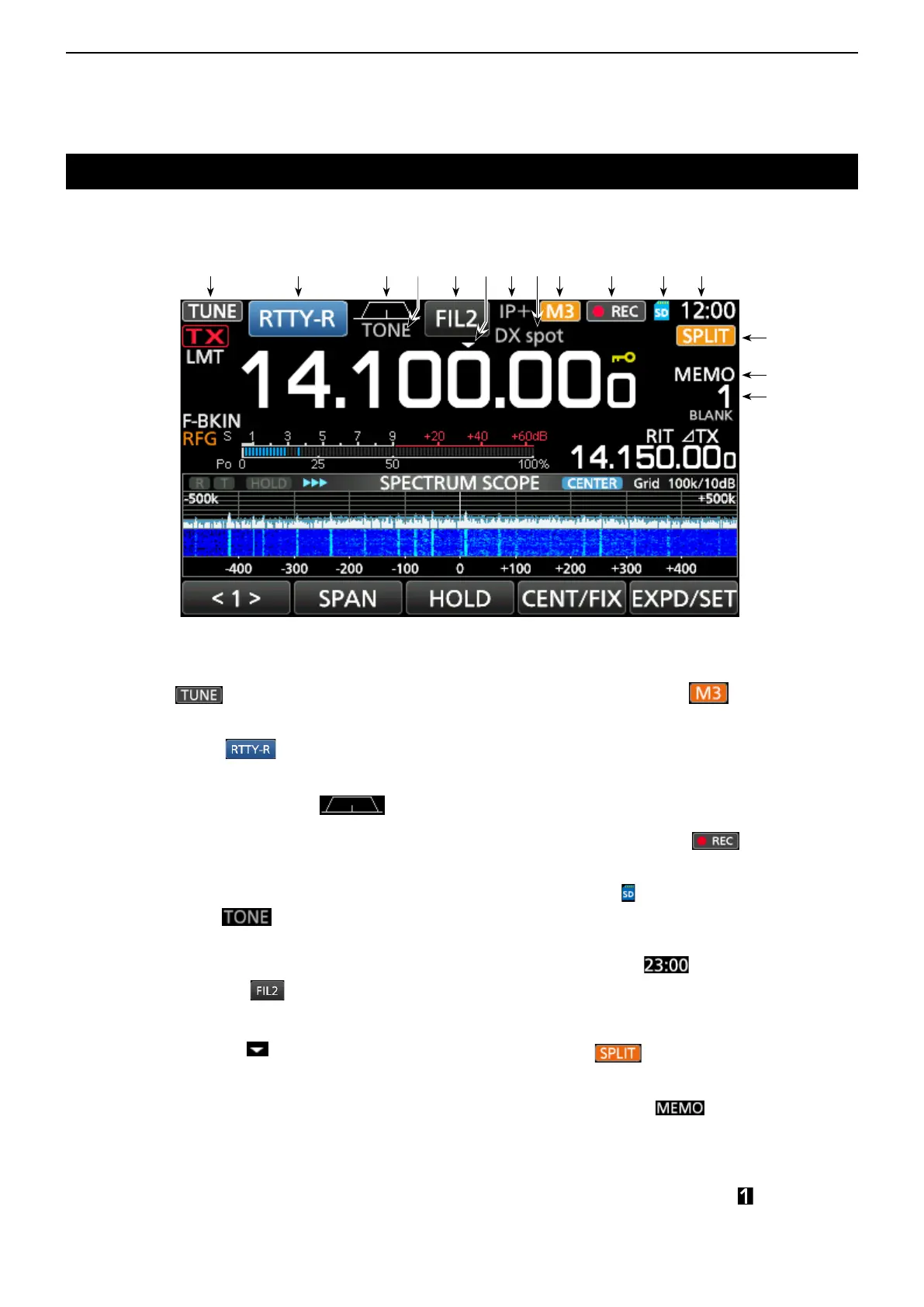
q TUNE ICON (p. 11-2)
Appears while tuning the antenna.
w MODE INDICATOR (p. 3-3)
Displays the selected operating mode.
e PASSBAND WIDTH INDICATOR
(p. 4-5)
Graphically displays the passband width for twin
PBT operation and the center frequency for IF shift
operation.
r TONE INDICATOR (p. 4-29)
Displays the selected tone type in the tone
operation mode.
t IF FILTER INDICATOR (p. 4-6)
DisplaystheselectedIFlter.
y QUICK TUNING ICON (p. 3-4)
Appears when the Quick Tuning Step function is
ON.
u IP PLUS ICON (p. 4-7)
Appears when the IP Plus function is ON.
i MEMORY NAME READOUT/AUTO TUNE ICON
Displays the memory name if entered (p. 9-5), or
displays the “AUTOTUNE” icon when the Auto
Tuning function is ON (p. 4-16).
This section describes the icons, screens, dialogs, readouts and so on that are displayed on the IC-7300 screen.
Refer to the pages posted beside each item for details.
o M1~M8/T1~T8/OVF ICON
Displays “M1”~“M8” while “External Keypad” on
the CONNECTORS screen is set to ON and using
the Memory Keyer function (p. 4-18). Displays
“T1”~“T8” while using the Voice TX memory. (p. 7-4)
Displays “OVF” when an excessively strong signal is
received.
!0 VOICE RECORDER ICON (p. 6-2)
Appears while recording.
!1 SD CARD ICON (p. 8-2)
Appears when an SD card is inserted, or blinks
while accessing the SD card.
!2 CLOCK READOUT (p. 12-11)
Displays the current local time.
Touch the readout to display both the current local
time and UTC time.
!3 SPLIT ICON (p. 4-13)
Appears when the Split function is ON.
!4 VFO/MEMORY ICON (p. 3-2)
“VFO A” or “VFO B” appears when the VFO
mode is selected, and “MEMO” appears when the
Memory mode is selected.
!5 MEMORY CHANNEL READOUT (p. 3-2)
Displays the selected memory channel number.
q w e t i o !0 !1 !2
!3
!4
!5
yr u



 To Next Page