1
PANEL DESCRIPTION
1-2
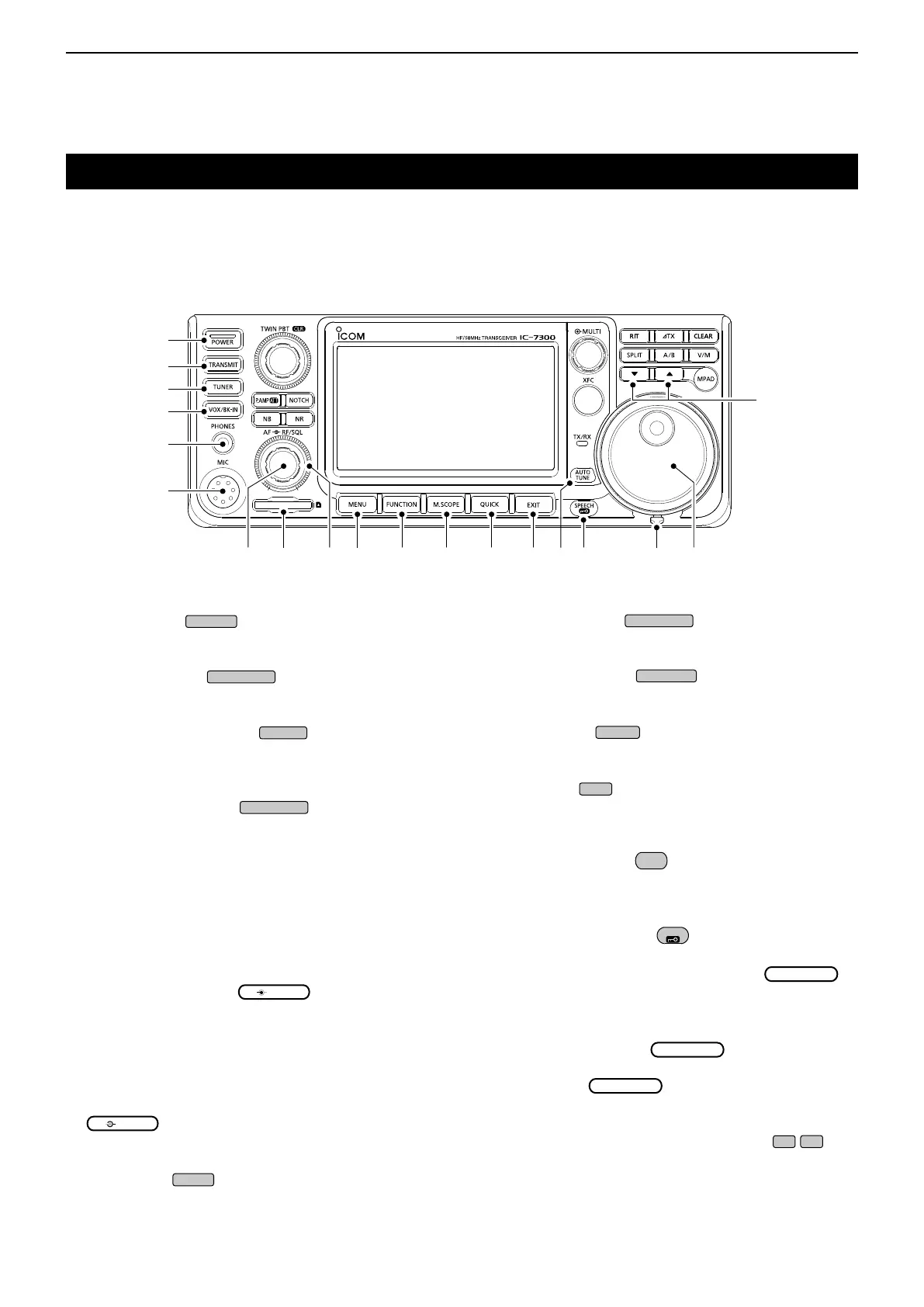
Front panel
q POWER KEY
(p. 3-2)
Turns the transceiver ON or OFF.
w TRANSMIT KEY
(p. 3-10)
Toggles between transmit and receive.
e ANTENNA TUNER KEY
(p. 11-2)
Turns the antenna tuner ON or OFF, or activates
the tuner.
r VOX/BREAK-IN KEY
Turns the VOX function (p. 4-10) and Break-in
function (p. 4-15) ON or OFF.
t HEADPHONE JACK [PHONES] (p. 2-2)
Connects to a standard stereo headphones.
y MICROPHONE CONNECTOR [MIC] (p. 2-2)
Connects to the supplied or an optional microphone.
u VOLUME CONTROL
(p. 3-2)
Adjusts the audio output level.
i SD CARD SLOT [SD CARD] (p. 8-2)
Accepts an SD card.
o RF GAIN CONTROL/SQUELCH CONTROL
(p. 3-10)
Adjusts the RF gain and squelch threshold levels.
!0 MENU KEY
(p. 1-7)
Opens the MENU screen.
q
w
e
r
t
y
i !0 !1 !2 !3 !4 !6 !7u o !8!5
!9
!1 FUNCTION KEY
(p. 1-7)
Displays the FUNCTION screen.
!2 MINI SCOPE KEY
(p. 5-2)
Displays the Mini Scope or Spectrum Scope.
!3 QUICK KEY
(p. 1-7)
Displays the QUICK MENU.
!4 EXIT KEY
(p. 1-7)
Exits a setting screen or returns to the previous
screen.
!5 AUTO TUNE KEY
(p. 4-16)
Automatically tunes the operating frequency to a
received CW signal.
!6 SPEECH/LOCK KEY
Announces the operating frequency or receiving
mode (p. 13-2), or electronically locks
(p.3-10).
!7 FRICTION ADJUSTER (13-2)
Adjusts the friction of
.
!8 MAIN DIAL
(p. 3-4)
Changes the operating frequency.
!9 MEMORY CHANNEL UP/DOWN KEY
/
(p. 9-3)
Changes the Memory channel.
This section describes the keys, controls and dials that you use to operate the IC-7300.
Refer to the pages posted beside each key, control, or dial for details.



 To Next Page